What Is SAP Integration Suite? Capabilities, Architecture, and Enterprise Use Cases
Integration Suite is not CPI with a new name. It is a set of capabilities that solve different problems, and choosing between them is the actual work. What each capability does, how they combine, where it fits with SAP BTP, and when another platform is the better answer.

Last technically reviewed: 26/08/2026. Reviewed by Marek Juračka, CTO.

Table of contents
Very few enterprises run one coherent technology stack. An SAP S/4HANA or ECC core exchanges data with SaaS applications, an MES on the shop floor, warehouse systems, cloud services, mobile applications, trading partners, and a set of custom applications that were built for good reasons nobody wrote down.
SAP Integration Suite is SAP's portfolio of integration capabilities for managing those interactions across SAP and non-SAP environments. Three things are worth establishing before anything else. It sits inside SAP's broader platform strategy rather than standing alone. It is not another name for CPI. And it supports several distinct integration styles, which is the reason capability selection matters more than most introductions suggest.
This guide explains the platform from an enterprise architecture perspective. Not a feature catalogue and not a configuration tutorial, but the set of decisions an architect actually has to make.
What is SAP Integration Suite?
SAP Integration Suite is SAP's enterprise integration platform as a service (iPaaS) for connecting applications, data, APIs, events, processes and business partners across SAP and non-SAP environments. It brings together capabilities for application integration, API management, event-driven integration, B2B connectivity, integration governance and migration assessment.
What does SAP Integration Suite do?
The clearest way into the product is through the problems it addresses rather than the components it ships. Enterprises typically arrive with some combination of these:
Connect applications that were never designed to talk to each other
Orchestrate processes that span several systems and several owners
Expose and govern APIs so that access to business capabilities is controlled rather than improvised
Publish and consume events so systems react to change instead of polling for it
Connect business partners across company boundaries, usually with EDI in the mix
Govern which integration technology gets used for which requirement
Modernise legacy middleware that is approaching an end-of-maintenance date
Those are seven different problems. They are not solved by one runtime, and this is the single most useful thing to understand about Integration Suite. It is closer to an architecture toolbox than to a single product, and the skill lies in choosing the right tool rather than forcing every requirement through the one you know.
How does SAP Integration Suite relate to SAP BTP?
SAP BTP is the broader technology platform covering integration, application development, automation, data and AI. SAP Integration Suite is the integration-focused offering within it. The cloud service is provisioned on SAP BTP in the Cloud Foundry environment, though supported integration and API workloads can also be executed inside a private landscape through Edge Integration Cell in a hybrid deployment.
In practice this means you do not choose between them. Adopting Integration Suite means adopting a slice of BTP, which carries the platform's account model, identity handling, and commercial mechanics along with it. That is worth knowing at evaluation time rather than at procurement time. We cover the wider platform in what is SAP BTP.
What are the main SAP Integration Suite capabilities?
Many product overviews list these alphabetically, which does little for anyone making a decision. SAP's own Integration Suite documentation is the reference for the current capability set. Mapped to the question that actually prompts each one:
Capability | Primary role | The question it answers |
Cloud Integration | Application and process integration | How do we connect and orchestrate systems? |
API Management | API design, security, governance | How do we expose and control APIs? |
Event Mesh | Event-driven integration | How do systems communicate asynchronously? |
Integration Advisor | Interface and mapping design | How do we accelerate B2B message design? |
Trading Partner Management | Partner configuration and governance | How do we manage many B2B partners? |
Open Connectors | Third-party SaaS connectivity | How do we simplify connections to SaaS? |
Integration Assessment | Integration strategy and technology selection | Which technology should handle this interface? |
Migration Assessment | PI/PO migration analysis | What is involved in moving our PO landscape? |
Other capabilities include OData Provisioning, API Composition within API Management, and Data Space Integration. They matter in specific scenarios rather than in most, so they are noted here and not expanded.
SAP Cloud Integration, formerly CPI
Cloud Integration handles application and process integration: cloud to cloud, cloud to on-premise, SAP to SAP, and SAP to non-SAP. It is where integration flows are built, where adapters connect to source and target systems, and where mappings transform one message format into another.
It is also the capability most people mean when they say "CPI", and the source of the terminology confusion this article exists partly to resolve. Cloud Integration is one capability within Integration Suite, not the whole of it. That distinction has practical weight: an organisation that scopes an Integration Suite programme as though it were a CPI programme will underestimate both what it can do and what it needs to govern.
SAP API Management
API Management covers the lifecycle of an API rather than its implementation. Exposure, security, policy enforcement, versioning, analytics and consumption by internal or external developers.
The distinction between building an integration and governing an API is one that estates tend to learn expensively. An interface built once and consumed by one system needs a runtime. An interface consumed by fifteen systems across three business units needs rate limiting, authentication policy, a versioning strategy, and somewhere a consumer can discover it without asking a person.
SAP Event Mesh
Event Mesh supports publish and subscribe messaging, letting a system announce that something happened without knowing or caring which systems care.
The architectural payoff is decoupling. A synchronous call means the caller waits and fails if the target is down. With queued asynchronous messaging, the producer does not need the consumer to be available at publication time, because the broker can retain guaranteed messages until a consumer is available. The dependency shifts to the messaging infrastructure rather than disappearing, and the delivery guarantees depend on the acknowledgement and retention model in use. In estates where a plant system going offline currently stalls an order process, that shift is not academic.
SAP Integration Suite, advanced event mesh is a related option for higher-volume and more distributed event streaming. It is a distinct offering rather than a newer version of Event Mesh, and the two are best treated as different tools for different scales.
Integration Advisor and Trading Partner Management
These two work together on the B2B side and are easiest to understand in sequence. Integration Advisor helps define interfaces and mappings for partner message formats, accelerating work that is otherwise slow and repetitive. Trading Partner Management holds the partner profiles and agreements that determine how each partner is actually dealt with.
The split is design time versus runtime. Integration Advisor produces the interface and mapping definitions. Trading Partner Management manages partner profiles and agreements and generates the runtime configuration from those artefacts. Cloud Integration then processes the message using that configuration, and the result lands in SAP S/4HANA. Runtime processing does not pass through Integration Advisor.
Integration Assessment
This capability gets less attention than it deserves in generic overviews, and it is the one most aligned with how good integration teams actually work.
Integration Assessment applies SAP's Integration Solution Advisory Methodology (ISA-M) to help an organisation define integration strategy and determine which integration technology suits which requirement. The question it answers is "which technology should handle this interface", not "how do we build this interface in the technology we already picked".
That is a meaningfully different question, and asking it early is the difference between an estate with deliberate patterns and an estate where every requirement became an iFlow because iFlows were what the team knew.
Migration Assessment
Migration Assessment extracts and evaluates existing SAP Process Orchestration scenarios and estimates the technical migration effort involved. It helps identify what is in the estate and how much technical work moving it would represent. It does not produce a cost or TCO figure, which remains a separate business analysis. See SAP's Migration Assessment documentation.
It is not the migration itself. The actual conversion tooling sits within Cloud Integration. Keeping those two separate in your planning matters, because assessment and migration are different orders of undertaking, and conflating them produces business cases that fall apart on contact with the work.
How do SAP Integration Suite capabilities work together?
Capabilities are composable, and the value usually comes from combinations rather than from any single one. Two common patterns illustrate how they fit together.
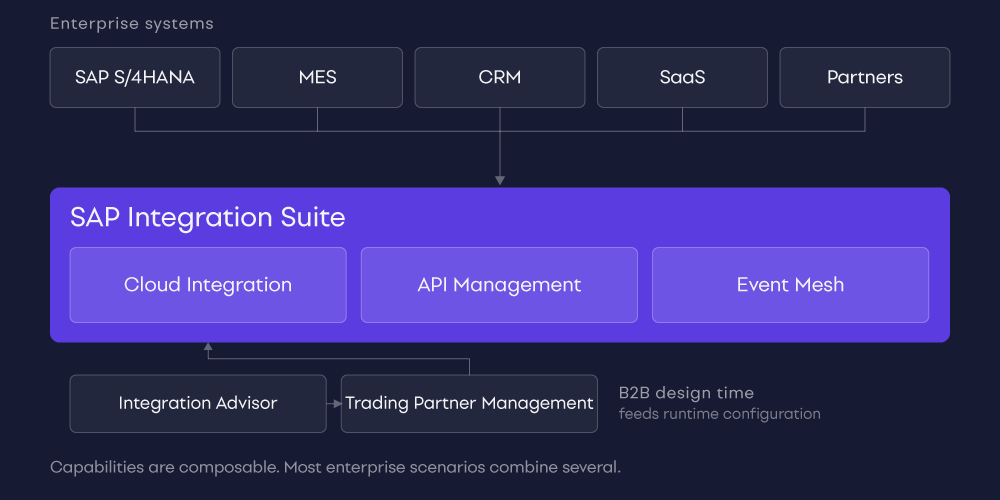
API-led scenario
A backend SAP system holds the data. Cloud Integration handles the connection to it, along with any orchestration or transformation needed to turn an internal representation into something a consumer can use. API Management then exposes the result as a governed API, applying authentication, rate limits and versioning before an external or mobile application ever reaches it.
In this scenario each layer has a distinct job. Cloud Integration makes the capability available and API Management governs how it is exposed. Not every API scenario needs both, and API Management is one element of a security model rather than the whole of it. Capability selection follows the integration requirement.
B2B scenario
At design time, Integration Advisor supplies the interface and mapping definitions for the message format, and Trading Partner Management manages the partner profile and agreement. At runtime, Cloud Integration processes the message using the generated partner-specific configuration, and SAP S/4HANA receives the result.
Described as a flat list of products this reads as four things. Described as a design-time and runtime split it reads as one process, which is closer to how it behaves in production.
What types of integration does SAP Integration Suite support?
Integration style | Example |
Application to application | SAP S/4HANA to Salesforce |
Process integration | Order to cash spanning several systems |
API integration | Secure business APIs for internal and external consumers |
Event-driven integration | Reacting to production or order events as they happen |
B2B and EDI | Suppliers, customers and logistics partners |
Hybrid integration | Cloud to on-premise across a mixed estate |
SAP to SAP | S/4HANA to another SAP cloud application |
SAP to non-SAP | SAP to MES, CRM or SaaS |
SAP Integration Suite for SAP and non-SAP environments
Reading Integration Suite as an SAP-to-SAP tool is the most common misconception about it, and it does not survive contact with a real manufacturing, logistics, retail or utilities estate. The SAP core is usually surrounded by systems SAP did not build:
SAP to MES on the shop floor, frequently more than one MES across sites
SAP to CRM, commonly Salesforce
SAP to warehouse and transport management
SAP to SaaS applications and cloud services
SAP to logistics providers and carrier platforms
SAP to custom applications built in-house
SAP to partner ecosystems over B2B and EDI
Example: SAP and MES integration
Our published SAP and MES integration case study covers one SAP ECC core, five factories, two different MES platforms and 41 integration points, built on a canonical integration model with monitoring, retry and replay.
That project was delivered on webMethods Integration Server, not on SAP Integration Suite, and we are not presenting it as an Integration Suite implementation. We include it because the hard problems in it were not platform-specific. Agreeing a canonical format two different MES platforms could both accept, deciding which system owns which master data, and designing what happens when a plant drops offline mid-shift are architecture problems. They arrive in the same shape whichever platform executes them, and they are what determines whether an integration estate is maintainable five years later.
SAP Integration Suite vs SAP CPI: what is the difference?
They are not competing products. One contains the other.
SAP Integration Suite | SAP Cloud Integration (CPI) |
The wider integration platform | One capability within Integration Suite |
Supports multiple integration styles | Primarily application and process integration |
Includes API management, events, B2B and assessment capabilities | Integration flows, adapters, mappings, message processing |
A strategic integration platform | A design and runtime capability |
The name history explains most of the confusion. Cloud Integration has carried several names over the years, and "CPI" stuck in common usage long after SAP's own terminology moved on. If a colleague says CPI, they almost certainly mean Cloud Integration, and they may or may not mean the wider suite. Worth clarifying early in any conversation about scope.
SAP Integration Suite and hybrid integration
Most enterprises are hybrid and will remain so. The ERP may still be on-premise. Some systems cannot leave a specific data centre for regulatory or latency reasons. Others are pure SaaS.
Integration Suite supports cloud to cloud and cloud to on-premise scenarios, with secure connectivity into private landscapes. Where integration logic physically executes is a genuine architectural decision rather than a detail, driven by data residency requirements, latency tolerance, and how a plant or warehouse should behave when its link to the cloud is interrupted.
Runtime placement, connectivity options and the components involved are covered properly in SAP Integration Suite architecture.
SAP Integration Suite and PI/PO modernisation
A large share of the interest in Integration Suite comes from organisations running SAP PI or PO and working out what happens next. Maintenance timelines are the trigger, but they are not the interesting part.
The interesting part is that moving an interface off PI/PO does not mean recreating it as it stands. Any given interface might be migrated close to as-is, redesigned around a different pattern, replaced with an API, replaced with events, consolidated with a duplicate, or retired because nothing consumes it any more.
Three patterns turn up in almost every inventory. Interfaces built for a business process that has since changed or ended. Duplicated interfaces moving substantially the same data, built by different teams years apart. And interfaces whose consuming system was decommissioned without anyone switching off the feed. A one-to-one migration carries all of that forward and pays to host it.
SAP's own transition guidance frames this as assess, transform, move, and encourages using the transition to improve the target landscape rather than reproduce the existing one. That is the right instinct, though it does make scoping harder, because "improve it" has no natural stopping point without architecture principles agreed in advance.
The full methodology is covered in SAP PI/PO migration to SAP Integration Suite.
Benefits of SAP Integration Suite
Stated as architectural outcomes rather than marketing claims, and deliberately qualified:
Integration capabilities centralised in one governed place rather than spread across teams
Connectivity to both SAP and third-party systems without separate tooling for each
Reusable integration assets, where the organisation has the discipline to reuse them
Reduced point-to-point complexity, provided the governance to prevent it recurring is in place
API governance as a first-class concern rather than an afterthought
Support for event-driven patterns where synchronous coupling is causing problems
B2B standardisation across a partner ecosystem
Tooling to assess and support migration from PI/PO
A structured mechanism for integration technology selection through Integration Assessment
Two of those carry conditions, and the conditions are the whole story. A platform can reduce point-to-point complexity. It cannot prevent an organisation from rebuilding that complexity inside the platform, which is exactly what happens when governance is deferred until after the first wave of delivery.
Challenges and considerations
Integration Suite is not automatically simpler than an existing platform that already works. Realistic considerations:
Commercial model. Service plans and consumption metrics need modelling against your actual message volumes, not a vendor estimate
Platform governance. Who approves a new integration, and what stops the estate sprawling again inside the new platform
Skills. Cloud Integration development is a real skill set, and teams coming from PI/PO or another middleware platform need time
Migration complexity. Sized from an assessment, and usually larger than the first estimate
Security. How identity and credentials propagate across a hybrid estate
Observability. What operations can see when something fails at 02:00, and whether that is enough to act on
Operating model. Who owns the platform after go-live, and whether that team exists yet
Coexistence. How Integration Suite sits alongside middleware you are keeping
iFlow proliferation. The cloud-era version of point-to-point sprawl, and just as hard to unwind
Integration style selection. Building everything as an iFlow because iFlows are familiar is the most common and most expensive default
The last two are related and they are where estates quietly degrade. Neither is a platform limitation. Both are governance problems that the platform will faithfully execute if nobody addresses them.
When is SAP Integration Suite a good fit?
An SAP-heavy landscape where the ERP is genuinely the centre of gravity
An active or planned S/4HANA transformation
PI/PO modernisation with a maintenance deadline in view
A need for governed SAP to non-SAP connectivity rather than tactical connections
API governance requirements that have outgrown informal arrangements
Hybrid integration across cloud and on-premise
A B2B partner ecosystem of meaningful size
Growing need for event-driven patterns
A Clean Core initiative with real executive backing
When should an enterprise consider other or additional integration platforms?
Several situations make a single-platform answer the wrong one:
Substantial existing investment in webMethods, MuleSoft, Boomi, Azure Integration Services or a custom platform that works
Specialised non-SAP workloads where SAP is one system among many rather than the centre
Multi-cloud requirements that a vendor-aligned platform serves less naturally
Organisational standards set outside the SAP team
Team capability already concentrated in another platform
Gradual migration where two platforms coexist for years by design
The strengths are real on both sides. SAP ships pre-built integration content and semantic knowledge of its own applications that third-party platforms replicate at additional effort. Equally, webMethods is strong in B2B, EDI and managed file transfer and in estates with a large on-premise footprint, while MuleSoft and Boomi bring mature API-led tooling and broad connector ecosystems. Our view on the vendor-neutral side is set out in what integrates with webMethods.
Coexistence is a legitimate architecture when it is chosen deliberately, with a boundary that can be stated in one sentence. Splitting by workload characteristic tends to hold. Splitting by whichever team moved first does not, because the resulting rule cannot be explained to the next architect who joins.
The conclusion is not that Integration Suite is wrong. It is that platform strategy should follow integration requirements and enterprise architecture rather than vendor preference alone.
How to evaluate SAP Integration Suite for your organisation
A sequence that produces decisions rather than workshops:
Inventory applications and interfaces, including the ones nobody documented
Map current middleware and what it actually costs to run
Identify integration domains and the styles each one needs
Separate SAP from non-SAP requirements honestly
Classify what you have into APIs, events, messages, files and B2B scenarios
Define architecture and governance principles before evaluating products against them
Evaluate security and operations together rather than in sequence
Determine what must be migrated and what will coexist
Map requirements to specific capabilities rather than to the platform as a whole
Prioritise a first scope narrow enough to finish
Integration Assessment is a structured mechanism for several of these steps, particularly technology selection. Steps one to three are where most of the value sits, and they are the steps most often skipped, because they produce no demo and no one is promoted for completing an inventory.
Conclusion
SAP Integration Suite is not CPI in the cloud. It is a broader platform spanning several integration styles and several architectural concerns, and treating it as a single runtime with a new name leads to scoping that misses most of what it does and most of what it needs.
Its value depends on four things that have little to do with the product: which capabilities you select, how the integrations are designed, how existing middleware is modernised rather than merely relocated, and how the platform is governed and operated once the first wave of delivery is done.
That last one gets the least attention and causes the most trouble. Platforms do not degrade because the technology fails. They degrade because nobody owns the rules.
If your landscape spans SAP and non-SAP systems and you are weighing migration against coexistence, our SAP integration services team works through exactly that assessment.
See also: What is SAP BTP? · SAP Integration Suite architecture · SAP PI/PO migration
Sources
• SAP: SAP Integration Suite product page
• SAP Help Portal: SAP Integration Suite documentation
• SAP: SAP Business Technology Platform product page
• SAP Help Portal: Migration Assessment documentation
• SAP Business Accelerator Hub: integration content and APIs
Related questions
What is SAP Integration Suite used for?
Is SAP Integration Suite part of SAP BTP?
Is SAP CPI the same as SAP Integration Suite?
What is SAP Cloud Integration?
Can SAP Integration Suite connect non-SAP systems?
Can SAP Integration Suite replace SAP PI/PO?
Does SAP Integration Suite support APIs?
Does SAP Integration Suite support event-driven architecture?
Does SAP Integration Suite support EDI and B2B?
Is SAP Integration Suite suitable for hybrid integration?
How should an enterprise decide which capability to use?
Latest writings
The latest news, technologies, and resources from our team.
View all blogs

Let’s make it click!
Whether you're scaling a startup or streamlining a corporate ecosystem, we help teams launch faster and integrate smarter.

Eva Polcíková
Project Manager