SAP Cloud Connector: Architecture, Access Control, High Availability and Security
Cloud Connector is a path, not an engine. How the outbound tunnel reaches your private network without a single inbound port, what virtual hosts and allowlists really expose, why production needs a shadow, and where Edge Integration Cell takes over.

Last technically reviewed: 03/11/2026. Reviewed by Marek Juračka, CTO.

Table of contents
Most hybrid SAP BTP projects hit the same wall early. The integration flow is designed in the cloud, but the system it needs to call, an SAP S/4HANA or ECC backend, an MES database, an LDAP directory, sits behind a firewall that rightly accepts no connections from the internet. SAP Cloud Connector is SAP's standard answer: a small agent inside your network that opens a secure tunnel outward to your SAP BTP subaccount and lets cloud services reach only what you have explicitly exposed.
It is also often misunderstood: described as middleware, run as a single instance and exposed more broadly than intended. This article covers how the tunnel works, what it exposes, how to run and secure it, who should own it, and where its role ends and Edge Integration Cell begins.
In short
- SAP Cloud Connector is a reverse invoke proxy: a controlled path from SAP BTP to explicitly exposed private resources, not an integration engine.
- The tunnel is opened outbound from your network over TLS, so no inbound firewall ports are needed, and nothing is reachable unless it is mapped and allowlisted.
- Production use calls for a master and shadow pair, a deliberately narrow exposure policy, monitored certificates and a named owner.
What is SAP Cloud Connector?
SAP Cloud Connector is an on-premise agent, part of SAP BTP Connectivity, that links SAP BTP applications to systems in a private network. SAP describes it as a reverse invoke proxy: it runs inside your network, initiates the connection to SAP BTP itself, and controls which systems and resources cloud applications can reach.
As the SAP Integration Suite architecture guide sets out, Cloud Connector belongs to SAP BTP Connectivity rather than being an Integration Suite capability. On the cloud side it works with the Connectivity and Destination services. On your side it holds the list of what is exposed.
What it does not do matters as much. Cloud Connector does not transform, route by content, orchestrate, queue or retry. SAP's Cloud Connector FAQ states that if the connection fails mid-request the response is lost, because Cloud Connector only tunnels and does not store and forward data. For simple point-to-point access to BAPIs, RFCs or OData services it may be enough; for many-to-many integration SAP points to Cloud Integration, which uses Cloud Connector as its channel.
How does the Cloud Connector tunnel work?
Cloud Connector opens a TLS-encrypted connection from inside your network to the SAP BTP Connectivity service, and cloud services send requests back down that tunnel. The connection is established outbound but used inbound, which is why no inbound firewall ports have to be opened.
Cloud Connector needs outbound internet access, directly or through an HTTPS proxy, to the Connectivity service hosts of its regions. Per SAP's Cloud Connector prerequisites, those connections are TLS-based on port 443, and the Connectivity service documentation states that no ports need to be exposed on the on-premise side. The tunnel is bound to a subaccount, and only applications assigned to that subaccount can use it.
The topology, end to end
For anyone looking for a Cloud Connector architecture diagram, this is the path of a typical cloud-to-on-premise request:
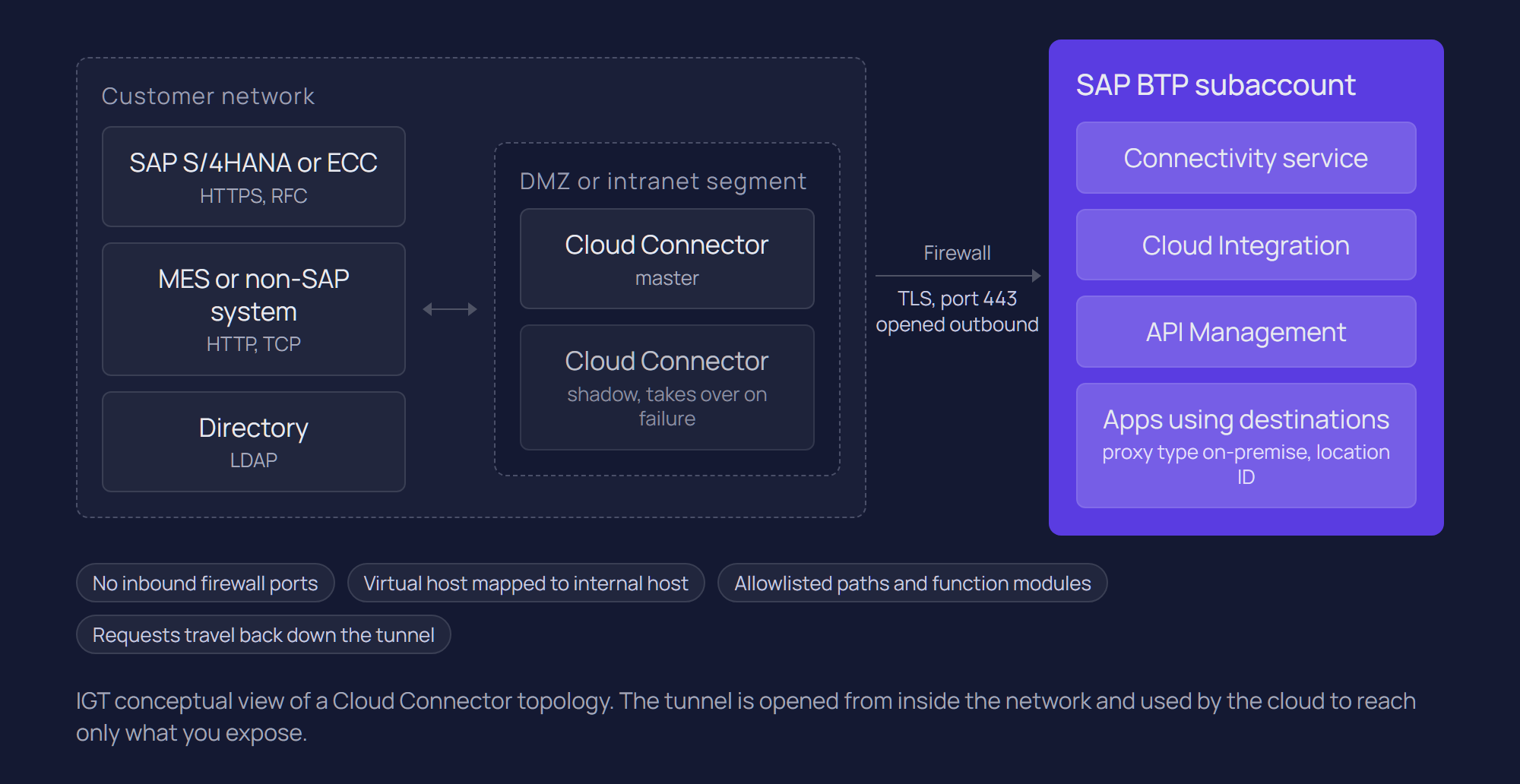
- A service in your BTP subaccount, such as a Cloud Integration receiver adapter or an application using a destination, addresses a virtual host and port with proxy type on-premise and, where needed, a location ID.
- The Connectivity service passes the request into the tunnel held open by the Cloud Connector registered for that subaccount and location ID.
- Cloud Connector, in a DMZ segment or the intranet, checks the virtual host and port against its access control entries and the requested URL path or RFC function module against its allowlist. Anything not allowed is denied and can be audit-logged.
- If allowed, it connects to the real internal host, optionally over HTTPS, TLS or SNC, and optionally presenting a system certificate or a propagated user identity.
- The response returns through the same tunnel.
A production topology adds a shadow instance beside the master in the same network segment. If Cloud Connector sits in a separate zone from the backends, the internal firewall still needs their ports open (HTTP, LDAP, RFC gateway and message server, or an SAProuter), as SAP's network zones guidance explains.
One constraint surprises security teams: SAP states that a TLS-terminating firewall between Cloud Connector and SAP BTP is not possible, because it breaks their mutual trust. Agree any inspection exception before installation day.
What does Cloud Connector expose? Virtual hosts and access control
Only what you configure. Each exposed system is an access control entry mapping a virtual host and port, used by the cloud side, to a real internal host and port. For HTTP and RFC you also allowlist the specific URL paths or function modules that may be called; everything else is denied.
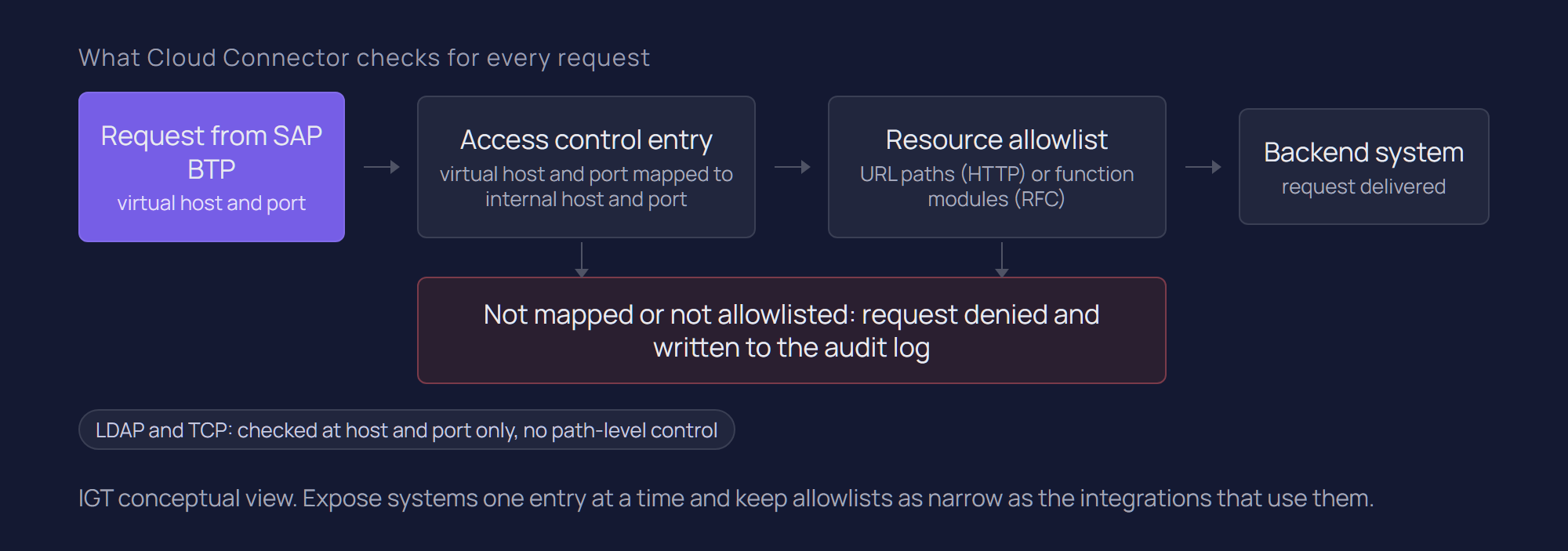
The virtual host can be a fictitious name, so internal host names never appear in cloud configuration, and a mapping can be re-pointed to a backup system without touching the cloud side. The backend protocol is also set independently: SAP's HTTP access control documentation notes that a destination can use http:// while Cloud Connector uses HTTPS to the backend. Consistent with this, SAP's Cloud Integration guidance for Cloud Connector asks for receiver URLs starting with http://.
The level of control differs by protocol, and that should shape your exposure policy:
Protocol | What access control checks | Typical use |
HTTP, HTTPS | Virtual host and port, plus allowlisted URL paths (exact path, or path and all sub-paths) | OData, REST and SOAP services on SAP and non-SAP systems |
RFC, RFC SNC, WebSocket RFC | Virtual host and port, plus allowlisted function modules (exact name or prefix); optional client and user authority lists for classic RFC | BAPIs and remote-enabled function modules on ABAP systems |
LDAP, LDAPS | Virtual host and port | Authenticating against an on-premise directory |
TCP, TCP TLS | Virtual host and port or port range only | TCP-based protocols whose client supports a SOCKS5 proxy |
Only HTTP and RFC add resource-level checks. For plain TCP, the Cloud Connector UI itself warns that the mapping can permit unmonitored traffic, because individual calls cannot be inspected or logged, so treat TCP mappings as justified exceptions. The backend type chosen for a mapping determines which protocols are offered, as listed in SAP's access control overview; WebSocket RFC is documented as of version 2.19.
Which SAP BTP services use Cloud Connector?
Any BTP service that reaches a private system through SAP BTP Connectivity. In integration work that mostly means Cloud Integration and API Management.
- Cloud Integration. Receiver adapters select proxy type on-premise and, where several Cloud Connectors serve the subaccount, the matching location ID. Flow design is covered in SAP Cloud Integration (CPI).
- API Management. An API provider of type on-premise routes through Cloud Connector, and SAP documents an on-premise-connectivity plan for principal propagation. API governance is the subject of SAP API Management.
- Applications and runtimes. Cloud Foundry applications use on-premise destinations; Kyma and other Kubernetes workloads use the Connectivity Proxy.
- Other services. SAP's prerequisites mention on-premise scenarios for services such as SAP HANA Cloud, SAP Business Application Studio and SAP Datasphere.
One Cloud Connector therefore often serves several teams, and a shared component needs shared rules. Platform context is in what is SAP BTP.
High availability, location IDs and multiple subaccounts
Run a master and a shadow instance for production, use location IDs when one subaccount needs more than one Cloud Connector, and keep production subaccounts on a production-only installation.
Master and shadow
In SAP's high availability setup, the master pushes its configuration to the shadow and keeps it synchronised. The shadow pings the master and, if it stays unreachable beyond a configurable takeover delay, opens the tunnel and becomes master. Only one shadow is supported, in the same network segment and without a proxy between the two. SAP's sizing guidance says the shadow should always be added in productive setups, and its FAQ warns against running both as virtual machines on one physical host.
Three details matter. A network break between master and shadow can cause a temporary double-master state, so their link must be stable. It is failover, not load balancing. And role switching lets you upgrade without a planned outage, though SAP's master and shadow administration notes that zero downtime is not guaranteed and active requests are aborted at the switch. For disaster recovery, SAP suggests spare machines in another data centre and regular configuration backups.
Location IDs and multiple subaccounts
Several Cloud Connectors can connect to one subaccount, each with a location ID unique within it, and destinations or adapters name the location ID to choose the connector. Typical reasons are reaching separate network segments, such as plants or data centres, and spreading load statically across installations.
Conversely, one installation can serve several subaccounts with separate configurations, as described in adding and managing subaccounts. SAP recommends grouping only subaccounts of the same quality, so productive subaccounts sit on a production-only Cloud Connector. Access control settings can be copied or exported between subaccounts, which is useful for promoting a reviewed configuration and just as effective at copying an over-broad one.
Security: least privilege and principal propagation
Cloud Connector security comes down to three decisions: expose as little as possible, separate administrative duties, and decide how the backend learns who is calling. Principal propagation lets the backend authenticate the actual cloud user rather than a shared technical user.
Least privilege in practice
Allowlists are only as narrow as the entries people create. A resource of "/" with all sub-paths exposes the whole server, and a short RFC prefix can expose far more function modules than intended. Prefer specific paths and exact names.
SAP's recommendations for secure setup add a dedicated machine, minimal operating system access, LDAP for named users and roles, a replaced self-signed UI certificate, disk encryption and the built-in Security Status view. It also recommends separating the operating system and Cloud Connector administrator roles. Certificates need an owner too: subaccount, system, UI and principal propagation CA certificates all expire on schedule.
How principal propagation works
The cloud user's identity travels as a JSON Web Token through the Connectivity service to Cloud Connector, which by default trusts no token issuer; per SAP's trust configuration, you synchronise identity providers from the subaccount and mark the trusted ones. For HTTPS, Cloud Connector authenticates to the backend with its system certificate and forwards the user as a short-lived X.509 certificate in the SSL_CLIENT_CERT header, which the backend maps to a local user. For RFC, the identity travels in the RFC protocol over SNC. Kerberos is also supported.
It earns its setup effort where backend authorisation must reflect the real person, such as user-facing APIs and applications. For system-to-system flows, a tightly scoped technical user is often the intended design. Either way, decide early.
Operating Cloud Connector
Treat Cloud Connector as production infrastructure: supported, monitored, audited, kept current and owned by a named team.
Installation, monitoring and audit
Cloud Connector runs on Windows and Linux, with a portable version for macOS. SAP's installation guide limits the portable version to non-productive use and strongly recommends the installer version for production, since it runs as a service or daemon and upgrades in place. A full JDK is required, and the prerequisites list supported operating systems per release, so check them before each upgrade.
The BTP cockpit shows connected Cloud Connectors and their high-availability setup. The administration UI adds hardware and performance metrics, SAP's monitoring documentation describes REST APIs for external tools, and email alerts cover tunnels, high availability, CPU, disk and expiring certificates.
The audit log defaults to the Security level, recording denied requests and critical configuration changes; All also records allowed requests. SAP states it must stay on for productive use, with files archived to local rules. SAP supports the latest two feature releases and recommends upgrading development, then QA, then production. Outbound firewall rules need maintaining too, as SAP announces Connectivity service host and IP changes in its documentation.
Who should own Cloud Connector?
SAP's network zones guidance allows either a DMZ installation operated centrally by IT or an intranet installation operated by a line of business. What matters is that each concern is assigned explicitly. This table is IGT's suggested starting point, not an SAP standard:
Concern | Suggested owner |
Server, operating system, JDK, backups | Infrastructure or SAP Basis |
Tunnel, subaccounts, high availability, certificates | SAP Basis or BTP platform team |
Access control entries and allowlists | Integration team requests, security approves, Basis applies |
Principal propagation and backend user mapping | SAP Basis with the identity and security team |
Alert response and triage | Integration operations, escalating to Basis |
Whatever the names, every exposure should have a requester, an approver and a review date.
Cloud Connector vs Edge Integration Cell
Cloud Connector gives the cloud a controlled path to private systems; Edge Integration Cell runs supported integration workloads inside the private landscape. Connectivity versus execution: the comparison table is in the Integration Suite architecture article, and neither replaces the other.
With the SAP-managed cloud runtime, processing happens in the cloud, so an interface between two on-premise systems travels out through the tunnel and back. For many interfaces that is fine. Where data locality, latency or a plant's ability to keep working during an internet outage matter, the question becomes where processing should run, which is what Edge Integration Cell is for.
Adopting it does not retire Cloud Connector. SAP's documentation describes onboarding the Edge Integration Cell node through Edge Lifecycle Management with either an embedded Cloud Connector or an external Cloud Connector you operate, with system mappings for the cell's monitoring and operations APIs. The useful question is per interface: where should processing run, and what path does it need? If most traffic is ground to ground and the platform choice is open, a customer-managed platform such as webMethods can also be the better fit.
What are the most common Cloud Connector mistakes?
Most problems are configuration and ownership problems, not product defects. These are IGT's general observations rather than SAP-defined rules:
- Treating it as middleware. Expecting retries, queuing or transformation from a component that only tunnels.
- Exposing too much. "/" with all sub-paths, broad RFC prefixes, or TCP mappings created for a test and never narrowed.
- One instance in production. No shadow, or a shadow on the same physical host, so routine maintenance becomes an outage.
- Mixing production and non-production. Test subaccounts on the production connector share its exposure and administrators.
- Unwatched certificates and allowlists. Expired certificates and outdated firewall rules stop every hybrid interface at once.
- No owner. Audit logs never read and access control entries nobody can explain.
Conclusion
SAP Cloud Connector does one job: it gives SAP BTP a controlled, outbound-initiated path into a private network, exposing only the systems and resources you name. Designs that respect its limits tend to hold up.
The value comes from how it is run: a master and shadow pair, narrow allowlists, deliberate identity decisions, monitored certificates and a clear owner. Where processing must move closer to the systems, Edge Integration Cell sits alongside Cloud Connector rather than replacing it.
If you are planning hybrid connectivity for SAP BTP, or reviewing a Cloud Connector setup that grew without a plan, talk to our SAP integration team. Our SAP integration services cover architecture, delivery and operations across SAP and non-SAP platforms.
Related questions
Is SAP Cloud Connector middleware?
No. SAP describes it as a reverse invoke proxy that tunnels requests from SAP BTP to exposed on-premise resources. It does not transform, queue, retry or store and forward messages, so integration logic belongs in Cloud Integration or another integration platform.
Does SAP Cloud Connector need inbound firewall ports?
No. Cloud Connector opens a TLS connection outbound to the SAP BTP Connectivity service on port 443, and cloud requests travel back through that tunnel. You still need outbound access to the Connectivity service hosts and internal firewall rules from Cloud Connector to the backends it exposes.
Can one Cloud Connector serve several BTP subaccounts?
Yes. One installation can connect to several subaccounts, each with its own configuration. SAP recommends grouping only subaccounts of the same quality, so productive subaccounts should sit on a Cloud Connector used for production only.
When do you need Edge Integration Cell instead of Cloud Connector?
When the requirement is about where processing runs rather than reaching a system: data locality, latency or continued operation during a cloud connection outage. Even then it is not a replacement, because Edge Integration Cell itself uses an embedded or external Cloud Connector for its connection to the cloud.
Sources
SAP Help Portal: Cloud Connector
SAP Help Portal: Connectivity Service
SAP Help Portal: Cloud Connector Frequently Asked Questions
SAP Help Portal: Cloud Connector Prerequisites
SAP Help Portal: Cloud Connector Installation
SAP Help Portal: Network Zones
SAP Help Portal: Configure Access Control
SAP Help Portal: Configure Access Control (HTTP)
SAP Help Portal: Adding and Managing Subaccounts
SAP Help Portal: High Availability Setup
SAP Help Portal: Master and Shadow Administration
SAP Help Portal: Sizing Recommendations
SAP Help Portal: Recommendations for Secure Setup
SAP Help Portal: Manage Audit Logs
SAP Help Portal: Using SAP Cloud Connector with Cloud Integration Adapters
SAP Help Portal: Accessing On-Premise Systems through API Management
SAP (SAP-docs on GitHub): Configure an External Cloud Connector for Edge Integration Cell
Latest writings
The latest news, technologies, and resources from our team.
View all blogs


Let’s make it click!
Whether you're scaling a startup or streamlining a corporate ecosystem, we help teams launch faster and integrate smarter.

Eva Polcíková
Project Manager