SAP and Non-SAP Integration: A Practical Architecture Guide for Heterogeneous Landscapes
An SAP core surrounded by CRM, MES, warehouses, banks, EDI partners and SaaS it did not build. Which pattern fits each counterpart, what Integration Suite really offers for non-SAP systems, who owns the data, and when webMethods is the better carrier.

Last technically reviewed: 18/11/2026. Reviewed by Marek Juračka, CTO.

Table of contents
Very few companies run on SAP alone. A typical manufacturer or distributor has an SAP core for finance, logistics and production planning, surrounded by a CRM, MES in the plants, a warehouse and transport system, banks, EDI partners, SaaS tools, a data platform and some legacy applications that nobody has had the budget to replace. SAP and non-SAP integration is the work of making that mixed landscape behave like one system: the right data, in the right format, at the right time, with someone accountable when it fails.
The question is rarely whether SAP can connect to a given system; it usually can, in several ways. The harder questions are which connection method fits each counterpart, which system owns which data, where the integration logic lives, and which platform should carry the traffic.
This guide covers the non-SAP systems that typically connect to SAP, the connectivity options SAP Integration Suite offers in 2026, data ownership, platform choice, security and a reference architecture. Where we have covered a topic in depth, we summarise it and link to the detailed article.
In short
SAP and non-SAP integration is the normal state of an enterprise landscape, and each class of non-SAP system (CRM, MES, WMS, banks, EDI partners, SaaS, legacy, data platforms) has a pattern that usually fits it.
SAP Integration Suite connects to non-SAP systems through more than 80 adapters, adapters delivered through the SAP Business Accelerator Hub, about 170 Open Connectors connectors and custom adapters, but a connector does not settle data ownership or mapping.
Decide master data ownership and a canonical model first, then choose the platform (Integration Suite, webMethods or both) by where the traffic actually flows.
What does SAP and non-SAP integration mean?
SAP and non-SAP integration is the exchange of data and process steps between SAP applications (SAP S/4HANA, SAP ECC and SAP cloud applications) and systems built by other vendors or in-house. It covers application-to-application flows inside the company, business-to-business exchanges with partners, and data movement into analytics platforms.
It is the normal state, not an exception. ERP is the system of record for orders, stock and finance, but sales teams work in a CRM, plants run on MES, warehouses on a WMS, and partners send EDI messages from their own systems. Few organisations plan to replace all of them with SAP equivalents.
What differs from SAP-to-SAP integration is how much SAP has already done for you. Between SAP applications, SAP often ships prepackaged content, documented APIs on both sides and favourable metering. Between SAP and a third-party system, you usually own more of the design: the mapping, the code lists, the error handling and the contract with the other side.
SAP's overview of SAP Integration Suite describes hybrid integrations that connect "SAP and non-SAP, cloud, and on-premise applications". The platform on SAP BTP is built for mixed landscapes; the design decisions are still yours.
Which non-SAP systems typically connect to SAP?
Most non-SAP counterparts fall into eight groups: CRM, MES, warehouse and transport systems, banks, EDI partners, SaaS applications, legacy systems and data platforms. Each group exchanges characteristic data with SAP and has a pattern that usually suits it.
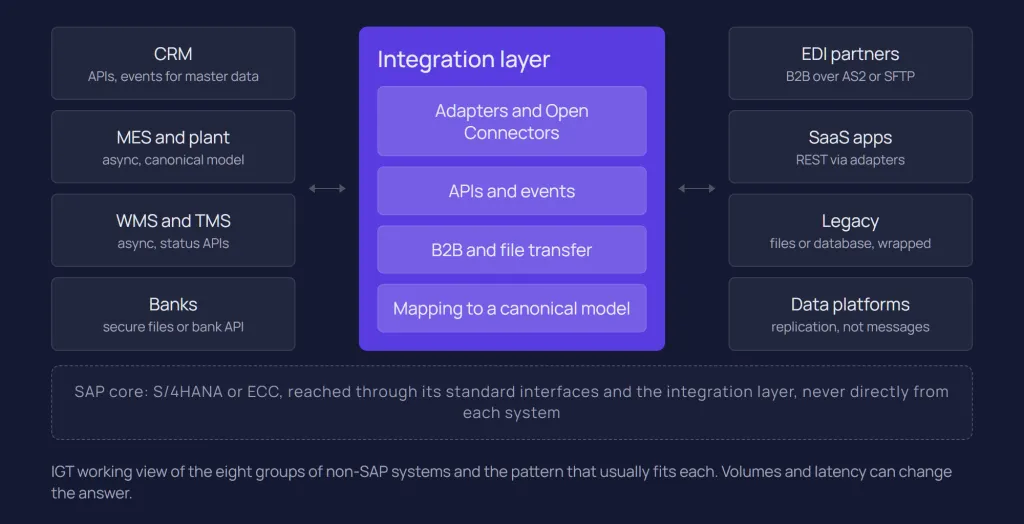
The table below is IGT's working view, not an SAP classification. It shows starting points; volumes, latency requirements and the counterpart's own interfaces can change the answer.
Non-SAP system | Typical data exchanged with SAP | Pattern that usually fits |
CRM (for example Salesforce or Microsoft Dynamics) | Customers and business partners, products, prices, quotes, sales orders, order status | APIs for create and read; events or scheduled sync for master data changes |
MES and plant systems | Production orders, routings, material master down; confirmations, goods movements, quality results up | Asynchronous messaging with a canonical model; store-and-forward close to the plant |
WMS and TMS | Deliveries, transport orders, picking confirmations, goods receipts, shipment status | Asynchronous messaging; APIs for status queries |
Banks | Payment files, bank statements, payment status | Secure file transfer or the bank's API, with strict audit |
EDI partners (customers, suppliers, carriers) | Orders, order responses, despatch advices, invoices | B2B exchange over AS2, SFTP or similar, with partner-specific mapping |
SaaS applications (HR, procurement, service, collaboration) | Employees, cost centres, purchase requests, tickets, notifications | REST APIs through an adapter or Open Connectors |
Legacy and in-house applications | Anything, often through a database, flat files or a message queue | File or database integration, ideally wrapped in an API over time |
Data platforms and warehouses | Large extracts of transactional and master data | Data replication tooling, not transactional integration flows |
Two rows need their own design work. MES integration has plant-specific behaviour, network outages and ISA-95 boundaries, and is covered in depth in our SAP MES integration guide. Data platforms are a boundary rather than an integration flow: message-based interfaces are a poor fit for mass replication, and our article on SAP integration patterns explains why bulk data belongs in replication tooling.
What connectivity options does SAP offer for non-SAP systems?
SAP Integration Suite offers six routes to non-SAP systems: prepackaged integration content, standard adapters, adapters delivered through the SAP Business Accelerator Hub, the Open Connectors catalogue, custom adapters built with the Adapter Development Kit, and generic protocols such as HTTP, SOAP, OData, AMQP and SFTP. SAP's connectivity options documentation lists "80+ standard adapters" and "170+ non-SAP connectors", plus the Adapter Development Kit.
Prepackaged integration content
SAP delivers integration packages "for some of the commonly used integration scenarios", which you copy from the Discover view, configure and deploy. According to SAP's documentation on working with prepackaged integration content, the same catalogue also contains packages from SAP partner vendors, which you find by filtering on a vendor other than SAP. Content from partner vendors cannot be downloaded.
For non-SAP counterparts, check the catalogue before designing from scratch, but expect to design more yourself. SAP recommends keeping your modifications separate from standard content, because updates cannot be applied to a package you have edited.
Standard adapters
The adapter list in SAP's connectivity documentation covers most protocols and many products a non-SAP landscape uses. Examples include HTTP, SOAP, OData, FTP and SFTP, Mail, AS2 and AS4 for B2B, JDBC variants for databases such as Oracle, Microsoft SQL Server and DB2 on-premise, JMS and AMQP (with documented variants for Microsoft Azure Service Bus, IBM MQ, Solace PubSub+ and Apache ActiveMQ), Kafka and Amazon Web Services.
A few adapters, namely NFS, OFTP and the RFC sender, are documented as "only available for Edge Integration Cell", the private runtime.
Adapters from the SAP Business Accelerator Hub
Some application adapters are not preshipped. SAP's page on consuming integration adapters from the SAP Business Accelerator Hub explains that when you select such an adapter in an integration flow, Cloud Integration imports it with its own package and deploys it to the runtime profile of the flow. The Workday, ServiceNow, Snowflake and Google BigQuery receiver adapters, for example, are documented as available on the Hub, and their availability depends on your service plan (SAP Notes 2903776 and 3188446).
A third route exists: the Salesforce and Microsoft Dynamics CRM adapter pages state that the adapter is downloaded from the SAP Software Download Center and deployed to the tenant. Before planning around a product-specific adapter, check its delivery route, plan availability and supported operations.
Open Connectors
Open Connectors is the capability for non-SAP cloud applications. In SAP Discovery Center, the Integration Suite service plans list it as included, to "connect to non-SAP cloud applications" with about 170 non-SAP connectors. In November 2026 the listing names regional exceptions: Open Connectors is not available in the Alibaba Cloud China (Shanghai), Frankfurt EU Access and Microsoft Azure Zurich regions. SAP Discovery Center notes that the standalone SAP Open Connectors service was removed from the list of eligible cloud services as of 1 January 2021, and that Integration Suite now includes its features.
In an integration flow you reach a connector through the OpenConnectors receiver adapter, after creating an instance of the connector for the target application. The adapter calls REST APIs and cannot process payloads with attachments. Open Connectors suits SaaS applications without a dedicated adapter, where a normalised REST interface saves time; for document-heavy flows, note that the adapter cannot process payloads with attachments.
Custom adapters
Where nothing fits, the Adapter Development Kit lets you build and deploy your own adapter, which then becomes code you maintain. A generic HTTP, SOAP or JDBC adapter with a mapping step is often the simpler choice.
Which option for which counterpart?
The adapter answers how bytes reach the other system, not which pattern the exchange should follow. That choice (request-reply, asynchronous message, event, file or replication) is covered in SAP integration patterns, and the choice of interface on the SAP side in IDoc vs API vs events. The summary below is IGT's rule of thumb:
Option | Use it when | Watch out for |
Prepackaged content | A package covers your counterpart and scenario | Modifications block automatic updates; partner packages cannot be downloaded |
Standard protocol adapter (HTTP, SOAP, OData, SFTP, AS2, JDBC, AMQP, Kafka) | The counterpart exposes a standard protocol or a documented API | You own the mapping and error handling; some adapters run only on Edge Integration Cell |
Application adapter (preshipped, Hub or download) | A specific SaaS product is a long-term counterpart | Delivery route, plan availability and supported operations differ per adapter |
Open Connectors | A cloud application has no dedicated adapter | Regional exceptions; REST only, no attachments |
API Management | Several non-SAP consumers call the same SAP API | It governs exposure; mapping and orchestration stay in Cloud Integration |
Events (Event Mesh, advanced event mesh, Kafka) | Several systems need to react to the same change | Payload limits and event ordering; consumers often call back for details |
Files and managed file transfer | Banks, partners or legacy systems work in batches | Restart, duplicate detection and audit must be designed explicitly |
API exposure is covered in our SAP API Management article and broker choice in SAP Event Mesh.
Who owns the data?
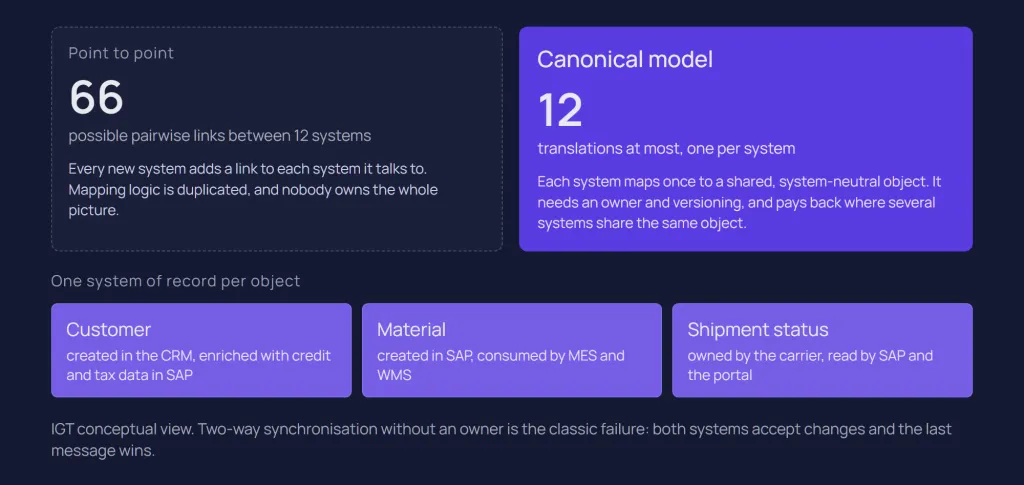
Every business object that crosses the SAP boundary needs one system of record, one agreed representation in transit, and explicit mapping of codes and units between systems. Connectivity is the easy part; many long-running integration problems in mixed landscapes trace back to unclear data ownership.
Master data ownership
For each master data object, decide which system creates it, which systems may change which attributes, and which systems only consume it. A customer may be created in the CRM and enriched with credit and tax data in SAP; a material is usually created in SAP and consumed by MES and WMS; a carrier's tracking status lives with the carrier. Write these decisions down per object and per attribute group.
Two-way synchronisation without an owner is the classic failure: both systems accept changes and the last message wins. If an attribute must be maintained in two places, design the conflict rule before go-live.
A canonical model
A canonical model is a shared, system-neutral representation of a business object in transit. With a canonical model, each system needs one translation to and from it, rather than one per pair of systems. A fully connected estate of 12 systems has 66 possible pairwise links; with a canonical model, it needs at most 12 translations.
Canonical models are not free. They need an owner, versioning and the discipline to keep system-specific fields out. They pay back where several systems share the same business object, such as orders, materials or production confirmations, and are overhead for a simple one-to-one interface. Our patterns article covers the trade-off in more detail.
Codes, units and identifiers
SAP and non-SAP systems rarely agree on plant codes, units of measure, country codes, payment terms or customer numbers. Keep these translations in the integration layer as maintained data, not hard-coded in mappings. In Cloud Integration, the value mapping artefact exists for exactly this: it defines "how the same object is identified differently across systems". Cross-references between SAP numbers and external IDs belong in the same category.
The resulting boundary, from the core outwards: SAP as system of record for its objects, released interfaces at the core, an integration layer that owns mapping and routing, and non-SAP systems that own their own objects.
How do you choose the integration platform?
Choose the platform by where your traffic flows: if most of it starts or ends in SAP and SAP cloud applications, SAP Integration Suite is the natural default; if SAP is one system among many, with heavy on-premise, plant, B2B or file traffic, a platform such as IBM webMethods often fits better; and many mixed estates run both with a stated boundary.
We compare the two platforms in detail in SAP Integration Suite vs webMethods. For a non-SAP landscape, these criteria tend to decide:
Criterion | Points towards Integration Suite | Points towards webMethods or another platform |
Share of SAP traffic | Most flows start or end in SAP | SAP is one system among many |
SAP-to-SAP content | Many SAP cloud applications with prepackaged content | Few SAP applications besides the core |
On-premise and plant traffic | Edge Integration Cell is acceptable, with its Kubernetes requirement | Much ground-to-ground traffic and no Kubernetes platform |
B2B and EDI | X12 or EDIFACT partners feeding SAP; Trading Partner Management and Integration Advisor fit | Complex B2B with many protocols, or heavy managed file transfer |
Existing estate | Leaving SAP PI/PO with mainly SAP-centric interfaces | A healthy webMethods estate and team already in place |
Commercial terms differ too. SAP's documentation on handling prepackaged SAP-to-SAP content states that messages processed by unmodified artifacts marked "Integration: SAP-to-SAP" are metered but not billed. Flows to non-SAP systems do not carry that marking, so a non-SAP-heavy estate should model its message volumes against the Integration Suite metric before committing.
Other iPaaS products can also carry SAP traffic if they handle IDocs or SAP APIs reliably. If you run two platforms, split by workload, not by whichever team moved first. For example: "SAP-to-SAP and SAP-to-SaaS flows run on Integration Suite; plant, legacy, partner and file traffic runs on webMethods." The range of systems on the webMethods side is covered in what integrates with webMethods.
How do you secure connectivity across the SAP boundary?
Security across the boundary has three parts: the network path between cloud and private systems, the runtime placement for flows that should not leave your network, and authentication towards each non-SAP system.
The network path: Cloud Connector
SAP Cloud Connector gives cloud services a controlled path into your private network without opening the on-premise firewall to external access, and it works for non-SAP systems as well as SAP ones. Its access control is configured per protocol (HTTP, RFC, LDAP and TCP), and SAP's TCP access control documentation shows "Non-SAP System" as a back-end type. Expose only the hosts and paths a flow needs. Cloud Connector does not queue, retry or map messages; it is connectivity, not integration.
The runtime: Edge Integration Cell
Edge Integration Cell is an optional hybrid runtime that runs integration flows and APIs in your own Kubernetes environment, designed and monitored from the cloud. For SAP and non-SAP integration it matters in two cases: ground-to-ground traffic, such as SAP to a WMS in the same data centre, which otherwise leaves the network and comes back; and adapters that only run there, such as NFS, OFTP and the RFC sender.
Authentication to non-SAP systems
Receiver adapters authenticate with security material stored on the tenant: user credentials, OAuth 2.0 credentials or client certificates from the keystore, depending on the adapter. Open Connectors adds its own secrets: SAP's documentation describes HTTP custom authentication with an organisation secret, user secret and instance token. Certificate lifecycle and inbound access control for partners calling into SAP are covered in SAP Integration Suite security.
IGT recommends giving each non-SAP system its own technical identity with the narrowest rights it needs. A shared integration user with broad SAP access makes audits harder and widens the impact of one leaked credential.
What does a reference architecture for SAP and non-SAP integration look like?
A reference architecture puts the SAP core behind a boundary of released interfaces, places one governed integration layer between the core and every group of non-SAP systems, and chooses runtime placement per flow. The model below is IGT's, not an SAP-defined architecture; the S/4HANA side is described in detail in our S/4HANA integration architecture guide.
SAP core. S/4HANA or ECC, exposing released APIs and events first, IDocs and BAPIs where the edition allows and nothing released fits. No consumer-specific logic in the core, in line with clean core integration.
Integration layer. Integration Suite, webMethods or both, holding mapping, value mapping, routing, retry and the canonical model. API Management in front of APIs that several consumers share, and a broker for events.
Connectivity and runtime. Internet and TLS for SaaS, Cloud Connector for private systems reached from the cloud, Edge Integration Cell or a self-managed runtime for ground-to-ground and plant traffic.
Non-SAP groups. SaaS and CRM, plants and MES, warehouse and logistics, banks and EDI partners, legacy, data platforms. Each group gets a default pattern from the table above.
Governance. An interface catalogue, data ownership decisions, naming, monitoring and a named owner per interface, across both SAP and non-SAP systems.
Governance is what keeps this from degrading into point-to-point again. Our article on SAP integration governance covers the catalogue and decision rules, and SAP Integration Suite monitoring covers alerting and ownership in operation.
The architecture in practice: five factories, one SAP core
Our SAP ECC and MES case study shows the reference model applied to one non-SAP group. A global manufacturer connected five factories in Belgium, Switzerland, China, Turkey and the United States, running two different MES platforms, to a single SAP ECC core. Instead of one integration per plant, IGT built the integration on webMethods Integration Server around a canonical XML model: SAP IDocs are transformed once into a plant-agnostic format and routed to the right MES by configuration, with ActiveTransfer handling file-based document exchange and built-in monitoring, retry and replay.
The result was 41 integration points between the plants and SAP, all flowing through the canonical model, with zero code forks: plant-specific behaviour lives in configuration. The principles (canonical model, configuration-driven routing, one shared contract) are platform-independent and carry over to S/4HANA and to other non-SAP groups.
What are the common mistakes, and how do you start?
Most problems in SAP and non-SAP integration come from decisions taken by default rather than by design. These are IGT observations from integration projects, not SAP-defined rules.
Point-to-point growth. Each new system gets its own direct connection to SAP, with its own credentials, mapping and error handling. It works for the first few systems and becomes unmaintainable as the estate grows.
Logic in the core. Custom ABAP that formats data for a specific CRM or MES. It ties SAP upgrades to the release cycle of a non-SAP system and lowers the clean core level.
No interface catalogue. Nobody can say which non-SAP systems depend on a given SAP interface, so every SAP change becomes a risk assessment from scratch.
Choosing the connector before the owner. Picking an adapter before deciding which system owns the data, which leads to two-way synchronisation conflicts.
Errors that end nowhere. A failed message to a non-SAP system with no retry, no alert and no business owner. Our error handling guide covers retries, idempotency and replay.
IGT recommends starting with the following sequence. It is our framework, not an SAP standard.
Inventory. List every interface between SAP and non-SAP systems, including file drops, database links and ABAP programs that call external systems, with volume, owner and pattern.
Decide ownership. For each shared business object, record the system of record and who may change which attributes.
Group by counterpart type. Assign each interface to one of the non-SAP groups and its default pattern; flag the exceptions.
Choose platform and placement. Decide which platform carries which group and where each runtime sits, and write the boundary down in one sentence.
Pilot one group. Build one group end to end, including canonical model, value mappings, monitoring and ownership, before scaling to the rest.
Conclusion
SAP and non-SAP integration is where much of the integration effort goes in many estates, because that is where SAP's prepackaged work ends and your own design begins. SAP Integration Suite gives you many ways to reach non-SAP systems, from standard and Hub adapters to Open Connectors and Edge Integration Cell, and webMethods remains a strong option where SAP is one system among many.
The connector is rarely the hard part. Data ownership, a canonical model where several systems share an object, a governed integration layer outside the core, and a clear platform boundary decide whether the landscape stays maintainable as new systems arrive.
If you are connecting an SAP core to CRM, plants, warehouses, partners or SaaS, and want an architecture that works across both SAP and non-SAP platforms, talk to our integration team. You can also see our SAP integration services, our webMethods services and our full range of integration services.
Related questions
Can SAP BTP integrate non-SAP applications?
Yes. SAP Integration Suite, which runs on SAP BTP, connects to non-SAP systems through more than 80 adapters, adapters delivered through the SAP Business Accelerator Hub, about 170 Open Connectors connectors and custom adapters. Cloud Connector and Edge Integration Cell extend that reach to non-SAP systems in your private network. Our SAP Integration Suite overview explains the capabilities.
What is the best way to connect SAP with Salesforce or another CRM?
Use an integration layer rather than a direct connection, decide first which system owns customers, products and prices, and use APIs for orders and events or scheduled sync for master data changes. On Integration Suite, check the delivery route of the dedicated adapter for your CRM, or use Open Connectors or the HTTP adapter if none fits.
Do I need SAP Integration Suite to integrate non-SAP systems?
No. You need an integration layer outside the SAP core, and Integration Suite is the natural choice in SAP-centric estates. Where most traffic is non-SAP, on-premise or B2B, webMethods or another platform can carry it, and many estates run both with a clear boundary.
How do you keep master data consistent between SAP and non-SAP systems?
Assign one system of record per object and attribute group, distribute changes from that system only, and keep code and ID translations in maintained value mappings in the integration layer. Where several systems share an object, a canonical model reduces the number of translations, and reconciliation reports catch drift that monitoring alone does not.
Sources
SAP (SAP-docs on GitHub): What Is SAP Integration Suite
SAP (SAP-docs on GitHub): Connectivity Options
SAP (SAP-docs on GitHub): Consuming Integration Adapters from SAP Business Accelerator Hub
SAP (SAP-docs on GitHub): Workday Receiver Adapter
SAP (SAP-docs on GitHub): Salesforce Adapter
SAP (SAP-docs on GitHub): OpenConnectors Receiver Adapter
SAP Discovery Center: SAP Integration Suite, service plans
SAP Discovery Center: SAP Open Connectors
SAP (SAP-docs on GitHub): Working with Prepackaged Integration Content
SAP (SAP-docs on GitHub): Use Prepackaged Integration Content Provided by SAP
SAP (SAP-docs on GitHub): Handling Prepackaged SAP-to-SAP Integration Content
SAP (SAP-docs on GitHub): Creating Value Mapping
SAP (SAP-docs on GitHub): Cloud Connector, Configure Access Control
SAP (SAP-docs on GitHub): Cloud Connector, Configure Access Control (TCP)
Latest writings
The latest news, technologies, and resources from our team.
View all blogs


Let’s make it click!
Whether you're scaling a startup or streamlining a corporate ecosystem, we help teams launch faster and integrate smarter.

Eva Polcíková
Project Manager