SAP Integration Suite Security: Authentication, Certificates, API Policies and a Practical Checklist
Most Integration Suite security incidents are not break-ins but defaults: a generic sending role, an expired certificate, a secret in a script, a trace left on. How to set up inbound and outbound authentication, keystores, API policies and logging, with a checklist to copy.

Last technically reviewed: 17/11/2026. Reviewed by Marek Juračka, CTO.

Table of contents
Most SAP integration incidents with a security angle are not break-ins. They are an integration flow that any credential on the tenant can call, a client certificate that expired overnight, an OAuth secret pasted into a script, or a trace left running while personal data flowed through it. SAP Integration Suite security is mostly about getting these ordinary decisions right, consistently, across every interface.
The platform provides the building blocks: BTP service keys for senders, credential and keystore artefacts for receivers, roles and access policies for people, and API Management policies for exposed APIs. Several defaults, such as the standard sending role, are convenient rather than strict. This guide follows a message through each layer and closes with a checklist you can copy.
In short
Inbound calls to Cloud Integration are always authenticated, and SAP recommends client certificates or OAuth client credentials from a BTP service key, combined with a custom role rather than the generic ESBMessaging.send.
Outbound credentials and keys live as security material and keystore entries on the tenant, so they can be rotated without touching flow logic, provided someone owns their expiry dates.
API Management policies, log levels, access policies and role collections decide who can reach an API and who can read payloads, which matters as much as encryption.
What does security in SAP Integration Suite cover?
It covers four areas: identity (who may call an integration and how the integration authenticates to receivers), transport and message protection, the data integration stores and logs, and the lifecycle of credentials and certificates.
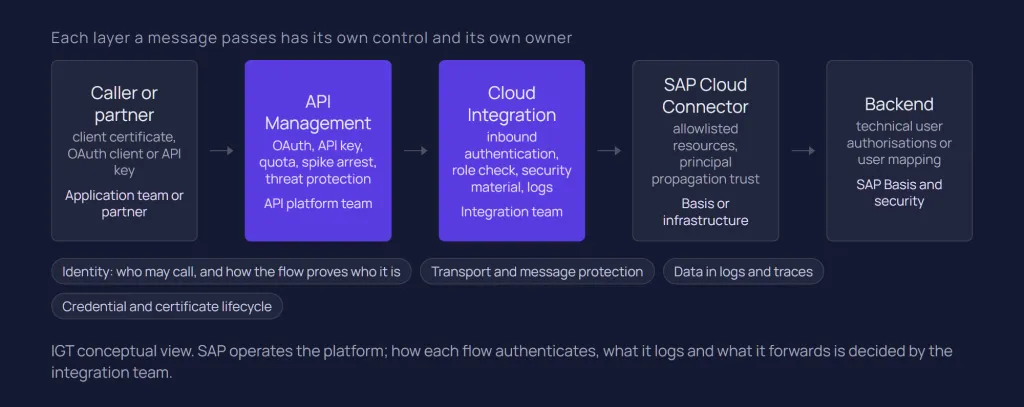
SAP operates the platform, the load balancer and the tenant infrastructure. The integration developer decides how each flow authenticates, what it logs and what it forwards. SAP's guideline Apply the Highest Security Standards states that a significant part of the responsibility lies with the integration developer.
In a hybrid landscape, a request passes through several layers, each with its own control:
Layer | Main security control | Typical owner |
Calling application or partner | Holds a client certificate, OAuth client or API key, and protects it | Application team or partner |
API Management | Policies: OAuth, API key, quota, spike arrest, threat protection, IP filtering | API platform team |
Cloud Integration | Inbound authentication and role check, security material, keystore, log levels, access policies | Integration team and tenant administrator |
SAP Cloud Connector | Allowlisted resources, principal propagation trust, system certificate | Basis or infrastructure team |
Backend (S/4HANA, ECC, MES) | Technical user authorisations or user mapping for propagated identities | SAP Basis and application security |
The components themselves are introduced in what is SAP Integration Suite and SAP Integration Suite architecture.
Inbound: who may call an integration flow?
A sender is first authenticated, then authorised. In the Cloud Foundry environment, authentication is based on a service instance and service key created in SAP BTP (or on a user in the identity provider), and authorisation is a role check configured in the sender adapter. SAP states that inbound communication to Cloud Integration must always be authenticated.
Our SAP Cloud Integration guide summarises this; here is the setup detail.
Service instances and service keys
For senders calling an integration flow endpoint, you create a service instance of the Process Integration Runtime service with the plan integration-flow. SAP describes this instance as an OAuth client with the client credentials grant type. API clients calling the Cloud Integration OData APIs use a separate plan, api.
Each instance gets service keys. SAP's service key types are ClientId/Secret; Certificate, where SAP BTP generates a client certificate with a validity you set, up to 365 days; and External Certificate, a PEM-encoded certificate you supply, signed by a CA that SAP supports.
Which inbound option should you choose?
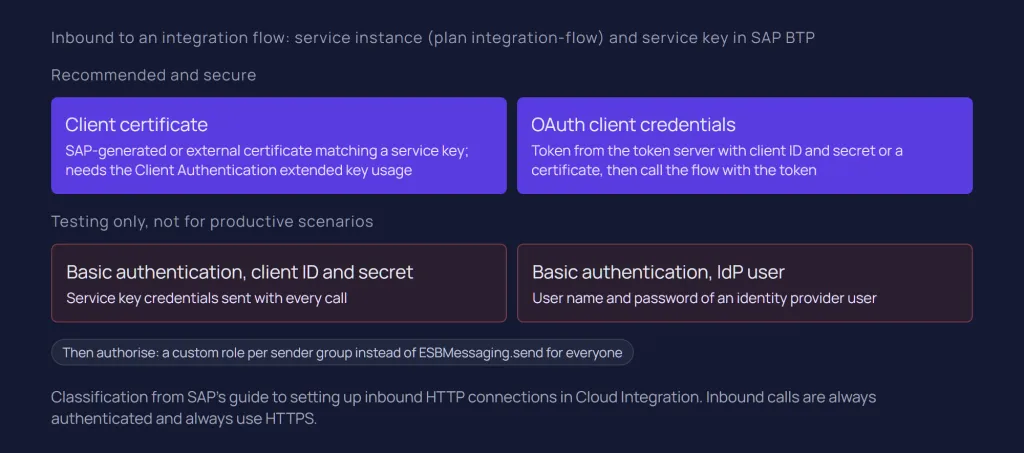
SAP's guide to setting up inbound HTTP connections labels two options as recommended and secure, and two as suitable for testing:
Option | How the sender authenticates | SAP's position |
Client certificate | Presents a certificate that matches a service key; the linked service instance must carry the required role | Recommended and secure |
OAuth client credentials | Fetches a token using client ID and secret or a client certificate, then calls the flow with the token | Recommended and secure |
Basic authentication with client ID and secret | Sends the service key credentials with each call | Not recommended for productive scenarios |
Basic authentication with an IdP user | Sends a user name and password from the identity provider | Not recommended for productive scenarios |
Client certificates: the Extended Key Usage trap
Client certificates are validated at the SAP BTP load balancer. SAP's documentation states that the certificate must include the Client Authentication Extended Key Usage (OID 1.3.6.1.5.5.7.3.2), otherwise it is rejected during the TLS handshake. SAP also notes that public certificate authorities began excluding this EKU from newly issued certificates in September 2025.
A sender that renews its certificate from a public CA as usual can therefore start failing with no change on the integration side. SAP points to certificates issued through the SAP Cloud Root CA, or a custom domain with a customer-managed trust model. Check the EKU on every renewed certificate before go-live.
The same page lists the phased reduction of maximum TLS certificate validity: 200 days from 15 March 2026, 100 days from 15 March 2027 and 47 days from 15 March 2029. SAP renews its load balancer server certificates periodically and advises clients to trust the root CA, not a specific server certificate.
Roles: do not stop at ESBMessaging.send
A new integration-flow service instance gets the predefined role ESBMessaging.send by default, and the sender adapter's User Role authorisation checks it. If every sender uses it, any valid credential on the tenant can call any flow on the tenant.
SAP's guideline to use secure authentication methods recommends avoiding generic user roles for sender-side authorisation and creating a custom role for inbound communication. Custom roles are created in the Monitor section under Manage Security, in the User Roles tile, and assigned to the service instance. One role per integration domain or sender system means a leaked key reaches only the flows it was meant for.
The older Client Certificate authorisation option, which checks the certificate's subject and issuer DN, is no longer recommended by SAP: every renewal forces a redeployment, and only the distinguished names are checked.
Two further settings need a decision per flow. The CSRF Protected option on HTTP-based sender adapters is enabled by default and should stay on when users call a flow from a browser. And XML parsing in scripts should not resolve external entities, one of the rules in SAP's security guidelines.
Outbound: how do flows authenticate to receivers?
Outbound authentication is set in the receiver adapter and points to an artefact on the tenant: user credentials, an OAuth2 credential or a key pair alias in the keystore. Options depend on the adapter; basic authentication, client certificates and OAuth 2.0 cover most HTTP-based receivers, and principal propagation serves on-premise targets.
Option | Tenant artefact | Points to note |
Basic | User Credentials | Widely supported, weakest of the authenticated options |
OAuth2 Client Credentials | OAuth2 Client Credentials (client ID, secret, token URL) | Short-lived tokens; the secret goes only to the token service |
OAuth2 SAML Bearer Assertion | OAuth2 SAML Bearer Assertion | Propagates a user context; SAP lists SAP SuccessFactors and SAP BTP as receiver types |
OAuth2 Authorization Code | OAuth2 Authorization Code, authorised once by a user | Used for some SaaS APIs; not supported on Edge Integration Cell |
Client certificate | Key pair in the tenant keystore, referenced by alias | No shared secret; the receiver must trust the tenant's certificate chain |
Principal propagation | Trust in Cloud Connector and the backend | In the HTTP receiver adapter, only with the On-Premise proxy type |
SAP's OAuth 2.0 documentation for Cloud Integration names HTTP, OData, SuccessFactors, Mail and AMQP among the adapters that support OAuth. The HTTP receiver adapter documentation adds a caveat: when the token URL belongs to an on-premise system, the built-in token fetch fails and a separate token call is needed. Setting an Authorization header manually in a script also works, but moves the secret into flow logic where it is harder to govern.
Receiver channels can also run with no authentication, which SAP calls the most insecure method; message-level signatures and encryption are then the fallback.
Principal propagation
Principal propagation forwards the original user's identity, rather than a technical user, through Cloud Integration and SAP Cloud Connector to an on-premise backend. Cloud Connector issues a short-lived X.509 certificate for the user, and the backend maps it to a local user and applies that user's authorisations. The trust setup is covered in our SAP Cloud Connector guide.
From the integration side, the receiver adapter must use the On-Premise proxy type, and the inbound call must carry a real user identity: a flow called with technical client credentials has no user to propagate. SAP also notes that in a scenario spanning several components, you are responsible for configuring each correctly. For system-to-system interfaces, a narrowly authorised technical user is often the right design.
Transport and message-level protection
Inbound HTTP connections to Cloud Integration are always HTTPS. Outbound, SAP's guideline to use secure protocols recommends HTTPS, SFTP or FTPS, SMTPS or STARTTLS, and AMQP over TLS. TLS protects data only between two points, so where content must stay protected end to end, Cloud Integration supports message-level security with OpenPGP, PKCS#7/CMS, XML Digital Signature and WS-Security.
Keystores, certificates and secrets
Every credential and key a flow uses should be a tenant artefact referenced by name, not a value inside the flow. Cloud Integration provides security material for credentials and secure parameters, and a keystore for certificates and key pairs. Their expiry needs a named owner.
Security material
The Security Material tile holds User Credentials, OAuth2 Client Credentials, OAuth2 Password Credentials, OAuth2 SAML Bearer Assertion, OAuth2 Authorization Code and Secure Parameter artefacts, plus Known Hosts files for SFTP, as described in Managing Security Material. PGP keyrings are managed separately. Credential names and key aliases can be externalised, so one flow uses different credentials per environment.
Secrets a script or custom adapter needs belong in secure parameters; a secret hard-coded in a Groovy script travels with every export and transport.
The keystore
The tenant keystore holds key pairs and trusted certificates. Some entries are SAP-owned and marked with a lock icon; others belong to the tenant administrator. According to SAP's keystore documentation, private keys cannot be downloaded, customer-owned entries can be backed up and restored, and the Valid Until column highlights expired entries in red. SAP also notes that many key pairs in the keystore make outbound authentication take significantly longer (SAP Help: Client Certificate Authentication (Outbound)), so removing unused entries is a performance task too.
Certificate lifecycle and expiry monitoring
For SAP-owned keys, SAP prepares the new key pair 60 days before expiry in a New SAP Keys view. In the key renewal process, the tenant administrator coordinates with the administrators of connected senders and receivers, distributes the new certificate, agrees any downtime and activates the key.
Customer-owned material has no such reminder: keystore entries, service key certificates, sender certificates, receiver passwords and OAuth secrets, and Cloud Connector certificates all expire.
SAP interfaces help automate the inventory. The Security Content OData API lets an authorised client read keystore entries and certificates. SAP also documents how to manage service keys using an API, including reading their validuntil value, explicitly to support notifications for keys about to expire. For API Management, SAP documents certificate health monitoring through SAP Cloud ALM for custom domain and Developer Hub certificates.
IGT recommends one rule on top of the tooling: every certificate and secret has an owner, an agreed renewal lead time and a calendar entry, because an expired certificate stops an interface as effectively as a broken mapping.
Protecting APIs with API Management
When a flow or backend service is exposed to many consumers, API Management adds a policy layer: who may call, how often, with what payload and from where. It complements the inbound authentication of Cloud Integration and does not replace authorisation in the backend.
Our SAP API Management guide compares the policy models in detail. The security-relevant policies in SAP's policy types list fall into four concerns:
Identify and authenticate. Verify API Key identifies the application; OAuth v2.0, Verify JWT, SAML Assertion and Basic Authentication establish identity. An API key identifies an application, not a person.
Limit consumption. Quota enforces a per-application allowance. Spike Arrest smooths the overall rate to protect a backend, and SAP's Spike Arrest documentation says not to use it to limit individual clients.
Reject malicious content. JSON Threat Protection, XML Threat Protection and Regular Expression Protection.
Restrict network origin. Access Control allows or denies IP ranges; SAP warns to evaluate the True-Client-IP header only from a trusted source.
Backend secrets that proxies need belong in key value maps with the Encrypted option, not in policy code. For on-premise backends, API Management supports principal propagation through Cloud Connector with the on-premise-connectivity plan.
A layered API typically combines OAuth and threat protection at the proxy, its own credentials and custom role towards Cloud Integration, and a technical user or propagated identity towards the backend. When the proxy only forwards to a released S/4HANA API, the flow layer can disappear, one reason to prefer released APIs in a clean core integration approach.
Data protection in logs and payloads
Integration platforms process sensitive data in clear text. Log levels, trace, attachments and debug sessions decide where copies end up and who can read them.
Trace and custom logging
The Trace log level records every step plus message content. SAP's log level documentation states that trace expires after 10 minutes by default, content is kept for 1 hour by default, and recommends Trace only in development or test. In production, treat it as a time-boxed, approved activity. API Management has an equivalent: a proxy debug session captures messages from live traffic and stops automatically after 10 minutes.
The larger risk is usually custom logging. Scripts that attach full payloads or all headers to the processing log expose them to everyone who can open message monitoring. SAP's guideline to remove sensitive or secret content before logging or forwarding prefers an allowlist over a blocklist and recommends deleting sensitive headers in a Content Modifier before calling a receiver. Standard mechanisms such as tracing and the Persist step keep standard secret headers like Authorization out of logs; custom scripts do not get that protection automatically.
Who may read payloads
PI_Business_Expert is an add-on role collection that allows reading message payloads and attachments, editing trace configuration and reading data store content, according to SAP's personas for Cloud Integration. Assign it deliberately, not as part of a default developer bundle.
For finer control, access policies restrict operations and runtime data for selected packages or artefacts, including log attachments, trace data, data stores, variables and message queues. Users without the role can still view a protected artefact, and custom header properties are not protected, so they should never carry personal or secret data.
Cloud Integration also writes design-time security events, such as package import, artefact creation and transports, to the audit log. Pair that trail with change control for security material and keystore entries, because a swapped credential can change an interface's behaviour as much as a code change.
The SAP Integration Suite security checklist
This is IGT's working checklist, built from the SAP sources linked above. Adjust owners and frequencies to your landscape.
Inbound
Senders use client certificates or OAuth client credentials; basic authentication stays on test tenants.
Custom roles per integration domain or sender system; no productive sender relies on ESBMessaging.send.
Each sender has its own service key, so one can be revoked alone.
Renewed sender certificates are checked for the Client Authentication EKU.
Senders trust the root CA, not a pinned server certificate.
Subject/issuer DN authorisation is replaced by role-based checks.
Outbound
No receiver channel uses authentication None without message-level security.
OAuth or client certificates where the receiver supports them.
No credentials hard-coded in Content Modifiers or scripts.
Credential names and key aliases externalised per environment.
Only encrypted protocols outbound.
Principal propagation where the backend must see the real user, with each trust step documented.
Keys and certificates
An inventory of keystore entries, service key certificates, partner certificates and secrets, with owner and expiry date.
Expiry monitored automatically or through a scheduled Keystore review.
A named recipient for SAP key renewal notices.
Customer-owned entries backed up; expired and unused entries removed.
APIs
Every exposed API has authentication, threat protection, and Quota or Spike Arrest.
Proxy secrets in encrypted key value maps.
Developer Hub and custom domain certificates included in monitoring.
Logs, data and access
Trace and API debug sessions time-boxed and approved.
Scripts log only allowlisted fields; no payloads by default.
Sensitive headers removed before calling receivers.
PI_Business_Expert limited to named people.
Access policies on packages that process HR, finance or personal data.
No personal or secret data in custom header properties.
Conclusion
SAP Integration Suite provides solid security mechanisms, but most are choices rather than defaults. Certificates and OAuth instead of basic authentication, custom roles instead of ESBMessaging.send, secrets in security material instead of scripts, and Trace as an exception: each is a small decision that is hard to retrofit across hundreds of flows.
The operational side matters as much: certificate validity periods are shrinking and SAP rotates its own keys on a schedule. The same principles apply on other platforms, including webMethods, so keep the checklist platform-neutral in a mixed estate. A PI/PO move is a good moment to reset these conventions, as our PI/PO migration guide discusses.
If you want a tenant reviewed against this checklist, or help setting up roles, certificate monitoring and API policies, our SAP integration services cover design, delivery and review. Talk to our SAP integration team.
Related questions
How do I protect SAP API endpoints?
Put API Management in front of endpoints consumed by many systems or external parties, with an authentication policy such as OAuth v2.0 or Verify API Key, threat protection and Quota or Spike Arrest. Behind it, Cloud Integration endpoints should still require client certificates or OAuth with a custom role, and the backend keeps its own authorisation checks.
Does SAP Cloud Integration support OAuth?
Yes, in both directions. Inbound, senders obtain a token with the client credentials grant using a service key. Outbound, adapters such as HTTP and OData can use OAuth2 Client Credentials or SAML Bearer Assertion artefacts deployed as security material, and the Mail adapter also supports Authorization Code.
What is principal propagation in SAP BTP?
It forwards the identity of the original cloud user to an on-premise backend instead of a shared technical user. SAP Cloud Connector issues a short-lived X.509 certificate for the user, which the backend maps to a local user. Every component on the path needs trust configured.
How should certificates be managed in SAP Integration Suite?
Keep key pairs and trusted certificates in the tenant keystore, reference them by alias, and maintain an inventory with an owner and expiry date for each. Monitor expiry through the Keystore monitor or SAP's APIs, act on SAP key renewal notices, and check renewed client certificates for the Client Authentication EKU.
Sources
SAP Help (SAP-docs): Client Certificate Authentication (Outbound)
SAP Help (SAP-docs): Apply the Highest Security Standards
SAP Help (SAP-docs): Setting Up Inbound HTTP Connections (Integration Flow Processing)
SAP Help (SAP-docs): Creating Service Instance and Service Key for Inbound Authentication
SAP Help (SAP-docs): Service Key Types
SAP Help (SAP-docs): Client Certificate Authentication for Integration Flow Processing
SAP Help (SAP-docs): Use Secure Authentication Methods
SAP Help (SAP-docs): Use CSRF Protection
SAP Help (SAP-docs): OAuth 2.0
SAP Help (SAP-docs): HTTP Receiver Adapter
SAP Help (SAP-docs): Setting Up Principal Propagation (Example Scenario)
SAP Help (SAP-docs): Use Secure Protocols
SAP Help (SAP-docs): Managing Security Material
SAP Help (SAP-docs): Managing Keystore Entries
SAP Help (SAP-docs): Renewal of Keys Provided by SAP
SAP Help (SAP-docs): Managing Service Instances and Service Keys Using an API
SAP Help (SAP-docs): Security Content (OData API)
SAP Help (SAP-docs): Monitor the Health of Certificates Using SAP Cloud ALM
SAP Help (SAP-docs): API Management Policy Types
SAP Help (SAP-docs): Spike Arrest
SAP Help (SAP-docs): Access Control
SAP Help (SAP-docs): API Management Principal Propagation
SAP Help (SAP-docs): Debug an API Proxy
SAP Help (SAP-docs): Edge Integration Cell Runtime Scope
SAP Help (SAP-docs): Setting Log Levels
SAP Help (SAP-docs): Remove Sensitive or Secret Content Before Logging or Forwarding
SAP Help (SAP-docs): Personas for Cloud Integration
SAP Help (SAP-docs): Access Policies
SAP Help (SAP-docs): Auditing and Logging Information for Cloud Integration
Latest writings
The latest news, technologies, and resources from our team.
View all blogs


Let’s make it click!
Whether you're scaling a startup or streamlining a corporate ecosystem, we help teams launch faster and integrate smarter.

Eva Polcíková
Project Manager