SAP S/4HANA Integration Architecture: APIs, Events, IDocs and Editions in 2026
Public Edition, Private Edition and on-premise do not offer the same interfaces. Which APIs, events, IDocs and BAPIs each edition gives you, where the integration layer sits, and a reference architecture for S/4HANA with SaaS, MES, partners and legacy.

Last technically reviewed: 17/11/2026. Reviewed by Marek Juračka, CTO.

Table of contents
Every SAP S/4HANA programme inherits interfaces. The MES in each plant, the warehouse system, the CRM, banks, EDI partners, a data platform and a handful of legacy applications all need data from the core or send data to it. SAP S/4HANA integration architecture is the set of decisions that determines how those connections work: which interface the core exposes, where mapping and routing run, which runtime and network path a message takes, and who owns the result.
These decisions depend more on the S/4HANA edition than many project plans assume. A design that is routine on an on-premise system, such as a custom IDoc to the shop floor, may not be available at all in SAP S/4HANA Cloud Public Edition. A design that suits Public Edition may ignore assets a Private Edition customer already owns.
This article maps the integration options around S/4HANA in 2026: the interface types, what changes between Public Edition, Private Edition and on-premise, where the integration layer sits, and a reference architecture for a hybrid landscape of SAP and non-SAP systems. It builds on our articles on clean core integration and SAP integration patterns rather than repeating them.
In short
S/4HANA exposes released OData and SOAP APIs and business events in every edition; IDocs, BAPIs and RFC remain fully available in Private Edition and on-premise, while Public Edition is built around released APIs, events and communication arrangements.
Mapping, routing and orchestration belong in an integration layer outside the core, whether that is SAP Integration Suite, webMethods or another platform, with Cloud Connector as a network path and Edge Integration Cell as a private runtime.
Start with an interface catalogue and an edition-aware interface matrix, then decide patterns per class of interface instead of per project.
What is S/4HANA integration architecture?
S/4HANA integration architecture is the target design for how SAP S/4HANA exchanges data and process steps with every other system: the interfaces at the core boundary, the integration layer between the core and its consumers, the runtime and network placement of each flow, and the governance that keeps the design consistent over time.
In practice it comes down to four decisions per interface:
The interface at the core boundary. A released API, a business event, an IDoc, a BAPI or, as a last resort, a custom interface.
The integration layer and pattern. Which platform handles mapping and routing, and whether the exchange is request-reply, a queued message, an event or a file.
Runtime placement and network path. Cloud runtime or private runtime, internet or Cloud Connector.
Ownership and operations. Who catalogues, monitors and changes the interface after go-live.
The capabilities of SAP Integration Suite, and the difference between connectivity and runtime, are covered in our SAP Integration Suite architecture guide. This article looks at the same landscape from the S/4HANA side.
Which integration interfaces does SAP S/4HANA offer?
S/4HANA offers five families of interfaces: released OData APIs (V2 and V4), released SOAP APIs, business events, IDocs, and BAPIs called over RFC. Custom APIs built through extensibility fill the gaps. Their availability and clean core rating differ by edition.
The SAP Business Accelerator Hub is the reference for released APIs and events. In November 2026 it keeps separate packages for SAP S/4HANA Cloud Public Edition and for SAP S/4HANA, whose content reflects SAP S/4HANA Cloud Private Edition 2025 FPS2, plus separate business event packages for each. Both API packages contain OData V2, OData V4 and SOAP APIs, some of them marked as deprecated. SAP's disclaimer is worth reading: some APIs exist in both editions "but may differ", so check the package for your edition and release.
SAP distinguishes remote APIs, for consumers outside the system, from local APIs such as released CDS views, used by extensions inside it. According to SAP's learning material on released APIs, SAP guarantees the stability of released interfaces from release to release. For integration, the remote APIs and events are what matter.
Interface | What it is | Where to check it | Typical fit |
Released OData API (V2, V4) | Entity-based HTTP API for reading and changing business objects | Business Accelerator Hub, package for your edition | Create, read and update from SaaS and apps; detail lookups after an event |
Released SOAP API | Service operations, many asynchronous inbound or outbound, some marked B2B | Business Accelerator Hub | Document-style A2A and B2B exchanges, replication of master data |
Business event | Notification that a business object changed, published to a broker | Business Accelerator Hub, business event packages | Change notification to several consumers |
IDoc | Classic asynchronous document format | System documentation; clean core rating in SAP Note 3690029 | Partner EDI, stable existing flows; limited in Public Edition |
BAPI over RFC | Classic function-based API | System documentation; SAP Note 3690029 | Interim phases where no released API covers the function |
Custom API | Service built with extensibility tools (custom CDS view, ABAP RESTful Application Programming Model) | Your own interface catalogue | Genuine gaps, after checking standard content |
The Hub lists more than the headline objects. The SAP S/4HANA package, for example, includes OData APIs for production orders and production order confirmations, which matters for shop-floor integration. Before designing a custom interface, search the Hub for the business object in your edition and release.
How each technology is rated for clean core is set out in SAP Note 3690029, which uses an A to D scale. We summarise it in our clean core integration article; check the note itself for the current rating of a given technology. How to choose between an API, an IDoc and an event for a particular flow is the subject of IDoc vs API vs events.
Cloud Public Edition, Private Edition and on-premise: what changes?
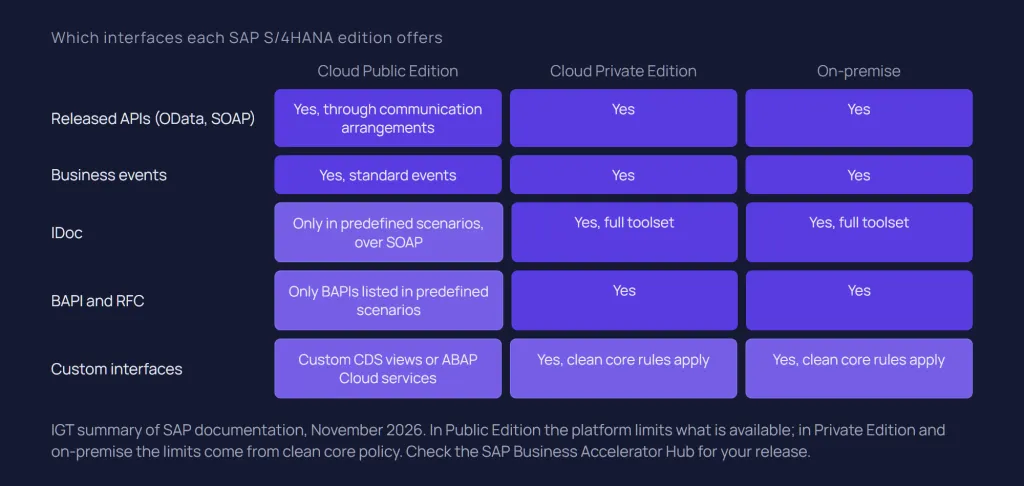
The edition decides which interfaces you can use and how they are enabled. Public Edition centres integration on released APIs and events, enabled through communication arrangements, and offers BAPIs and IDocs only inside predefined communication scenarios. Private Edition and on-premise run the same S/4HANA product with the full classic toolset, where the limits come from clean core policy rather than from the platform.
SAP S/4HANA Cloud Public Edition
In Public Edition, integration runs through communication management. SAP's communication management lesson defines the objects:
A communication scenario bundles inbound and outbound design-time artefacts. SAP predefines scenarios for its standard APIs.
A communication system represents the partner: the system that calls your services, or the system your services call.
A communication user is the technical identity used for integration.
A communication arrangement defines which system and which user can call which APIs.
Architecturally this is an allowlist. An external system can reach only what an arrangement enables, and only released objects are available. SAP enforces the use of released interfaces in custom ABAP code through syntax checks and ABAP test cockpit checks, according to the same released-API material.
IDocs have not disappeared from Public Edition: SAP documents BAPIs and IDocs as part of predefined communication scenarios, with IDocs supported only via SOAP (SAP Help Portal: BAPIs/IDocs in SAP S/4HANA Cloud Public Edition). SAP's own knowledge base describes, for example, outbound accounting document IDocs sent through communication scenario SAP_COM_0277 (SAP KBA 3766365). If a Public Edition integration depends on an IDoc, confirm that a delivered scenario covers it, and do not plan custom IDoc extensions.
Where no released API fits, Public Edition offers two routes. Key users can create custom CDS views with an external API scenario and expose them through a custom communication scenario, but SAP's documentation notes that the external API scenario supports only basic authentication (SAP Help Portal: External API: Exposing a Custom CDS View as OData API), which matters for security design. Developers can build custom services with ABAP Cloud. Both create interfaces you own and must catalogue.
For events, SAP's Public Edition event package describes consuming business events by subscribing through SAP Event Mesh. The broker setup, including the communication scenarios for advanced event mesh, is covered in our SAP Event Mesh article.
SAP S/4HANA Cloud Private Edition and on-premise
Private Edition and on-premise share one API catalogue on the Hub, and both keep the classic interfaces: IDocs, BAPIs, remote-enabled function modules and the full ABAP stack. Interfaces are configured in the backend by your Basis and integration teams, for example RFC destinations, IDoc partner profiles and, for business events, channels in transaction /IWXBE/CONFIG; some SAP-delivered scenarios also use communication arrangements, as in Public Edition.
The constraint is policy, not availability. SAP's learning material for Private Edition recommends standard integrations and released APIs first, notes that "tried-and-tested methods such as IDocs might still be recommended", and asks that missing integrations be raised with SAP as a requirement (SAP Learning: clean core compliant integrations). In other words, a Private Edition customer can still build a custom RFC module for the MES, but it remains custom code in the core, a last resort in SAP's clean core guidance, and becomes part of every upgrade.
Custom events on these editions use RAP in current releases, with SAP Application Interface Framework as SAP's route for older releases and ECC, as our Event Mesh article explains.
Aspect | Public Edition | Private Edition and on-premise |
API catalogue on the Hub | "SAP S/4HANA Cloud Public Edition" package and its event package | "SAP S/4HANA" package and its event package, release-dependent |
How an interface is enabled | Communication scenario, system, user and arrangement | Backend configuration such as RFC destinations, partner profiles, service activation and event channels; communication arrangements for some SAP scenarios |
IDocs | Within SAP-delivered communication scenarios, only over SOAP | Available, including extensions; clean core rating applies |
BAPI and RFC | Only the BAPIs SAP lists in predefined communication scenarios, called via WebSocket RFC or Cloud Connector | Available; classic APIs rated below released APIs |
Custom interfaces | Custom CDS views as external API, custom communication scenarios, ABAP Cloud | ABAP Cloud recommended; classic ABAP possible at a lower clean core level |
Main architectural risk | Designing around interfaces the edition does not offer | Rebuilding ECC-style custom interfaces in a new core |
Where does the integration layer sit?
The integration layer sits between S/4HANA and its consumers and holds the logic that is specific to a consumer: mapping, routing, enrichment, retry and orchestration. In an SAP-centric estate that layer is usually SAP Integration Suite; in a mixed estate it may be webMethods or another platform, or both with a stated boundary.
Within SAP Integration Suite, each capability has a distinct role around S/4HANA:
Cloud Integration runs integration flows. Its IDoc adapter exchanges IDocs with systems that communicate via SOAP web services. SAP's migration guide states that the traditional IDoc with packing over RFC cannot be used, and that the RFC sender adapter is available only on Edge Integration Cell (SAP: standard adapter migration). An ECC-style design that pushes IDocs over tRFC or calls the middleware by RFC needs adjusting.
API Management governs exposure when several consumers use the same S/4HANA API, so partners and apps depend on a managed contract rather than on the backend.
Event Mesh or advanced event mesh distributes S/4HANA business events; the choice depends on volume and landscape, as our Event Mesh article explains.
Trading Partner Management and Integration Advisor handle partner-specific B2B configuration and mapping design, with Cloud Integration as the runtime.
Two components decide placement and path. SAP Cloud Connector gives cloud services a controlled path to a privately hosted S/4HANA and does not process messages. Edge Integration Cell is an optional hybrid runtime that lets you manage APIs and run integration scenarios in your private landscape, designed and monitored from the cloud. SAP positions it for security and compliance cases and as a migration path for ground-to-ground scenarios from SAP Process Integration.
Public Edition adds a nuance. Because it is a cloud service, SaaS applications and cloud runtimes reach its APIs over the internet. Integration with on-premise SAP systems is a different matter: SAP's Solution Manager monitoring guidance for Public Edition covers three set-ups for integrating an SAP backend: mediated by Cloud Integration, mediated by SAP Process Integration, or directly via Cloud Connector.
The integration layer does not have to be SAP's. webMethods, for example, consumes IDocs and calls S/4HANA APIs, and estates with strong existing B2B, managed file transfer or plant integration on another platform may keep it deliberately. The trade-offs are in SAP Integration Suite vs webMethods.
Reference architecture for a hybrid landscape
A workable reference architecture places S/4HANA behind a boundary of released interfaces, puts one governed integration layer between the core and every consumer group, and chooses runtime placement per flow. The view below is IGT's reference model, not an SAP-defined architecture.
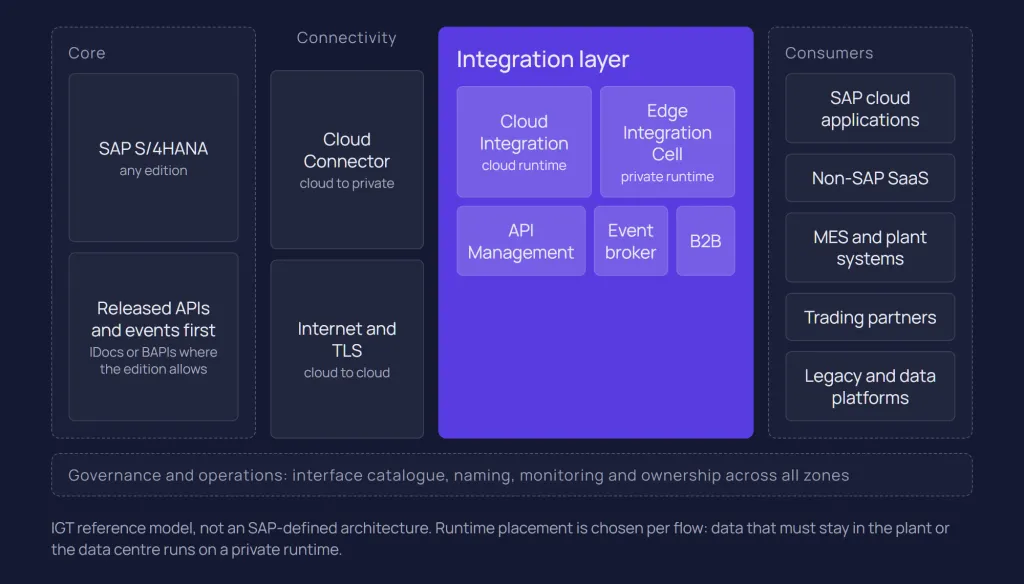
Read it as five zones, from the core outwards:
Core. S/4HANA in any edition, exposing released APIs and events first, and IDocs or BAPIs where the edition allows and nothing released fits.
Connectivity. Internet and TLS for cloud-to-cloud; Cloud Connector for cloud-to-private. SAP's Architecture Center also names Private Link service as a direct integration path.
Integration layer. Cloud Integration on the cloud runtime or Edge Integration Cell, API Management, an event broker and B2B capabilities, or an equivalent platform.
Consumers. SAP cloud applications, non-SAP SaaS, MES and plant systems, trading partners, legacy applications and data platforms.
Governance and operations. Interface catalogue, naming, monitoring and ownership across all of the above.
Each consumer group then gets a default design. These are starting points that non-functional requirements can override:
Flow | Interface at S/4HANA | Integration layer | Runtime and path |
SAP cloud applications | Released APIs used by SAP standard content | Cloud Integration with prepackaged content | Cloud runtime; Cloud Connector if S/4HANA is private |
Non-SAP SaaS, such as CRM | Released OData or SOAP APIs; events for change notification | Cloud Integration; API Management where several consumers share an API | Cloud runtime |
MES and plant systems | Production order and confirmation APIs or IDocs, depending on edition | Canonical model with configuration-driven routing, on Integration Suite or webMethods | Private runtime close to the plant where data must stay local |
Trading partners | B2B SOAP APIs or IDocs | Trading Partner Management, Integration Advisor and Cloud Integration, or an existing B2B platform | Cloud runtime |
On-premise legacy, ground to ground | APIs, IDocs or BAPIs (Private Edition, on-premise) | Edge Integration Cell or an existing on-premise platform | Private runtime; traffic need not leave the network |
External API consumers | Released APIs | API Management | Cloud or Edge Integration Cell |
Analytics and bulk data | Data integration interfaces, not transactional APIs | Data integration tooling | Outside the message runtime |
The MES row deserves its own design, because plants need plant-specific behaviour and that behaviour should not live in the ERP. Our SAP ECC and MES case study shows the principle on webMethods Integration Server: IDocs transformed into a canonical XML model and routed to two MES platforms by plant configuration, across five factories and 41 integration points with zero code forks. It was an ECC project, but the architecture carries over to S/4HANA. The detail is in SAP MES integration.
The last row is a boundary, not a gap. SAP warns against using transactional interfaces for mass replication, and bulk data belongs in data integration tooling, as our patterns article explains.
Governance: naming, ownership and monitoring
Governance makes the reference architecture last: one catalogue of interfaces, consistent naming, a named owner per interface and monitoring that reaches the people who act on it. Without it, each project reopens the decisions above.
Catalogue. Record every interface that touches the core, with edition-specific interface type, clean core level, pattern, runtime, consumer and owner. Integration Suite can discover APIs from SAP S/4HANA Cloud systems added to a formation and publish them as products on its Developer Hub, according to SAP's documentation on publishing S/4HANA APIs, which helps for APIs but does not replace a catalogue of IDoc and file interfaces.
Naming. One convention for packages, flows, APIs and communication arrangements, so that an alert or arrangement can be traced to its business interface.
Technology policy. Integration Assessment, based on SAP's ISA-M methodology, can record which interface type and pattern apply to which class of requirement.
Monitoring. Decide where messages, events and API calls are monitored and who receives alerts. Cloud Integration is not delivered with out-of-the-box alerting; SAP's PI/PO migration guide points to a predelivered package that uses SAP Alert Notification service, or to external tools such as SAP Solution Manager.
Security. Authentication per communication arrangement or destination, certificate ownership and identity propagation; see SAP Integration Suite security.
Common mistakes
Most S/4HANA integration problems are design decisions taken by default. These are IGT observations from SAP projects, not SAP-defined rules:
Rebuilding point-to-point. Each consumer gets its own path into S/4HANA, with its own credentials and mapping. A fully connected estate of 10 systems has 45 possible pairwise links; a governed integration layer keeps that from repeating in the new landscape.
Carrying ECC habits into a new core. Custom IDoc extensions, Z function modules and receiver-specific ABAP rebuilt in S/4HANA, where they lower the clean core level, or planned for Public Edition, where they are not available.
Choosing APIs without checking the edition. An API found in one Hub package is assumed to exist, unchanged, in the other.
No interface catalogue. Nobody can say which interfaces an upgrade or a released-API change affects.
Treating connectivity as integration. Expecting Cloud Connector to queue, retry or map, or ignoring that ground-to-ground traffic on the cloud runtime leaves the network and returns.
Transactional APIs for bulk data. Nightly loads of large data sets through OData calls, which a replication tool would handle with restartability built in.
How to start
Start with what already crosses the core boundary, then set target patterns before the first new interface is built. IGT recommends the following sequence; it is our framework, not an SAP standard.
Inventory. List the current interfaces, including those built in ABAP rather than middleware, with consumer, volume and owner. In an ECC conversion or a PI/PO migration, much of this data already exists.
Map to the edition. For each interface, check the Business Accelerator Hub package for your edition and release for a released API or event that covers it.
Classify. Keep, replace with a released API or event, move logic out of the core, consolidate or retire, as described in the clean core article.
Set target patterns and placement. Decide per class of interface which pattern, integration layer and runtime apply, using the reference table above as a draft.
Build the governance first. Catalogue, naming, monitoring and ownership before go-live, not after the first incident.
Where the estate is leaving SAP PI/PO at the same time, align the two programmes: the disposition of each interface should be decided once. Our guide to SAP PI/PO migration covers that side.
Conclusion
S/4HANA integration architecture is less about any single tool than about a consistent boundary: released APIs and events where they exist, classic interfaces only where the edition allows and nothing released fits, and consumer-specific logic in an integration layer outside the core.
The edition shapes the options, the integration layer shapes how maintainable they remain, and governance decides whether the design survives the next project. Estates that decide patterns per class of interface, and record those decisions, tend to need fewer exceptions later.
If you are planning the integration architecture for an S/4HANA programme, or reviewing one that grew without a plan, talk to our SAP integration team or see our SAP integration services.
Related questions
What integration options does SAP S/4HANA offer?
Released OData and SOAP APIs, business events, IDocs and BAPIs over RFC, plus custom APIs built with extensibility tools. Released APIs and events are documented on the SAP Business Accelerator Hub per edition, and their availability and clean core rating differ between Public Edition, Private Edition and on-premise.
Does S/4HANA still support IDocs?
Yes. Private Edition and on-premise support IDocs fully, and Public Edition uses them within some SAP-delivered communication scenarios. For new designs SAP recommends released APIs and events, and Cloud Integration exchanges IDocs over SOAP rather than the classic RFC-based transfer.
Do I need SAP Integration Suite for S/4HANA?
Not strictly. S/4HANA needs an integration layer outside the core for mapping, routing and monitoring, and Integration Suite is the natural choice in SAP-centric estates because of its prepackaged content. Another platform, such as webMethods, can fill that role, especially where it already handles B2B or plant integration.
How does S/4HANA Cloud Public Edition integrate with non-SAP systems?
Through released APIs and events enabled by communication arrangements, which define which system and user may call which APIs. Most designs place an integration layer such as Cloud Integration between Public Edition and the non-SAP system, and use Cloud Connector when systems inside a private network are involved.
Sources
SAP Help Portal: BAPIs/IDocs in SAP S/4HANA Cloud Public Edition
SAP Help Portal: External API: Exposing a Custom CDS View as OData API
SAP Business Accelerator Hub: SAP S/4HANA Cloud Public Edition
SAP Business Accelerator Hub: SAP S/4HANA
SAP Business Accelerator Hub: SAP S/4HANA Cloud Public Edition for Business Events
SAP Business Accelerator Hub: SAP S/4HANA Business Events
SAP Learning: Exploring Released APIs
SAP Learning: Setting up Communication Management
SAP Learning: Exploring How to Make Integrations Clean Core Compliant
SAP Knowledge Base Article 3766365: SAP_COM_0277 duplicate IDocs after changing receiver
SAP Support: SAP S/4HANA Cloud Public Edition operations
SAP (SAP-docs on GitHub): IDoc Adapter
SAP (SAP-docs on GitHub): Standard Adapter Migration
SAP (SAP-docs on GitHub): What Is Edge Integration Cell
SAP (SAP-docs on GitHub): Publish SAP S/4HANA APIs from Business Systems
SAP Architecture Center: Design Considerations for EDA Applications
Latest writings
The latest news, technologies, and resources from our team.
View all blogs


Let’s make it click!
Whether you're scaling a startup or streamlining a corporate ecosystem, we help teams launch faster and integrate smarter.

Eva Polcíková
Project Manager