SAP MES Integration: Architecture, Data Flows and Pitfalls for Multi-Plant Manufacturers
Orders go down, confirmations come back, and the plant network drops at the worst moment. Which data flows between SAP and MES, which interfaces carry it on ECC and S/4HANA, where to run the integration, and what five factories taught us about scaling it.

Last technically reviewed: 17/11/2026. Reviewed by Marek Juračka, CTO.
Table of contents
A production order is released in SAP. Within minutes the plant needs it on the line, with the right bill of material, routing and inspection characteristics. Hours later SAP needs to know what was actually produced, what was consumed and scrapped, and whether the batch passed. SAP MES integration is the plumbing between those two moments, and in a multi-plant manufacturer it is often one of the most operationally sensitive parts of the integration estate.
It is also where many estates carry their oldest interfaces, such as IDoc exits written for one plant or a polled file drop. Each works until a second MES arrives, a plant network drops, or the ERP moves to SAP S/4HANA.
This guide covers which data flows between SAP and an MES, which SAP interfaces carry it on SAP ECC and S/4HANA, the architecture options from direct connections to a runtime inside the plant, how to keep the flows reliable on the shop floor, and where projects commonly go wrong. It draws on IGT's published multi-plant case study, using only the facts made public there.
In short
- SAP MES integration exchanges orders and master data downwards and confirmations, goods movements and quality results upwards, across the ISA-95 boundary between business planning (level 4) and manufacturing operations (level 3).
- The architecture decision is mostly about where integration logic runs: in the ERP, in a cloud integration layer, in a runtime inside the plant, or on a self-managed platform such as webMethods.
- Plants with several MES products scale more easily with a canonical model and configuration-driven routing, so a new plant becomes a configuration task rather than a development project.
What does SAP MES integration mean?
SAP MES integration is the exchange of production data between the SAP ERP (SAP ECC or SAP S/4HANA) and the manufacturing execution system that runs work on the shop floor: production orders, master data and quality specifications go down, and confirmations, consumption, goods receipts and quality results come back.
The common reference model is ISA-95, also published as IEC 62264. The ISA-95 standard page describes five levels, from the physical process (level 0) through sensing, control and supervision (levels 1 and 2) to manufacturing operations management at level 3, where MES sits, and business planning and logistics at level 4, where ERP sits. ISA states that the standard primarily deals with the interface between levels 3 and 4.
That boundary is the subject of this article. Machine connectivity below level 3 (PLCs, sensors) is a separate discipline that SAP architects usually meet only through the data the MES passes up.
Which data flows between SAP and MES?
Most SAP MES interfaces fall into five groups: master data and orders flowing down, and confirmations, goods movements and quality data flowing up. The exact set depends on the manufacturing type (discrete, process, repetitive) and on which system owns each decision.
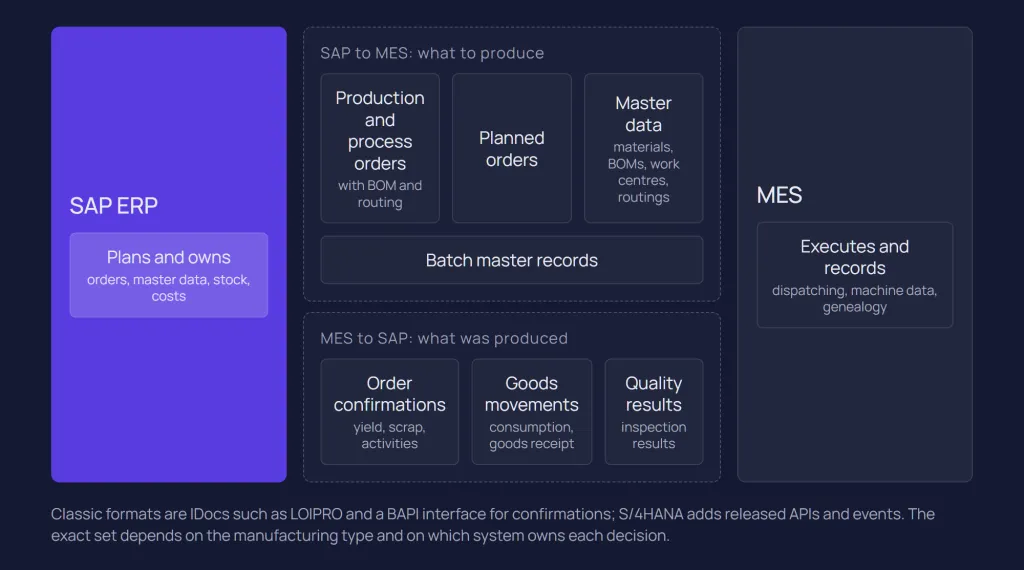
SAP's own documentation for ERP 6.0 describes this scope. The business function Integration of Production Processes with an MES (LOG_PP_MES_INT_02, available from enhancement package 5 and building on LOG_PP_MES_INT_01 for production orders) covers distributing production orders with serial numbers, documents and inspection lot data, distributing planned orders and master data such as work centres and routings, and integrating goods issues and stock transfers so the MES knows which components are available.
Direction | Business object | Classic SAP format (ECC, S/4HANA Private Edition and on-premise) | Released S/4HANA option |
SAP to MES | Production or process order, with BOM and routing | IDoc message type LOIPRO | Manufacturing Order - Send, Version 2 (asynchronous outbound); Production Order (Version 2) OData API for reads |
SAP to MES | Planned orders | IDoc message type LOIPLO | Check the SAP Business Accelerator Hub for your release |
SAP to MES | Materials, BOMs, work centres, routings | IDoc message types MATMAS, LOIBOM, LOIWCS, LOIROU | Check released master data APIs per object on the hub |
SAP to MES | Batch master records | Depends on the scenario | Batch - Outbound Integration (asynchronous); Batch Master Record OData API |
MES to SAP | Order confirmations (yield, scrap, activities) | BAPI interface | Production Order Confirmation API; Process Order Confirmation API |
MES to SAP | Goods movements (consumption, goods receipt) | Depends on the scenario | Material Document - Create (asynchronous inbound); Material Documents OData API |
MES to SAP | Quality results | Depends on the scenario | Inspection Lot OData API |
The table is a starting point, not a catalogue. The message types in the third column come from SAP's list of Production Optimization Interface (POI) IDocs, which the MES integration reuses (SAP Help Portal: POI IDocs), and the IDoc basic type version differs by release, so check it in your own system. Where a cell says "depends on the scenario", estates use several mechanisms and none is a safe default to name. The S/4HANA options are taken from the SAP Business Accelerator Hub, where separate packages list the APIs for SAP S/4HANA Cloud Public Edition and for SAP S/4HANA (Private Edition and on-premise).
What belongs in ERP and what in MES?
ERP owns what the business plans and accounts for: the order, its quantities and dates, the bill of material and routing as master data, stock valuation and the inspection plan. MES owns what happens on the line: sequencing within a shift, operator actions, machine data, in-process measurements and the as-built record.
The grey zone is where projects need explicit decisions:
- Confirmations. SAP's MES business function blocks direct quantity confirmations in ERP for orders distributed to an MES, so they are entered in the MES. If your design allows confirmations in both systems, decide which one wins.
- Batch and quality data. Decide whether batch characteristics and inspection results are recorded in the MES and posted to SAP, or recorded in SAP from the outset.
Which SAP interfaces carry the data?
On SAP ECC, MES integration is typically IDoc-based for orders and master data, with confirmations posted through BAPIs. On S/4HANA Private Edition and on-premise the same IDocs are still available; Public Edition offers IDocs only inside predefined communication scenarios and only over SOAP. In every edition, released OData and SOAP APIs, plus business events, offer a path closer to SAP's current integration guidance.
SAP ECC: IDocs, DRF and BAPIs
In SAP's documented production order integration, the system transfers order data to the MES by IDoc when the order is released, according to filter criteria set in the Data Replication Framework (DRF), and changes to a distributed order go out the same way. Confirmations for production quantities come back through a BAPI interface (SAP Help Portal: Production Order Integration). A related page states that the function requires SAP ERP 6.05 or later with LOG_PP_MES_INT_02 activated, and that a DRF replication model must be defined to replicate LOIPRO IDocs (SAP Help Portal: Transfer of Production Order with BOM and Routing).
In many older estates, production orders still reach the MES through custom triggers and IDoc extensions built before that business function was used. Those interfaces work, but they are custom code in the core, and they are worth listing before any S/4HANA move.
SAP S/4HANA: released APIs and events
The SAP Business Accelerator Hub lists released S/4HANA interfaces for the MES boundary. Among them, as of November 2026:
- Production Order (Version 2), a synchronous OData API to create, read and update production orders. The hub entry adds that orders and operations can also be released through it.
- Production Order Confirmation, a synchronous OData API to create, read and cancel confirmations, with a separate Process Order Confirmation API for process manufacturing.
- Manufacturing Order - Send, Version 2, an asynchronous outbound service that sends manufacturing orders.
- Material Document - Create (asynchronous inbound), Inspection Lot and Batch Master Record APIs for goods movements, quality and batches.
S/4HANA also publishes business events for production orders. SAP's knowledge base, for example, refers to the ProductionOrder Changed event in S/4HANA Cloud Public Edition. Which events exist differs by edition and release, so confirm them on the hub before designing around them. The trade-offs between these styles are covered in IDoc vs API vs events.
What are the architecture options for SAP MES integration?
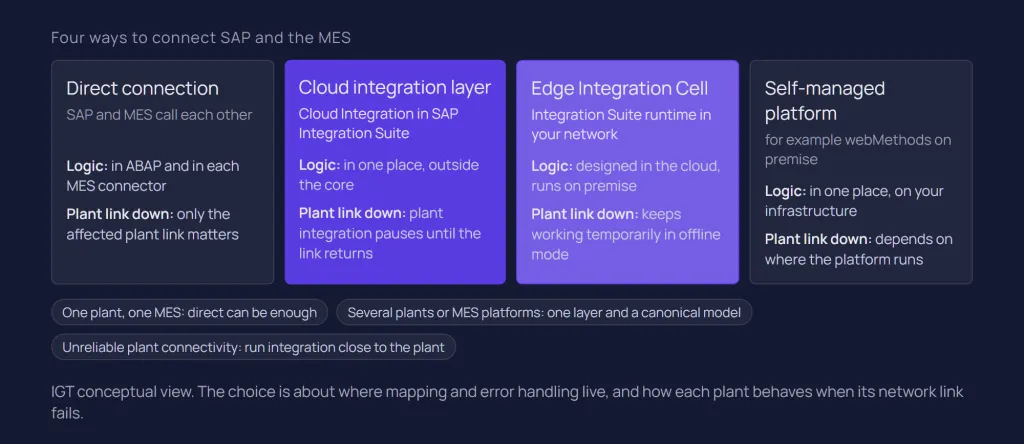
There are four main options: a direct connection between SAP and the MES, an integration layer in the cloud, an integration runtime inside the plant network, and a self-managed integration platform. They differ in where integration logic lives and how each plant survives a network outage.
Direct connection
The MES calls SAP directly, or SAP sends IDocs straight to an MES endpoint. With one plant and one MES it is the shortest path, with no extra runtime to license or operate.
The cost appears later. Mapping, plant-specific rules and error handling end up either in ABAP or in each MES's connector configuration, monitoring is split across systems, and every new plant or MES repeats the work.
Integration layer in the cloud
An integration layer such as Cloud Integration in SAP Integration Suite receives orders from SAP, maps them to each MES format, routes them by plant and returns confirmations. Logic, monitoring and retry live in one place outside the core.
With a cloud runtime, both SAP and the MES are usually on-premise, so every message leaves the site and comes back. SAP's migration guide describes the full cloud deployment model reaching on-premise systems through Cloud Connector or a reverse proxy (SAP-docs: Deployment Models); our SAP Cloud Connector guide covers that path. Note that the Cloud Integration IDoc adapter exchanges IDocs with systems that support SOAP web services, so the SAP side is configured for IDoc over SOAP.
This works well where plant connectivity is reliable and the business accepts that an internet outage at a plant pauses its integration until the link returns.
Edge Integration Cell in the plant
Edge Integration Cell is an optional hybrid runtime of SAP Integration Suite: content is designed and monitored in the cloud but deployed and run in your private landscape (SAP-docs: What Is Edge Integration Cell). SAP documentation states that Edge Integration Cell continues to function temporarily in offline mode during a network outage or loss of internet connectivity, and SAP's migration guide notes that it supports on-premise-to-on-premise scenarios. For MES traffic, that means an order can travel from an on-premise SAP system to a plant MES without leaving the corporate network.
It is real infrastructure. SAP's setup planning guide lists a supported Kubernetes cluster and, for production, an external PostgreSQL or SAP HANA database and a Redis, Valkey or SAP HANA data store; the HANA licence is not included. Whether you run one cell per plant, per region or centrally is a sizing and operations decision, not a default. SAP Integration Suite architecture covers runtime placement in more depth.
webMethods or another self-managed platform
A self-managed integration platform installed on-premise or in a private cloud keeps processing local by design. Where the estate already runs one, or most plant traffic never involves SAP, it can be the better fit. IGT's multi-plant case study below was delivered on webMethods Integration Server, not on SAP Integration Suite. The broader comparison is in SAP Integration Suite vs webMethods.
Option | Where logic runs | Plant network outage | Fits when |
Direct connection | In SAP (ABAP) or the MES connector | Depends on each endpoint's buffering | One plant, one MES, little change expected |
Cloud integration layer | Cloud Integration on SAP BTP | Plant traffic waits until connectivity returns | Reliable plant connectivity, SAP-centric estate |
Edge Integration Cell | SAP Integration Suite runtime in your landscape | Keeps functioning temporarily in offline mode | Data must stay local, sites need tolerance of internet outages |
Self-managed platform | Your own runtime, for example webMethods Integration Server | Local processing by design | Existing platform, heterogeneous non-SAP plant landscape |
A canonical model for several MES products
Whichever runtime you choose, a group with more than one MES product faces the same arithmetic. Mapping SAP formats directly to each MES multiplies interfaces with every new product or plant variant. A canonical model maps SAP once into a plant-agnostic format and maps that format once per MES, so adding a plant becomes a routing entry.
Canonical models are not free: they need an owner, versioning and the discipline to stop plant-specific fields leaking in. They pay back where many plants share the same business objects, which is exactly the MES situation. The general case is in SAP integration patterns.
How do you keep SAP MES integration reliable on the shop floor?
Design for the plant being temporarily unreachable, for messages arriving twice or out of order, and for operators who need to see and fix a failed transaction without calling a developer. These are properties of the integration design, not of a product.
Network outages and store-and-forward
Plants lose WAN links, and production does not stop when they do. Every hop needs persistence, so a message accepted is a message kept until it is delivered. Decide per flow what the plant does while the link is down: an MES that buffers confirmations locally behaves differently from one that refuses to start an order it has not received. Running the integration runtime inside the plant, through Edge Integration Cell or a self-managed platform, shortens the path that has to be available.
Ordering and idempotency
A confirmation that overtakes the order release, or a cancellation that overtakes the confirmation it cancels, creates errors that are hard to diagnose. Where order matters, use in-order delivery per business object (per production order, not globally) or make the receiver check a version or status before applying a message.
Retries after a timeout will produce duplicates sooner or later. A confirmation posted twice doubles yield in SAP. The robust answer is a stable business key that the receiver checks before posting, as described in the reliability section of our patterns guide. Events add their own ordering caveats, set out in our SAP Event Mesh article.
Reconciliation, not only monitoring
Message monitoring tells you whether a message failed. It does not tell you whether SAP and the MES agree. SAP's knowledge base, for instance, documents a case in S/4HANA Cloud Public Edition where a goods movement reversal changed the production order status without emitting the ProductionOrder Changed event (SAP Knowledge Base Article 3742157). IGT recommends a periodic reconciliation of open orders and confirmed quantities between SAP and each MES, so gaps surface before month-end closing does it for you. Plant support teams also need search by business keys (plant, order number, batch) and a controlled way to replay a message after a fix.
What does a real multi-plant SAP MES project show?
IGT's SAP ECC and MES global factory integration case study shows that a canonical model with configuration-driven routing can serve five factories and two MES platforms from one code base. It is a webMethods project on SAP ECC, which is why it is useful: the patterns carry over to other platforms.
A global manufacturer in nutrition, health and beauty runs five factories in Belgium, Switzerland, China, Turkey and the United States, all reporting production execution data into a single SAP ECC core. Some plants run TRAKSYS, others PREACTOR, for historical reasons, and forcing one MES on every plant was not the goal. The requirements were near-real-time flows without a nightly batch fallback, end-to-end traceability of every plant-to-ERP message for a regulated industry, and a rollout model in which the next plant would not mean a new development project.
The architecture had four elements:
- IDoc consumption. webMethods Integration Server consumes SAP IDocs and orchestrates the downstream flows.
- Canonical XML model. IDocs are transformed into a consistent intermediate XML format representing production execution data in a plant-agnostic way.
- Configuration-driven routing. From the canonical layer, data is routed to TRAKSYS or PREACTOR depending on which MES the receiving plant runs. Adding a plant means adding a configuration entry, not writing integration logic.
- Built-in operations. Monitoring, retry and replay, so support does not need a developer every time a transaction needs attention, with webMethods ActiveTransfer for file-based document exchange.
Delivery was sequenced by factory: each plant was integrated and validated against its live production rhythm before the next began, and the shared service contract was defined once. The result is 41 integration points between plant operations and SAP, two MES platforms on the same integration code and zero code forks. The case study states that a sixth plant, in India, was planned for 2026 and would join as a configuration exercise.
On SAP Integration Suite the same approach maps to Cloud Integration flows that route by externalised parameters, value mappings or the Partner Directory. The platform was a choice; the canonical model and the single contract were the architecture.
S/4HANA and Clean Core: what changes for MES integration?
Moving to S/4HANA is the natural point to move plant-specific logic out of the ERP and to replace custom IDoc exits with released APIs and events where they cover the requirement. Standard IDocs remain usable, so this is a portfolio decision per interface, not a rewrite.
Our Clean Core integration guide explains SAP's A–D rating of integration technologies in SAP Note 3690029 and the disposition approach (retire, keep, move logic out, replace, consolidate). Applied to MES interfaces, a few points stand out:
- Plant variants belong outside the core. Receiver-specific segments, code-list translation and plant routing in ABAP are exactly what Clean Core asks you to move into the integration layer.
- Check released coverage per object. Confirmations and production order reads have released APIs; verify the less common objects on the SAP Business Accelerator Hub before deciding.
- Events plus APIs for notification. Where several consumers care about an order status, an event with a follow-up API call decouples them from the core. Where one MES needs the complete order with BOM and routing, a full order message is often simpler.
- Time the change. An S/4HANA conversion forces regression testing at every plant anyway, so modernising interfaces then avoids testing them twice.
The wider S/4HANA picture, including how MES fits next to SaaS, partners and data platforms, is in S/4HANA integration architecture.
What are the common pitfalls in SAP MES integration?
Most problems in SAP MES projects are not adapter problems. They come from master data, time and testing, and from decisions nobody wrote down.
- Master data drift. An order referencing a material, work centre or routing version the MES does not know fails on arrival. Distribute master data before orders, and monitor that flow as closely as the orders themselves.
- Units and code lists. Units of measure, scrap reasons and status codes differ between SAP and each MES. Keep the mappings in one governed place, not in each flow.
- Time zones and shift calendars. A plant posting a confirmation in local time to a central system in another zone can land in the wrong day or period. Agree whether timestamps travel in UTC, and how shift ends and period closes are handled.
- Schedule changes after release. Planners rescheduling released orders, or changing quantities the plant has already started, produce conflicting states. Define which changes are allowed after distribution, as SAP's MES business function lets you restrict them.
- Double confirmation paths. Confirmations entered both in SAP and in the MES lead to doubled quantities or blocked postings. Decide one system of record per order type.
- Testing without the plant. Interfaces tested against a sandbox MES pass; the real line has different data, volumes and shift patterns. Test with plant users, against live production rhythm where possible, which is what the case study rollout did plant by plant.
- Unclear ownership. When a confirmation fails at 03:00, someone must own it. Define the support model per plant before go-live, not after the first incident.
How to start an SAP MES integration project
Start with an inventory of every flow between SAP and each plant, pick a pilot plant that is representative rather than easy, and design the shared contract before the second plant. IGT recommends the following sequence; it is our working approach, not an SAP standard.
- Inventory the flows. For each plant, list objects, directions, formats, volumes, latency needs and current custom code on the SAP side.
- Set the ownership split. Record which system owns each decision: confirmations, order changes after release, batch and quality data.
- Choose runtime placement. Decide per plant or region whether processing must survive an internet outage or keep data on site, and choose cloud runtime, Edge Integration Cell or a self-managed platform accordingly.
- Define the canonical contract. If more than one MES product is in scope, or likely, design the plant-agnostic model and the routing configuration now.
- Pilot one plant. Integrate, validate against live production and stabilise operations before scaling.
- Roll out by configuration. Add plants as configuration entries against the same contract, and treat any request for plant-specific code as a design review item.
Conclusion
SAP MES integration sits on the ISA-95 boundary between planning and execution, and its quality shows on the shop floor: orders that arrive on time, confirmations that post once, and plants that keep running when the network does not.
A few architectural decisions matter more than the product: keep plant logic out of the ERP, run processing where plant connectivity requires it, use a canonical model when there is more than one MES, and design reliability and reconciliation from the start. The canonical model and configuration-driven routing held across five factories on webMethods, and the same approach maps to SAP Integration Suite.
If you are planning MES integration for an S/4HANA programme, a new plant or a multi-MES landscape, talk to our SAP integration team, or see our SAP integration services.
Related questions
Can SAP S/4HANA integrate directly with MES?
Yes. An MES can call released S/4HANA APIs such as Production Order Confirmation, and S/4HANA can send production orders through an outbound service or, in Private Edition and on-premise, by IDoc. Direct connections suit a single plant with one MES; with several plants or MES products, an integration layer keeps mapping, routing and monitoring out of both systems.
Should MES integration run in the cloud or on-premise?
It depends on plant connectivity, data residency and latency. A cloud runtime suits sites with reliable connectivity. Where integration must continue through internet outages or data must stay on site, run it locally with Edge Integration Cell or a self-managed platform such as webMethods.
Which SAP interfaces are used for MES integration?
On SAP ECC, production orders often go to the MES as LOIPRO IDocs, distributed through the Data Replication Framework where SAP's MES business function is used,, with master data IDocs such as MATMAS and confirmations posted back through BAPIs. On S/4HANA, released OData and SOAP APIs for production orders, confirmations, material documents, batches and inspection lots are available in every edition, alongside the classic IDocs in Private Edition and on-premise, plus business events depending on edition and release.
How do you integrate SAP with several different MES systems?
Use a canonical data model and configuration-driven routing: map SAP data once into a plant-agnostic format, then route it to each MES by plant configuration. IGT used this approach with webMethods to connect five factories running TRAKSYS and PREACTOR to one SAP ECC core, with 41 integration points and zero code forks.
Sources
SAP-docs (SAP Integration Suite): Offline Mode Overview
ISA: ISA-95 Series of Standards: Enterprise-Control System Integration
SAP Help Portal: Integration of Production Processes with an MES
SAP Help Portal: Production Order Integration
SAP Help Portal: Transfer of Production Order with BOM and Routing
SAP Business Accelerator Hub: Production Order (Version 2)
SAP Business Accelerator Hub: Production Order Confirmation
SAP-docs (SAP Integration Suite): What Is Edge Integration Cell
SAP-docs (SAP Integration Suite): Plan Your Setup of Edge Integration Cell
SAP-docs (SAP Integration Suite): IDoc Adapter
SAP-docs (Migration Guide for SAP Process Orchestration): Deployment Models
Latest writings
The latest news, technologies, and resources from our team.
View all blogs


Let’s make it click!
Whether you're scaling a startup or streamlining a corporate ecosystem, we help teams launch faster and integrate smarter.

Eva Polcíková
Project Manager