SAP Event Mesh Explained: Event Mesh, Advanced Event Mesh and Cloud Application Event Hub
SAP Event Mesh now names two different services, and advanced event mesh and Cloud Application Event Hub are two more. Which one fits when, how S/4HANA business events reach Cloud Integration, the limits that shape a design, and when an event is the wrong answer.

Last technically reviewed: 09/11/2026. Reviewed by Marek Juračka, CTO.

Table of contents
Ask three SAP architects what SAP Event Mesh is and you may get three answers: the standalone SAP BTP service, the Event Mesh capability inside SAP Integration Suite, or SAP Integration Suite, advanced event mesh. SAP Cloud Application Event Hub often joins the conversation as a fourth name.
They are different services. Maximum message sizes range from 1 MB to 50 MB, and one of them has no customer-managed queues at all. A team that picks by name rather than by requirement can end up re-platforming a scenario it has only just built.
This article sorts out the names as of November 2026, explains how SAP S/4HANA publishes business events and how Cloud Integration consumes them, sets out the limits worth designing around, and says when events are not the answer. It builds on our articles on SAP integration patterns and clean core integration rather than repeating them.
In short
- "SAP Event Mesh" names two different services today, the standalone SAP BTP service and the Event Mesh capability of SAP Integration Suite, and SAP states that one-to-one parity between them is not in scope.
- Event Mesh suits starter and moderate volumes with messages up to 1 MB, advanced event mesh is a distributed multi-broker mesh for enterprise scale, and Cloud Application Event Hub distributes SAP business events between SAP cloud applications.
- S/4HANA business events are usually small notifications, so consumers call a released API for current state and must handle duplicates and reordering.
What is SAP Event Mesh?
SAP Event Mesh is SAP's publish-subscribe event broker on SAP BTP: publishers send events to topics, consumers receive them through queues, and neither side needs to know the other. In 2026 the name covers two separate services.
The standalone SAP Event Mesh service
The standalone SAP Event Mesh is an SAP BTP service in the Cloud Foundry environment with its own service plans. Its documentation states that the lite plan "is being discontinued" and advises creating new instances on the default plan (SAP Help Portal: What Is SAP Event Mesh?). The standalone trial was retired in February 2023, as SAP announced on SAP Community.
No retirement date for the default plan has been published, so "SAP Event Mesh is discontinued" is true of the lite plan and the trial, not of the service. The documentation contains migration guides from the default plan to the Event Mesh capability and to advanced event mesh. IGT's view: new projects should start on the Integration Suite services; for existing default plan installations, the guides are an option to plan for, not a deadline.
The Event Mesh capability of SAP Integration Suite
The Event Mesh capability is activated in SAP Integration Suite like Cloud Integration or API Management, plus one step to initiate the message broker. SAP describes it as working "with a single broker and with low and moderate event volumes" (SAP Integration Suite documentation: Event Mesh Bridge), and SAP Discovery Center lists it as included in the Integration Suite editions. Our SAP Integration Suite architecture article shows how it fits next to Cloud Integration and API Management.
It is a different service from the standalone offering, not a rebranding. SAP's scope page states that one-to-one parity between the two "is not in scope" and points to SAP Note 3461547 for the differences. There is also an account constraint: a subaccount that already uses the standalone default plan, or the SAP S/4HANA Cloud Extensibility service, cannot subscribe to the Event Mesh capability, so Integration Suite has to go into a different subaccount (SAP Integration Suite documentation: Activating and Managing Capabilities).
Event Mesh, advanced event mesh and Cloud Application Event Hub: which one when?
Use the Event Mesh capability to start with events at low or moderate volume, advanced event mesh when events must flow at enterprise scale across several brokers and landscapes, and Cloud Application Event Hub when SAP cloud applications exchange SAP business events with each other. SAP's Architecture Center describes the same split and points to ISA-M for the choice between the two brokers (SAP Architecture Center: Designing Event-Driven Applications on SAP BTP).
Offering | What it is | Scope | Typical use |
Event Mesh (capability of SAP Integration Suite) | A single broker with queues, topic subscriptions and webhook subscriptions | Low and moderate volumes, SAP and third-party applications | First event scenarios, S/4HANA events to a few consumers |
SAP Event Mesh (standalone service, default plan) | A separate SAP BTP service with its own plans and limits | Existing installations; lite plan being discontinued, trial retired | Scenarios already running on it |
SAP Integration Suite, advanced event mesh | A distributed mesh of brokers that can run on hyperscalers or in customer environments | Enterprise-wide, hybrid, high volume | An event backbone across SAP and non-SAP systems, regions or plants |
SAP Cloud Application Event Hub | SAP-managed distribution of SAP business events within eventing formations | SAP cloud applications and BTP extensions; no customer-defined topics or queues | Prebuilt SAP-to-SAP event integration; third-party and on-premise consumers via Integration Suite |
When is Event Mesh enough?
Event Mesh is enough when the scenario fits one broker: messages up to 1 MB, up to 250 queues, and volumes SAP calls low to moderate. Advanced event mesh fits better when messages exceed 1 MB (it allows 10 MB or 30 MB depending on broker class), when brokers are needed in several regions or close to on-premise systems, or when SMF or Kafka bridges are required.
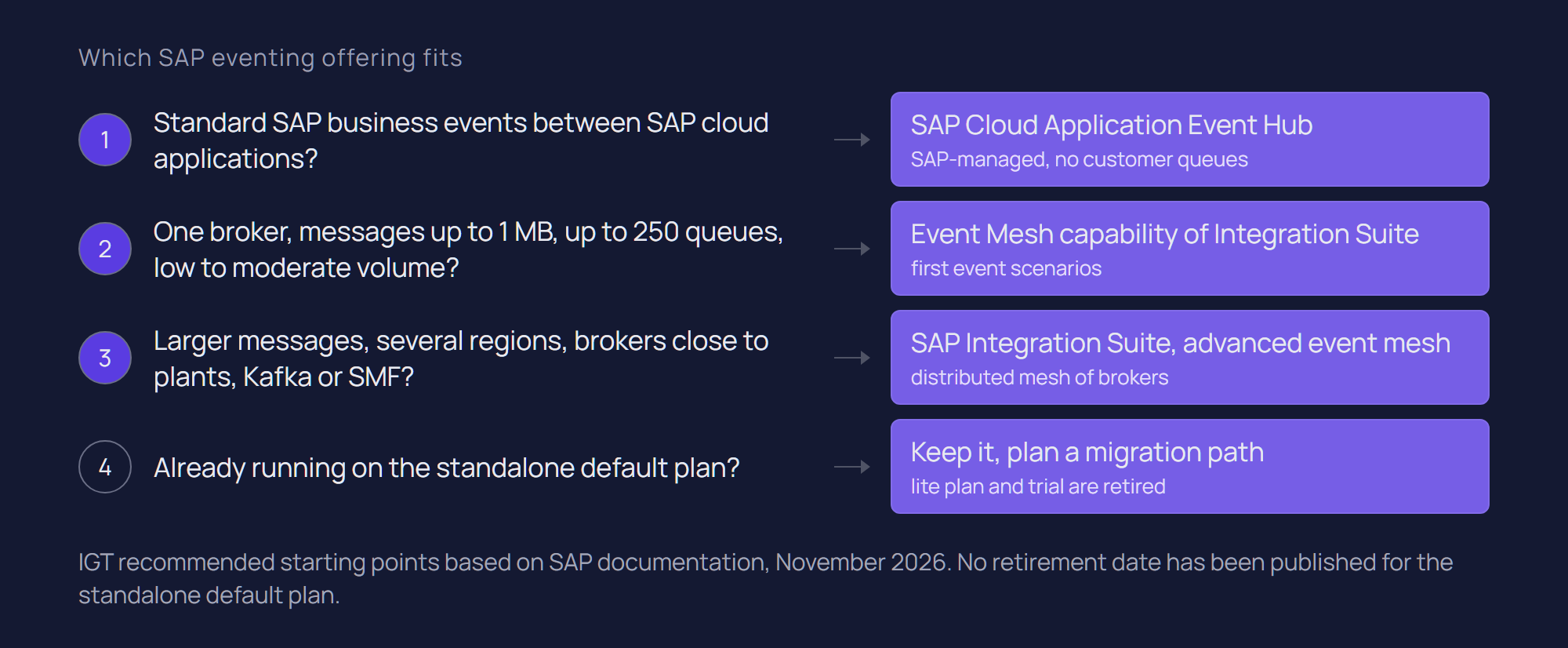
Moving up is not a forced cut-over. The Event Mesh Bridge makes the Integration Suite broker a node in an advanced event mesh network, so existing scenarios keep running, and SAP documents a migration path between the two.
Licensing differs too. SAP Discovery Center lists a quota of one Advanced Event Mesh Standard 100 broker per global account in the Enhanced Edition; otherwise advanced event mesh is licensed separately.
How does SAP S/4HANA publish business events?
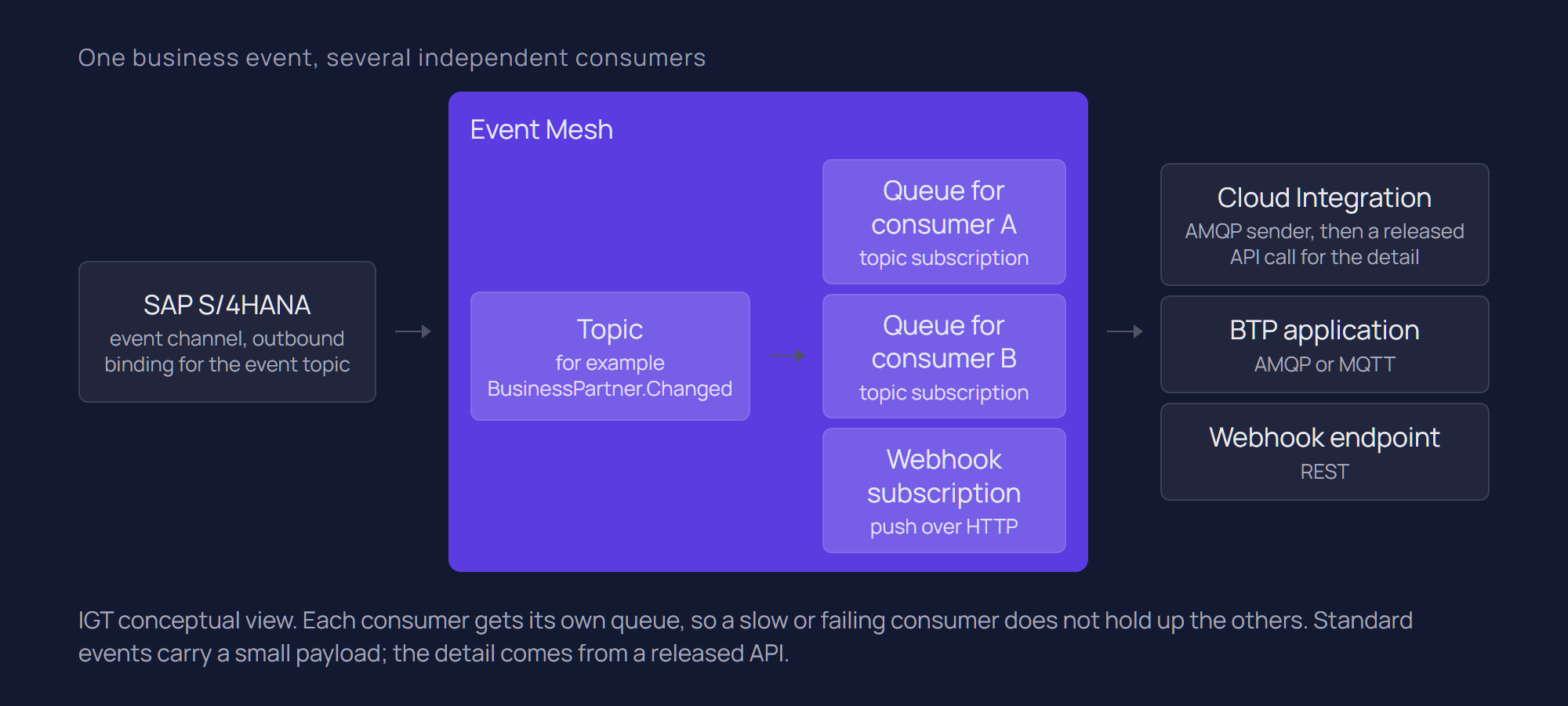
SAP S/4HANA publishes business events through Enterprise Event Enablement: a channel connects the system to a broker, and outbound bindings select which events are sent on it. SAP publishes the business events it supports on the SAP Business Accelerator Hub, which is the place to check before designing a custom event.
Standard events and event channels
On S/4HANA on-premise, channels are maintained in transaction /IWXBE/CONFIG. SAP's tutorial creates a channel to Event Mesh from the broker's service key, then maintains outbound bindings for the events to publish (SAP Developers: Event Processing in an SAP S/4HANA on-premise system). Since S/4HANA 2023, an "Advanced" channel type connects directly to advanced event mesh, using an AEM validation service and certificate-based authentication (SAP Community: SAP S/4HANA integration with advanced event mesh). In SAP S/4HANA Cloud the connection is set up through communication arrangements; SAP's tutorial for S/4HANA Cloud and advanced event mesh uses SAP_COM_0492 and SAP_COM_0493.
Standard events are usually small. SAP's own example of a notification event is a BusinessPartner.Changed event whose payload carries only the business partner key (SAP Architecture Center: SAP's EDA strategy). The consumer then asks a released API what the object looks like now.
Custom events and older systems
Where no standard event exists, SAP points to the ABAP RESTful Application Programming Model (RAP) for custom events in current releases; on S/4HANA on-premise, RAP supports business events from release 2022. For older S/4HANA releases and SAP ECC, SAP points to SAP Application Interface Framework (AIF), from SAP NetWeaver 7.31. How custom events fit the core boundary is covered in our clean core guide.
Queues, topics and protocols
Producers publish to topics, and consumers read from queues subscribed to those topics. A queue holds events until they are acknowledged or expire, so a consumer down for maintenance catches up later. IGT's default is one queue per consuming application: several applications reading one shared queue compete for messages instead of each receiving a copy.
- Event Mesh capability: AMQP, MQTT and HTTP, plus webhook subscriptions (SAP Integration Suite documentation: Event Mesh Scope).
- Standalone SAP Event Mesh, default plan: AMQP 1.0 and MQTT 3.1.1 over WebSocket, plus REST APIs and webhooks. SAP asks for 5 seconds between REST polls on the same queue and suggests webhooks or AMQP instead (SAP Help Portal: Default Plan Technical Constraints).
- Advanced event mesh: SMF and AMQP for enterprise clients, MQTT, Web Messaging and incoming REST, and Kafka bridges (advanced event mesh documentation: Service Class Limits).
- Cloud Application Event Hub: no customer-defined topics or queues; SAP cloud applications exchange events within formations (SAP Help Portal: What Is SAP Cloud Application Event Hub?).
How does Cloud Integration consume events?
Cloud Integration consumes Event Mesh events with the AMQP sender adapter, which reads from a queue, and publishes with the AMQP receiver adapter, which writes to queues or topics. For advanced event mesh there is a separate AdvancedEventMesh adapter using SMF, whose availability depends on the Integration Suite service plan.
Points from SAP's AMQP sender documentation for SAP Event Mesh worth knowing before go-live:
- Queues, not topics. The sender adapter consumes from queues only. To consume a topic, subscribe a queue to it and consume from the queue.
- Retries. If the maximum number of retries is left empty, the adapter retries endlessly. SAP recommends setting a value, returning REJECTED after the last attempt, and configuring a dead letter queue in the broker.
- Prefetch and parallelism. These trade throughput against load balancing; for flows running longer than a minute, SAP suggests considering a prefetch of 1.
The event plus released API pattern
A consuming flow reads the key from the event, calls a released API for the current state, then maps and routes the result. Our clean core article describes SAP's example, which replaces an outbound address IDoc with a Business Partner change event plus an OData call orchestrated in Cloud Integration: the event says something changed, the released API says what it now is.
A lookup triggered by a late or duplicate event still returns the current state, which limits the harm, but the target still needs idempotent writes. Calls to an on-premise S/4HANA system go through SAP Cloud Connector, and where several external consumers need the same detail, exposing it through API Management can be cleaner than one flow per consumer.
Limits and operational considerations
Message size, queue count and throughput shape most designs, and they differ by service. Values below are as documented in November 2026; check the linked pages before sizing.
Limit | Event Mesh capability | Standalone Event Mesh (default plan) | Advanced event mesh | Cloud Application Event Hub |
Maximum message size | 1 MB | 1 MB | 10 MB (Broker 100 and 250) or 30 MB (larger classes; Broker 1K on newer versions) | 50 MB per event |
Storage | 2 GB spool for all queues | 2,000 MB by default, up to 4,000 MB | 25 GB (Broker 100) to 1,000 GB (Broker 100K) | Not customer-managed |
Queues | 250 | 600 endpoints by default, up to 1,200 | Scales with broker class, from 100 on Broker 100 | No customer-defined queues |
Connections | 200 | 200 by default, up to 400 | Scales with broker class | Not applicable |
Throughput | Described as low and moderate volumes | 250 KB/s per subaccount | Scales with broker class | Not stated |
The 1 MB ceiling is the one most likely to surprise a team. It fits notification events comfortably and rules out documents, attachments and bulk extracts.
Monitoring
The Event Mesh capability has its own monitor in Integration Suite: message rates, spool and connection usage, and per queue the messages queued, unacknowledged messages, delivery counts and dead message queue eligibility. At the connection limit, new client connections cannot be established, so connection usage deserves an alert. A queue backlog shows in the broker and a failing flow in Cloud Integration, so runbooks need both views.
Ordering and duplicates
Design consumers to tolerate duplicates and out-of-order events. A message that is not acknowledged is delivered again, so a consumer that fails after writing to the target but before acknowledging will see it twice.
Ordering is a property of the queue and the consumer, not the event. The advanced event mesh documentation states that an exclusive queue delivers messages in the order received, non-exclusive queues can deliver out of order, and partitioned queues keep order only within a partition (advanced event mesh documentation: Queues). Parallel processing in the consumer can still reorder work, so where order matters IGT recommends checking a version or timestamp per business object in the target, building on the idempotency guidance in our patterns article.
When are events not the right answer?
Events are the wrong tool when the caller needs an answer, the payload is large, or one component owns the process state.
- Synchronous requests. An availability check or price lookup while a user waits needs request-reply, through an API governed in API Management where several consumers need it.
- Large data volumes. With 1 MB per message on both Event Mesh variants, bulk loads and documents belong in replication, file transfer or a paged API.
- One owner of process state. When one component must know where a process stands and compensate when a step fails, orchestration is easier to operate than a chain of subscribers.
- One consumer and no second in sight. A queued point-to-point message is simpler to run.
Events are also no reason to replace a messaging platform that works: advanced event mesh offers Kafka bridges and Cloud Integration's AMQP adapter connects to external brokers. Where webMethods already carries much of the estate, see SAP Integration Suite vs webMethods.
Getting started
Start with one business event that has several consumers, or soon will, such as business partner or material changes feeding a CRM, an e-commerce platform or an MES. IGT recommends this sequence; it is our working method, not an SAP standard.
- Confirm a standard event exists on the SAP Business Accelerator Hub for your S/4HANA release.
- Choose the broker by requirement, and if a standalone default plan exists, decide which subaccount hosts Integration Suite.
- Configure the channel and outbound bindings, then one queue per consumer.
- Build the consumer as event plus released API, with finite retries, a dead letter queue and idempotent writes.
- Add broker monitoring to the runbook before go-live.
For estates leaving SAP PI/PO, migration is a natural point to replace selected IDoc interfaces with events; see SAP PI/PO vs SAP Integration Suite and what is SAP Integration Suite.
Conclusion
SAP Event Mesh is no longer one thing. The standalone service continues on its default plan, the Event Mesh capability is the starting point inside SAP Integration Suite, advanced event mesh handles enterprise scale, and Cloud Application Event Hub connects SAP cloud applications.
The design work is similar on any of them: small notification events, a released API for current state, one queue per consumer, consumers that tolerate duplicates and reordering, and monitoring of the broker as well as the flows. And where the caller needs an immediate answer, an event is often the wrong tool.
If you are planning event-driven integration around S/4HANA, or choosing between Event Mesh and advanced event mesh, talk to our SAP integration team, or see our SAP integration services.
Related questions
Is SAP Event Mesh part of SAP Integration Suite?
The Event Mesh capability is, and SAP Discovery Center lists it as included in the Integration Suite editions. The standalone SAP Event Mesh is a separate SAP BTP service, and a subaccount using its default plan cannot also subscribe to the capability.
What is the difference between SAP Event Mesh and advanced event mesh?
Event Mesh is a single broker for low and moderate volumes with a 1 MB message limit. Advanced event mesh is a distributed mesh of brokers for enterprise-scale, hybrid distribution, with larger messages and more protocols.
Can SAP ECC publish events?
SAP points to SAP Application Interface Framework for custom events on SAP ECC, from SAP NetWeaver 7.31. Alternatively, the integration layer can publish an event when it receives an existing IDoc, leaving the ECC core unchanged.
Does SAP Event Mesh guarantee message order?
Do not rely on it end to end. Ordering depends on the queue type and the consumer: advanced event mesh documents in-order delivery for exclusive queues and within a partition of a partitioned queue, and parallel processing can still reorder work. Design consumers to check versions and handle duplicates.
Is SAP Event Mesh being discontinued?
For the standalone service, the lite plan is being discontinued and the trial was retired in 2023; no retirement date for the default plan has been published. The Event Mesh capability is a current part of Integration Suite.
Sources
SAP Help Portal: What Is SAP Event Mesh?
SAP Help Portal: SAP Event Mesh Default Plan Technical Constraints
SAP Help Portal: What Is SAP Cloud Application Event Hub?
SAP Integration Suite documentation (SAP-docs): Event Mesh Scope
SAP Integration Suite documentation (SAP-docs): Event Mesh Bridge
SAP Integration Suite documentation (SAP-docs): Activating and Managing Capabilities
SAP Integration Suite documentation (SAP-docs): Monitor Event Mesh
SAP Integration Suite documentation (SAP-docs): AMQP Sender for SAP Event Mesh
SAP Integration Suite documentation (SAP-docs): Advanced Event Mesh Adapter
SAP Discovery Center: SAP Integration Suite service plans
SAP Architecture Center: Designing Event-Driven Applications on SAP BTP
SAP Architecture Center: Event-Driven Architecture and SAP's EDA Strategy
SAP Integration Suite, advanced event mesh documentation: Service Class Limits
SAP Integration Suite, advanced event mesh documentation: Queues
SAP Developers: Event Processing in an SAP S/4HANA on-premise system
SAP Community: SAP S/4HANA integration with SAP Integration Suite, advanced event mesh
Latest writings
The latest news, technologies, and resources from our team.
View all blogs

Let’s make it click!
Whether you're scaling a startup or streamlining a corporate ecosystem, we help teams launch faster and integrate smarter.

Eva Polcíková
Project Manager