SAP PI/PO vs SAP Integration Suite: What Maps to What, Component by Component
PI/PO and Integration Suite share a vocabulary, not a design. What happens to ICOs, adapters, adapter modules, Java mappings, ccBPM, the B2B add-on, monitoring and licensing, what SAP's 2026 migration tooling converts, and what still needs a redesign.

Last technically reviewed: 09/11/2026. Reviewed by Marek Juračka, CTO.

Table of contents
Most comparisons of SAP PI/PO vs SAP Integration Suite stop at a two-column slide: on-premise on the left, cloud on the right. That is true, and not much help to a team that knows the Enterprise Services Repository, the adapter modules that hold the estate together and the ccBPM process nobody wants to touch.
What that team needs is a translation table: where an integrated configuration, a Java mapping, a JDBC sender channel or a B2B add-on scenario goes, and whether it migrates with SAP's tooling or has to be rebuilt.
This article goes through PI/PO component by component, with links to SAP's documentation for every point that changes over time. Migration strategy, waves and interface classification are covered in our SAP PI/PO migration guide.
In short
SAP PI/PO is customer-operated, on-premise Java middleware, while SAP Integration Suite is an iPaaS on SAP BTP whose integration flows run on an SAP-managed cloud runtime or, through Edge Integration Cell, in your own Kubernetes cluster.
Many PI/PO concepts have a clear counterpart, but ccBPM and BPM, ABAP mappings, adapter modules, sync/async bridges, fault messages and some adapters such as the JDBC sender do not map 1:1.
SAP's migration tooling converts supported patterns and components, and its 2026 additions (mass migration and a Java-mapping-to-Groovy agent) cut manual effort, but every result still has to be reviewed and tested.
SAP PI/PO vs SAP Integration Suite in one paragraph
SAP PI/PO is integration middleware on the SAP NetWeaver Java stack that you install, patch and operate yourself. SAP Integration Suite is an integration platform as a service on SAP BTP that covers several integration styles (Cloud Integration, API Management, Event Mesh, and B2B with Integration Advisor and Trading Partner Management) and runs integration flows either on an SAP-managed cloud runtime or on Edge Integration Cell inside your own network.
SAP names Integration Suite as the path forward for PI/PO customers. Mainstream maintenance for PI/PO 7.5 ends on 31 December 2027, with optional, paid extended maintenance until the end of 2030, as SAP restated in its October 2026 note to PI/PO customers. What those dates mean in operation is covered in SAP PI/PO end of maintenance, and the target platform as a whole in what is SAP Integration Suite.
How do the architecture and runtime differ?
PI/PO processes messages in an Adapter Engine (plus an ABAP Integration Engine on dual-stack PI) on servers you operate. Integration Suite separates design and monitoring, which stay in the cloud, from execution on SAP's managed cloud runtime or on a customer-managed Edge Integration Cell.
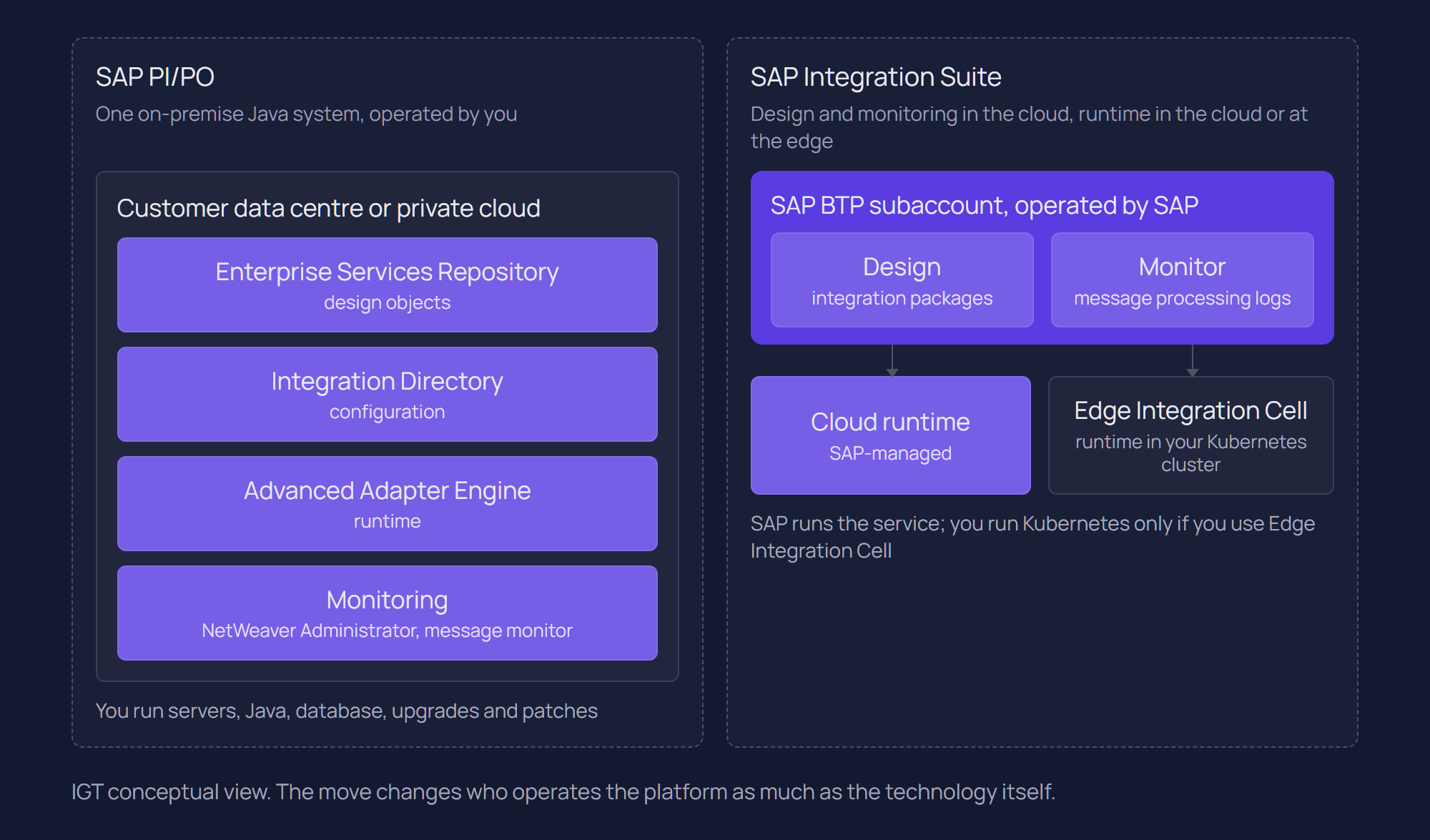
A single-stack PO or AEX installation runs everything in the Advanced Adapter Engine on SAP NetWeaver AS Java; dual-stack PI adds the ABAP Integration Engine, where ccBPM lives. Database, Java runtime, housekeeping and archiving are yours or your hosting partner's.
SAP documents two main deployment options for Integration Suite. In cloud deployment, SAP fully manages the Cloud Integration runtime on SAP BTP. In hybrid deployment, Edge Integration Cell runs in your own Kubernetes cluster while design and monitoring stay in the cloud. SAP describes Edge Integration Cell explicitly as a migration path for SAP Process Integration customers with ground-to-ground scenarios.
Edge Integration Cell is not a lighter PO. It needs a supported Kubernetes cluster and, for production, an external PostgreSQL or SAP HANA database plus a Redis, Valkey or SAP HANA data store; the SAP HANA licence is not included. Your team operates that infrastructure. In return, traffic between on-premise systems stays in the network, and SAP's migration guide notes that Edge Integration Cell can keep processing without internet connectivity for a limited period.
PI/PO can also run Cloud Integration content through its Integration Gateway Component (SAP Note 2428801), but that keeps a PO installation, so it is a transition aid rather than a target. On the cloud runtime, Adapter Engine tuning and cache administration largely disappear; content, connectivity, certificates, transports and error handling stay with your team. Runtime placement is covered in SAP Integration Suite architecture.
Design model: ESR and Integration Directory vs integration flows
PI/PO separates design objects in the ES Repository from configuration in the Integration Directory and organises them by SLD software components. Integration Suite collapses this into integration flows, grouped in packages with mappings, scripts and value mappings.
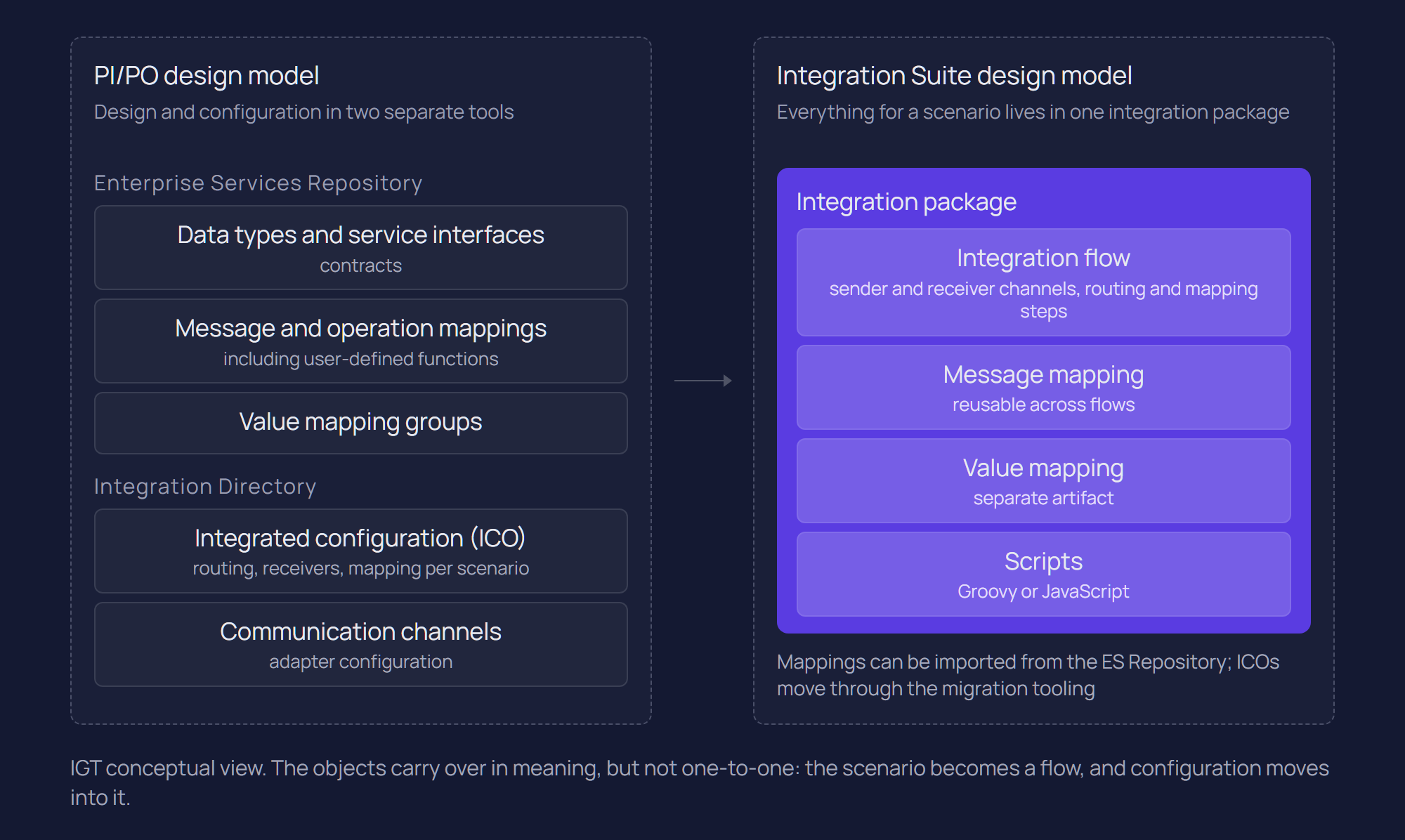
Cloud Integration has no software component versions and no namespaces. An integration flow models sender, processing steps and receivers in one artifact, as SAP's scenario and object assessment sets out. Routing that the Directory expresses as receiver determination becomes a router or recipient list inside the flow or, for many asynchronous scenarios, the pipeline concept, which mimics PO pipeline processing with generic integration flows and the Partner Directory.
PI/PO concept | Integration Suite counterpart | Note |
Software component version and namespace (SLD) | Integration package | No SLD concept |
Integrated configuration (ICO) | Integration flow | Main object the migration tooling converts |
Receiver determination (classic configuration) | Integration flow, or pipeline concept | Also supported by the migration tooling |
Communication channel | Sender or receiver adapter in the flow | Adapter scope differs |
Message mapping | Message mapping artifact | Importable from the ES Repository |
Operation mapping | Not imported as such | SAP recommends importing message mappings instead |
Value mapping | Value mapping artifact | Migrated in a separate step |
Services Registry | API Management | No equivalent inside Cloud Integration |
Widely consumed web services now get their governed exposure from SAP API Management.
Adapters and connectivity: what is equivalent and what is missing?
Most standard PO adapters have a Cloud Integration counterpart, but not all, and several behave differently. SAP's migration guide keeps an adapter-by-adapter list, which is the reference to check, because some entries are marked "planned for future".
PO adapter | Cloud Integration | Difference or alternative |
SOAP, WS_AAE, SOAP (XI protocol) | SOAP, XI | XI proxy runtime and generation in S/4HANA differ from Cloud Integration; see SAP's guide on migrating proxy interfaces |
IDoc_AAE | IDoc | IDoc over HTTP only, no classic IDoc packing over RFC |
RFC | RFC receiver; RFC sender only on Edge Integration Cell | Otherwise a web service called from an ABAP outbound proxy |
HTTP_AAE, REST | HTTP/HTTPS | REST path variables need the URL built in the flow |
File | FTP or SFTP | Content conversion via converter steps or scripts |
JDBC | JDBC receiver; sender planned for future | Timer plus JDBC receiver, with limited transaction handling |
JMS (external servers) | AMQP or IBM MQ | Internal JMS adapter cannot reach external servers; IBM MQ needs Standard plan or above |
AS2, Mail, OData, SFTP, SFSF | Direct equivalents (AS4 also available) | SFTP has limited advanced file selection |
EDISeparator | AS2, AS4 or SFTP with EDI splitter or validator steps | Splitting and validation move into the flow |
X400, BC, CIDX, EBICS, RNIF, RNIF11, OFTP | Planned for future in the current guide | OFTP sender via an external bridge application |
On the cloud runtime, Cloud Integration reaches on-premise systems through SAP Cloud Connector, which opens the connection outward from your network and runs no integration logic. If a scenario has to stay entirely inside the network, for example RFC sender traffic from ECC to a plant application, that points to Edge Integration Cell instead.
Adapter modules and custom adapters
Adapter modules do not exist as a concept in Cloud Integration. SAP's guidance on adapter modules is to replace each with flow steps or scripts: MessageTransformBean with XSLT or Groovy, PayloadZipBean with the Encoder and Decoder steps, IDoc XML-to-flat conversion with a converter step. The migration tooling imports neither standard nor custom modules, so every module chain is a manual design task.
For fully custom adapters, SAP suggests first checking for an existing SAP or partner adapter, including Open Connectors for SaaS APIs, and only then re-implementing with the Adapter Development Kit (ADK). Because both platforms are Java-based, SAP's custom adapter migration page notes that a significant proportion of adapter code can be ported.
Mappings and custom code: what can be reused?
Graphical message mappings and XSLT largely carry over, Java mappings are wrapped or converted to Groovy, and ABAP mappings, lookups and some UDF patterns have to be rewritten. Cloud Integration supports message mapping (XML and JSON), XSLT, Groovy and JavaScript.
Message mappings can be imported from the ES Repository through Cloud Connector, independently of the migration tooling. SAP documents the limits in the migration guide and the known limitations of migration tooling:
Local Java UDFs import and remain editable. UDFs that depend on function libraries, imported archives or parameters need more than the plain ESR import; the migration tooling handles function libraries except in documented cases.
RFC and JDBC lookups are not migrated and are rebuilt with Groovy, XSLT or a separate flow call.
ABAP mappings are not supported and must be reimplemented.
Operation mappings should not be imported; SAP recommends importing the underlying message mappings.
Adapter-specific message attributes (ASMA) used in mappings have to be recreated as headers or properties.
Java mappings and the 2026 migration agent
Java mappings are where effort concentrates in many estates. SAP's guide to migrating Java mappings offers two routes: reuse the JAR through a Groovy wrapper, or rewrite the logic in Groovy, which SAP describes as preferable because scripts can be edited without re-importing compiled code. SAP lists cases where the wrapper may not work, such as encryption, lookups, file system access and binary attachments.
Since August 2026 the migration tooling includes the Integration Content Migration Agent, an AI-assisted feature that generates Groovy equivalents of Java mappings and stores them in a script collection, plus a lookup integration flow where the mapping calls lookup services. Since October 2026 it accepts .class files as well as .java source, according to SAP's What's New for Integration Suite.
The documented scope is narrow: currently a single entry class that extends AbstractTransformation. Several entry classes, external library dependencies and custom adapter modules are listed as limitations, and SAP states that its AI features are available only in the Premium and Enhanced Editions, currently as a free promotion until the January 2027 software release. Treat the generated scripts as a first draft that needs code review, comparison with the original on real payloads and regression testing. The agent shortens the rewrite; it does not replace understanding what an undocumented mapping actually did.
ccBPM and BPM: where does process logic go?
Not anywhere automatically. Integration Suite has no direct equivalent of ccBPM or SAP NetWeaver BPM, and neither Migration Assessment nor the migration tooling converts process logic, so each process needs a redesign decision.
ccBPM belongs to dual-stack PI; single-stack PO uses SAP NetWeaver BPM on Java. Both were often used to collect several messages into one, correlate a request with a later response, bridge synchronous and asynchronous calls, or add a human approval. Migration Assessment flags BPM use but does not analyse the logic, and the migration tooling supports neither the N:1 and M:N multi-mappings these processes typically contain nor sync/async bridges.
SAP's migration guide on integration patterns splits the replacement in two. System-centric processes become integration flows, using aggregator, splitter, scatter-gather and content enricher steps, with data stores and JMS queues holding state between messages. User-centric processes with human tasks should be evaluated for SAP Build Process Automation.
A third option is removing the orchestration. A process that waits for three messages in sequence is sometimes a workaround for a source system that could publish one complete business event. IGT recommends asking that question for every BPM process before rebuilding it, because a rebuilt correlation process keeps all its complexity. See SAP integration patterns and SAP Event Mesh.
B2B: B2B add-on vs Integration Advisor and Trading Partner Management
The PO B2B add-on maps to Trading Partner Management with Integration Advisor, or to plain Cloud Integration for stable scenarios. Integration Advisor is a design-time tool; runtime messages are processed by Cloud Integration.
In Integration Suite, Integration Advisor creates message implementation guidelines (MIGs) and mapping guidelines (MAGs), Trading Partner Management holds partner profiles and agreements and generates the runtime configuration, and Cloud Integration processes the messages with EDI splitter, validator and converter steps.
SAP describes three B2B migration approaches: rarely changing messages move 1:1 into Cloud Integration; frequently changing messages, new message types and planned partner onboardings fit TPM with Integration Advisor; and a phased path shifts content first and lifts it to TPM later. Integration Suite has no editor for extended standard EDI messages (EDIFACT, X12), so those need an external editor or the legacy B2B cockpit. For B2G and e-invoicing mandates, SAP points to SAP Document and Reporting Compliance.
Migration Assessment does not assess B2B scenarios, so B2B estates need their own inventory by partner, message type and protocol.
Monitoring and operations: what changes for the support team?
Integration Suite has fewer monitors than PO because SAP operates the platform, and it has no out-of-the-box alerting. Support teams need new alerting, a retention plan and new runbooks before go-live.
SAP's comparison of monitoring in PO and Cloud Integration explains that Cloud Integration offers a message monitor with status, logs and traces, but no Adapter Engine, cache or channel monitors, since those components are part of SAP's platform service.
Alerting. Cloud Integration ships without pre-built alerting. SAP provides a predelivered package for the SAP Alert Notification service, and SAP Cloud ALM or SAP Solution Manager for central monitoring. PO alert rules have to be rebuilt.
Retention. SAP's migration guide on logging gives 30 days of database retention for message processing logs and notes this may change. Long-term compliance storage needs archiving to a content management service or external logging.
Tracing. Trace level can be switched on for a deployed integration flow without redeploying it.
The support team's knowledge of which channel to restart and which queue to watch has to be rebuilt for integration flows, JMS queues and Cloud Connector before go-live. Day-to-day operation is covered in SAP Cloud Integration (CPI).
Licensing and cost model: how do they compare?
PI/PO is on-premise software with licence, maintenance and infrastructure you fund; Integration Suite is a cloud service licensed by edition and message volume. The cost structures differ enough that a fair comparison needs your own message data.
PI/PO cost sits in licence and maintenance under your SAP contract, plus hosting, database, Basis effort and, from 2028, the extra fee for extended maintenance if you take it.
Integration Suite pricing in SAP Discovery Center (November 2026) follows different principles:
Commercial models include subscription, SAP BTPEA and CPEA (consumption against pre-purchased credits) and pay-as-you-go; which of the Standard, Premium and Enhanced Editions is available depends on the model you buy under.
Messages are sold in blocks of 10,000, and a message larger than 250 KB counts as an additional message for each further 250 KB or part of it.
Messages processed on an Edge Integration Cell node are charged at 50%.
SAP's migration guide states that messages processed by standard, unedited SAP content for SAP-to-SAP integration are free of charge.
So cost changes shape: PI/PO cost is largely fixed, while Integration Suite cost tracks volume, payload size, edition and runtime placement, and both platforms run in parallel during migration. Since July 2026, Migration Assessment shows simulated Integration Suite message figures from your PO data, intended for sizing and licence forecasting. That is a sound starting point; see SAP Migration Assessment.
What does not map 1:1?
Anything outside SAP's documented supported patterns and components for the migration tooling needs manual work, and some PI/PO features need a redesign because Integration Suite works differently.
The migration tooling is pattern-based. It migrates ICOs and receiver determinations from PI/PO 7.31 SP28, 7.40 SP23 and 7.50 SP06 or higher into integration flows using SAP's supported patterns (point-to-point asynchronous and synchronous, recipient list asynchronous, and content-based routing), with a pipeline approach for many asynchronous scenarios. SAP's list of supported components states that objects with other components need additional effort. Both lists change with releases, so check them against your own scenarios rather than any summary.
SAP's What's New lists mass migration of several ICOs in one run since August 2026, alongside the Java mapping agent. Both speed up conversion; neither validates behaviour, so each generated integration flow still needs review and testing with representative messages.
PI/PO object or feature | Integration Suite counterpart | Typical path |
ICO (point-to-point or recipient list) | Integration flow | Migration tooling, then review |
Message mapping with local UDFs | Message mapping | Migration tooling or ESR import |
Value mapping | Value mapping artifact | Separate import step |
Java mapping | Groovy script | Migration agent (limited scope) or Groovy wrapper, then review |
ABAP mapping, RFC or JDBC lookup | Message mapping, XSLT, Groovy or flow call | Rewrite |
Standard or custom adapter module | Flow steps or scripts | Rewrite |
Custom adapter | ADK adapter or partner adapter | Rebuild or replace |
Fault message | Exception subprocess | Redesign |
EOIO quality of service | JMS queue with exclusive access | Adjust after migration |
Sync/async bridge | Integration flow with message correlation | Redesign |
ccBPM, BPM, N:1 and M:N multi-mappings | Integration flows or SAP Build Process Automation | Redesign |
JDBC sender with select and update in one transaction | Timer plus JDBC receiver, database-side status handling | Redesign |
B2B add-on scenario | Cloud Integration, or TPM with Integration Advisor | Manual, by chosen approach |
Alert rules | SAP Alert Notification service, SAP Cloud ALM | Rebuild |
The rows marked "redesign" are where the original design question reopens: should this still be a message-based interface, or an API, or an event? That decision belongs in the migration plan rather than the tooling, as the PI/PO migration pillar explains.
Which one fits your landscape?
For SAP-centric estates, Integration Suite is the platform SAP develops as the successor, and staying on PI/PO is a time-limited position. Where SAP is one system among many, compare Integration Suite with other platforms before committing.
Integration Suite fits well where most interfaces connect SAP S/4HANA or ECC with SAP cloud applications and where APIs, events and B2B should be governed alongside process integration. Edge Integration Cell covers ground-to-ground traffic, and the suite fits a clean core integration approach built on released APIs and events.
The picture is less clear when most traffic is non-SAP: MES and warehouse systems talking to each other, heavy partner EDI, high-volume file transfer or an existing messaging backbone. Adapter gaps (JDBC sender, OFTP and X.400 in the current guide), the consumption model and the operational shape may favour another platform for part of the estate. IGT delivers integration on both SAP Integration Suite and IBM webMethods, and in some estates the honest answer is a split. That comparison is in SAP Integration Suite vs webMethods.
Staying on PI/PO is a short-term position, not a strategy. From 2031, PO 7.5 moves to customer-specific maintenance without a follow-on release, and SAP has said in its October 2026 planning article that it will not be able to provide comprehensive support for Java or database-related issues after 2030.
Conclusion
PI/PO and Integration Suite share vocabulary, but differ in the details that run production: who operates the runtime, which adapters exist, how custom code carries over, how process logic and B2B are modelled, how alerts reach a person and how cost scales.
A large part of standard PI/PO content moves with reasonable effort, and SAP's 2026 tooling additions reduce that effort for supported cases. BPM processes, adapter modules, ABAP and complex Java mappings, bridges and some adapters need design work, and that is where plan and budget are decided.
If you are mapping a PI/PO estate to Integration Suite, or weighing it against another platform, talk to our SAP integration team or read more about our SAP integration services.
Related questions
Is SAP Cloud Integration the same as SAP PI?
No. Both move and transform messages, but Cloud Integration is a capability of SAP Integration Suite on SAP BTP built around integration flows, while SAP PI is on-premise middleware built around the ES Repository and Integration Directory.
Can SAP PI/PO mappings be reused in SAP Integration Suite?
Many can. Message mappings with local UDFs and XSLT can be imported or migrated, and value mappings move in a separate step. ABAP mappings and lookups must be rewritten, and Java mappings run through a Groovy wrapper or are converted to Groovy, with SAP's migration agent covering a limited set of cases.
What replaces ccBPM in SAP Integration Suite?
There is no direct replacement. SAP recommends integration flows for system-centric processes and SAP Build Process Automation for user-centric ones, and no SAP tool converts the process logic. Sometimes an event or an API removes the need for orchestration.
Does SAP Integration Suite run on-premise?
Design and monitoring run in the cloud, but integration flows can execute on-premise through Edge Integration Cell in your own Kubernetes cluster. You operate that cluster with its database and data store, and SAP positions it as the path for ground-to-ground PI/PO scenarios.
Is SAP Integration Suite cheaper than SAP PI/PO?
It depends on the estate. PI/PO cost is mostly fixed, while Integration Suite cost depends on edition, message volume, payload size and runtime placement. A credible comparison uses your own message data plus the period in which both platforms run in parallel.
Sources
SAP Help (SAP-docs GitHub mirror): Adapter Modules, Migration Guide for SAP Process Orchestration
SAP Help Portal: Migrating Java Mappings
SAP Help (SAP-docs GitHub mirror): Monitoring, Migration Guide for SAP Process Orchestration
SAP Help (SAP-docs GitHub mirror): Logging, Migration Guide for SAP Process Orchestration
SAP Help Portal: Pipeline Concept
SAP Help Portal: What Is Migration Tooling?
SAP Help (SAP-docs GitHub mirror): Supported Patterns, SAP Integration Suite
SAP Help (SAP-docs GitHub mirror): Supported Components, SAP Integration Suite
SAP Help (SAP-docs GitHub mirror): Known Limitations of Migration Tooling, SAP Integration Suite
SAP Help (SAP-docs GitHub mirror): Integration Content Migration Agent, SAP Integration Suite
SAP Help (SAP-docs GitHub mirror): Known Limitations of Migration Assessment, SAP Integration Suite
SAP Help (SAP-docs GitHub mirror): Deployment Options and Runtimes, SAP Integration Suite
SAP Help Portal: What Is Edge Integration Cell
SAP Help (SAP-docs GitHub mirror): Plan Your Setup of Edge Integration Cell, SAP Integration Suite
SAP Help Portal: External Logging
SAP Help Portal: What's New in SAP Integration Suite
SAP Discovery Center: SAP Integration Suite service plans and pricing
SAP Help Portal: SAP Build Process Automation
SAP Community (Achim Kraiss, SAP): What SAP PI/PO Customers Need to Know About the 2030 Timeline
SAP News (Philipp Herzig): Planning Beyond 2030 for SAP Business Suite 7 and SAP NetWeaver Customers
Latest writings
The latest news, technologies, and resources from our team.
View all blogs


Let’s make it click!
Whether you're scaling a startup or streamlining a corporate ecosystem, we help teams launch faster and integrate smarter.

Eva Polcíková
Project Manager