SAP Migration Assessment: How to Set It Up, Read the Results and Turn Them into Migration Waves
Migration Assessment migrates nothing and prices nothing. What it needs (PO releases, Cloud Connector, roles), how extraction and evaluation run, what Ready to migrate really means, the 2026 readiness and coverage indicators, and how to turn results into a budget frame and waves.

Last technically reviewed: 09/11/2026. Reviewed by Marek Juračka, CTO.

Table of contents
A PI/PO team is asked for two numbers before the next budget round: how many interfaces can move to SAP Integration Suite, and what the migration will cost per interface. SAP Migration Assessment can answer a large part of the first question directly from the Process Orchestration system. It cannot answer the second on its own, and reading its output as a cost estimate is a common way for PI/PO migration budgets to go wrong.
Our PI/PO migration pillar explains where Migration Assessment sits in a seven-stage migration. This article is the practical follow-up for the team about to run it: what to prepare, how extraction and evaluation work, how to read the categories, sizes and the indicators SAP added in 2026, and how to turn the results into a budget frame and a wave plan. SAP facts are linked to SAP documentation; IGT's own method is labelled as such.
In short
SAP Migration Assessment extracts content from a PO system, evaluates it against SAP-defined rules and estimates technical migration effort per scenario; it migrates nothing and produces no cost figure.
"Ready to migrate" means the features a scenario uses exist in Integration Suite, not that the Migration Tooling will convert it automatically; the tool coverage indicator answers that separately.
A credible budget or wave plan combines the assessment output with testing, redesign, cutover, licence and business-priority input that the tool does not collect.
What is SAP Migration Assessment?
SAP Migration Assessment is a capability of SAP Integration Suite that connects to an SAP Process Orchestration system, extracts its integration content and message data, evaluates it against predefined rules, and estimates the technical effort of migrating each scenario to Integration Suite. SAP describes its purpose as helping you "estimate the technical effort involved in the migration process".
According to SAP's description of Migration Assessment, it runs in the SAP BTP Cloud Foundry environment and handles integrated configurations (ICOs) and dual-stack scenarios. Two things it does not do are worth stating first, because they are often misunderstood:
It does not migrate anything. SAP states that it covers extraction and assessment only. Integration flows are created by the Migration Tooling in the Cloud Integration capability.
It does not estimate cost. The output is a technical effort estimate. Turning it into a budget needs inputs the tool does not have.
Migration Assessment vs Integration Assessment vs the migration tooling
These are three separate capabilities: Migration Assessment evaluates existing PO content, Integration Assessment supports integration strategy and technology selection, and the Migration Tooling creates integration flows.
Capability | Purpose | Input | Output |
Migration Assessment | Estimate technical migration effort for existing PO content | A connected PO system: Integration Directory, ES Repository and message monitoring data | Category, effort estimation, recommendations, readiness and tool coverage, as dashboard, spreadsheet and PDF |
Integration Assessment | Define integration strategy, policies and technology choices using SAP Integration Solution Advisory Methodology (ISA-M) | ISA-M master data, interface requests, questionnaires | Technology recommendations and an overview of integration domains and styles |
Migration Tooling (Cloud Integration) | Create integration flows from supported PO objects using patterns | ICOs and receiver determinations from a connected PO system | Integration flows that still need configuration, testing and, where the tooling stops, manual work |
Integration Assessment is not a PI/PO scanner. SAP's Migration Guide for SAP Process Orchestration lists both the ISA-M tool and Migration Assessment in its "Assess" step: one helps decide what the target should look like, the other shows what exists and how hard it is to move. A fourth name, SAP Migration Factory for Integration, is an SAP advisory programme with a high-level assessment and plan; it is a service, not this product capability.
The Migration Tooling documentation advises evaluating objects with Migration Assessment before migrating them, although the tooling does not depend on it technically.
What you need before you start
You need a supported PO release, an Integration Suite subscription with the capability activated, a Cloud Connector path to the PO APIs, a PO technical user with three roles, and BTP role collections for the people using the tool. No agent is installed on the PO system; the tool reads standard PO APIs, although 7.50 SP06 to SP09 needs SAP Note 2456339 and the optional data collection needs configuration.
Supported PO releases
SAP's known limitations page lists the minimum releases: 7.31 SP28, 7.40 SP23 and 7.50 SP06, each or higher. For 7.50 SP06 to SP09, SAP Note 2456339 must be applied. Older systems cannot be assessed. At launch in early 2023 only PO 7.5 was supported, so older blog posts are out of date on this point. Being able to assess a 7.31 or 7.40 system does not change its maintenance status, covered in SAP PI/PO end of maintenance.
Integration Suite plan and activation
SAP states that availability depends on the Integration Suite service plan (SAP Note 2903776). In SAP Discovery Center (checked November 2026), Migration Assessment is listed as included in the Standard, Premium and Enhanced Editions and the 90-day free tier. On an older contract, check the note.
The capability is activated on the Integration Suite home page under Manage Capabilities, where it appears as "Assess Migration Scenarios"; SAP's enablement tutorial shows the steps. For the suite itself, see what is SAP Integration Suite.
Connectivity through Cloud Connector
Migration Assessment reads PO through its standard APIs using a BTP destination. SAP's guide to adding an SAP Process Orchestration system documents the setup: Cloud Connector connected to your subaccount, a cloud-to-on-premise HTTP system mapping with back-end type "SAP Process Integration", and access policy "Path And All Sub-Paths" so only the required endpoints are exposed.
The endpoints cover the Integration Directory InService APIs (channels, integrated configurations, agreements, receiver determinations and more), the ES Repository read and query APIs, message monitoring (/mdt), the channel admin servlet and /CPACache. Background is in our SAP Cloud Connector guide.
Users and roles
On PO, SAP requires a technical user with SAP_XI_API_DISPLAY_J2EE, SAP_XI_API_DEVELOP_J2EE and SAP_XI_MONITOR_J2EE; a central ES Repository user needs the same roles. Security teams sometimes query the DEVELOP role for a read-only exercise, so agree it before the setup day. On BTP, SAP's tutorial names two role collections: PIMAS_Administrator for administration such as system settings, and PIMAS_IntegrationAnalyst for running evaluations and downloading results.
Optional: performance and synchronous message data
Performance data collection (SAP Note 3300008) adds message size and processing time. Synchronous message logging in NetWeaver Administrator (SAP Note 2442344) adds synchronous throughput counts; SAP Note 2442373 describes the extra database load. Performance data cannot be collected for Integration Engine (ABAP) components.
A checklist to copy into your preparation plan:
PO release and SP level confirmed, SAP Note 2456339 applied if needed
Service plan checked against SAP Note 2903776, "Assess Migration Scenarios" activated
PIMAS_Administrator and PIMAS_IntegrationAnalyst assigned
Cloud Connector HTTP system mapping with back-end type SAP Process Integration
All required PO endpoints exposed with "Path And All Sub-Paths"
PO technical user with the three SAP_XI roles, also on a central ES Repository
Decision on performance data and synchronous message logging
A named owner for the results
How the assessment works step by step
You add the PO system, test the connection, run a data extraction request, run a scenario evaluation request on it, then review the dashboard, export and report.
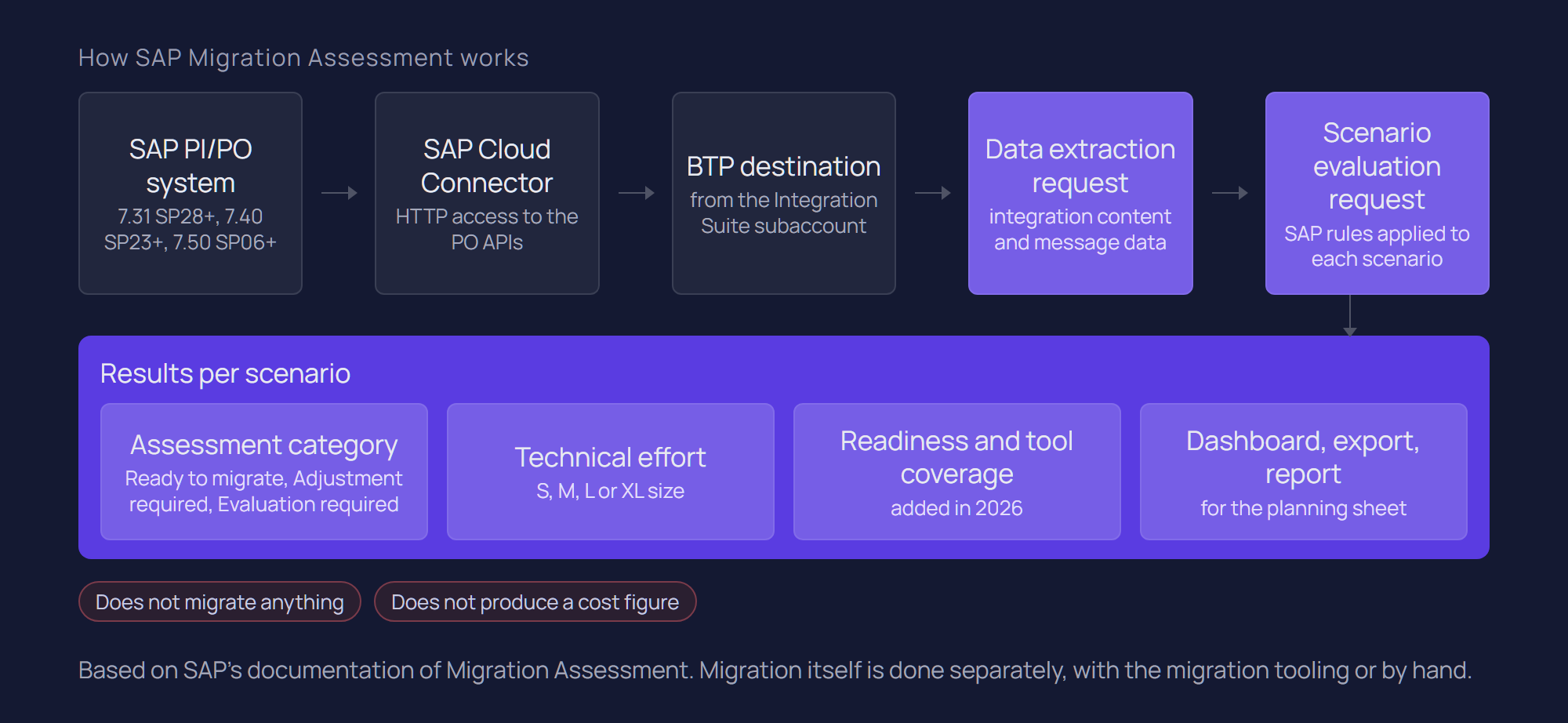
Add the system. In Settings, add the PO system with the Integration Directory address and technical user, plus the ES Repository (or "Same as Integration Directory"). The release can be auto-detected.
Test the connection. SAP recommends Test Connection even if the Cloud Connector and destination checks passed, because those do not confirm the PO resources are reachable.
Extract. A data extraction request is complete (all scenarios) or custom (you deselect what to exclude). It collects Integration Directory and ES Repository objects and processed-message data. Read the log: objects with errors are excluded from evaluation until fixed in PO and extracted again.
Evaluate. A scenario evaluation request applies SAP's rules to a completed extraction. Later runs can be triggered and compared.
Review. The dashboard shows results, adapters, recommendations and the rules used. Export gives a detailed spreadsheet per scenario; Generate Report gives a summary PDF. Custom adapter details appear only in the export.
Extractions and evaluations use disk storage, which is limited per tenant, and new requests can fail once it is full. Delete old extractions you no longer need.
Rules and how far you can adjust them
SAP's Migration Assessment concepts define a rule as a set of characteristics with weighted parameters; the weights determine each rule's contribution to the effort estimate. The rules are predefined by SAP, and the documentation does not describe customer-defined rules or editable weights. You control the scope of the extraction and the interpretation of the output.
SAP extends the ruleset regularly. What's New for SAP Integration Suite lists recent additions such as BPM and ccBPM identification, ABAP mappings, SOAP lookups, schema validation, fixed-length file content conversion and sender wildcards. New rules apply only to new extractions.
IGT recommends keeping the SAP evaluation unmodified as the baseline and recording adjustments, such as a scenario known to hide extra logic, in separate columns of the export.
How to read the results
Each scenario receives an assessment category, an effort estimate and, since August 2026, a readiness distribution and a tool coverage level.
The three assessment categories
Category | What SAP says it means | What it does not mean | IGT's recommended next step |
Ready to migrate | Features used are available in Integration Suite; the end-to-end design stays, though settings such as connectivity may change | Automatic conversion by the Migration Tooling, or no testing | Early-wave candidate; check tool coverage |
Adjustment required | Partly matches; the end-to-end design needs changes, for example protocol conversion or changes in sender or receiver | A rebuild from scratch | Name the change and the system owner who must agree |
Evaluation required | Cannot be migrated directly: limited target functionality, incomplete analysis, or custom code the tool cannot evaluate | Impossible to migrate, or still needed | Manual analysis: still relevant, and which redesign route |
SAP is explicit that categories reflect feature fit, not how much the Migration Tooling automates.
Effort estimates and sizes
Each scenario also gets an effort estimation, and the PDF report groups scenarios by category and size. SAP's launch material describes an overall estimate in days based on Small, Medium, Large and Extra Large sizing. SAP does not publish the day range behind each size, so we quote none. Treat sizes as relative indicators within your estate and calibrate them against measured effort.
2026 additions: readiness, tool coverage and message analysis
Migration Readiness (August 2026): a weighted distribution of each scenario across the three categories, derived from the rules it triggered, aggregated into a landscape profile in the Overview tab and the PDF.
Migration Tool Coverage (August 2026): how much of a scenario the Migration Tooling can support, as Low (up to 30%), Medium (up to 60%), High (up to 80%) or Very High (above 80%).
Message analysis (July 2026): extractions capture throughput over one, three and six months, plus message count, average size and processing time. A Message Analysis view shows simulated Integration Suite message figures that SAP positions as support for sizing and licence forecasting.
For planning, coverage matters because it separates "the target supports this" from "the tooling will do much of the conversion".
Typical findings and what they mean
In many mature PO estates the same findings recur, and SAP's documented limitations explain why they need manual follow-up:
Custom adapters and adapter modules are identified but not analysed.
Java mappings, XSLT, function libraries and UDFs are identified, but their dependencies are not followed recursively.
BPM and ccBPM are flagged, but process logic is not analysed; these usually need redesign.
B2B and BRM are out of scope and need a separate assessment.
Dynamic receiver determination leads to a partial assessment.
Interfaces without traffic are retirement candidates, not automatic retirements: a six-month window misses an annual interface, and sender wildcards can distort throughput figures.
Modernisation recommendations appear alongside, for example moving to predelivered packages, to SOAP, REST and OData, or, for IDoc and BAPI scenarios, to released APIs and business events. SAP notes you may receive none.
Why effort is not cost: answering "cost per interface"
There is no honest single figure for SAP PO migration cost per interface, and Migration Assessment does not produce one. It estimates technical effort per scenario. Cost depends on that effort plus testing, redesign, cutover, licences and parallel running, and on the rates of whoever does the work.
A per-interface average also hides distribution: in many estates a large group of straightforward scenarios sits next to a smaller group with custom modules, orchestration or partner traffic that carries a disproportionate share of the effort.
Cost component | Covered by Migration Assessment? |
Technical migration effort for standard content | Yes, as an effort estimate per scenario |
Custom adapter modules, depth of Java and XSLT logic | Identified, not analysed |
B2B and BRM content | No, out of scope |
Redesign to APIs, events or consolidated flows | Recommendations only, no target design |
Interface dependencies, business process analysis | No |
Regression, business and performance testing | No |
Cutover, parallel running, decommissioning | No |
Integration Suite licence volume | Message analysis supports sizing; no prices |
PI/PO maintenance during transition, team enablement | No |
IGT's approach: from categories to a budget frame
This is IGT's method, not an SAP standard. It produces a range that narrows as the programme runs:
Clean the population. Mark no-traffic and duplicate scenarios as retirement or consolidation candidates and confirm with business owners.
Group the rest by category, size and tool coverage. "Ready, Small, Very High coverage" and "Evaluation required, Extra Large, Low coverage" need different estimating methods.
Calibrate with a pilot. Migrate a small representative sample end to end, including testing, and measure the effort. Your own figures reflect your estate, documentation and team; published averages do not.
Estimate redesign separately for "Evaluation required" scenarios and anything changing pattern.
Add the lines the tool does not cover: testing, cutover and parallel running, licences based on the message analysis, PI/PO maintenance for the overlap, and operations enablement.
Present a range with explicit assumptions and refine it after each wave.
What Migration Assessment cannot tell you
It cannot tell you what an interface is for, how critical it is, what depends on it, or what the target architecture should be.
SAP documents that the output is object-based rather than scenario-based: it does not group ICOs and receiver determinations into configuration scenarios, does not detect dependencies between interfaces, and performs no business process analysis. Those answers come from people and architecture work. Our PI/PO migration guide covers the gaps, SAP PI/PO vs Integration Suite the functional differences, and SAP integration patterns the choice of target pattern.
From assessment results to a migration wave plan
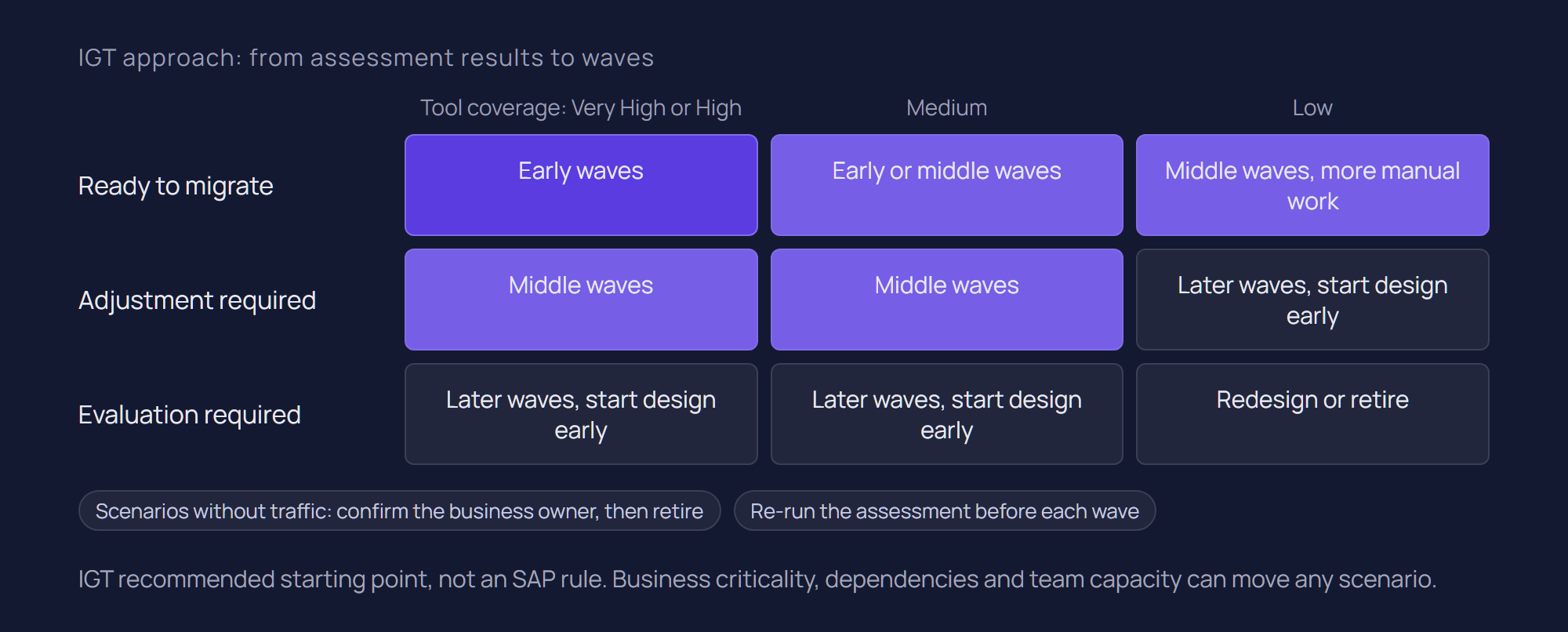
A wave plan combines the technical view from Migration Assessment with business priority, dependencies and the business calendar. What follows is IGT's approach.
Build one planning sheet from the export
Start from the spreadsheet export, which holds category, effort, readiness, adapters, message types, throughput and recommendations per scenario. Add what the tool cannot fill: business owner, criticality, dependency group, target pattern, test data availability and calendar constraints such as quarter end. Keep the SAP columns untouched so a later re-extraction can be merged in.
Regroup objects into end-to-end flows
Because the output is object-based, ICOs and receiver determinations belonging to one business flow appear as separate rows. Group them into end-to-end flows before assigning waves, so each wave is a coherent set that can be tested together.
Choose early waves for learning, not importance
Early waves suit scenarios that are ready or mostly ready, have High or Very High tool coverage, are well documented and matter without being business-critical. They establish naming, packaging, monitoring and transport conventions while the stakes are moderate. Critical, high-volume interfaces follow once the patterns are proven.
Start the long design work early
"Evaluation required" scenarios, BPM, B2B content and custom adapter modules often belong in later waves, but their design should start early, because redesign needs agreement across teams. Some will become APIs governed through SAP API Management or event-driven flows using SAP Event Mesh.
Some content may not belong on Integration Suite at all. Where an estate is largely non-SAP, or B2B and managed file transfer already run well elsewhere, a deliberate split can be the better outcome; our comparison of SAP Integration Suite vs webMethods discusses when.
Re-run the assessment between waves
New rules apply only to new extractions. A fresh extraction and evaluation before each wave picks up new findings, updated coverage and current volumes.
Conclusion
SAP Migration Assessment replaces a manual technical inventory with a structured, rule-based view of every scenario, and the 2026 additions (readiness distribution, tool coverage and message analysis) bring that view closer to what planning needs.
It remains a technical effort estimate. It does not migrate interfaces, it does not price the programme, and "Ready to migrate" is not a promise of automatic conversion. The budget and wave plan come from combining its output with pilot measurements, redesign and testing estimates, and business priorities.
If you are about to run Migration Assessment, or need to turn its results into a budget frame and wave plan, talk to our SAP integration team or read more about our SAP integration services.
Related questions
Is SAP Migration Assessment free?
It is not sold separately: SAP Discovery Center lists it as included in the Standard, Premium and Enhanced Editions of Integration Suite and the 90-day free tier. Availability depends on your service plan, so check SAP Note 2903776. Preparing, running and interpreting the assessment is a cost of its own.
Does Migration Assessment migrate interfaces automatically?
No. It extracts and evaluates PO content and estimates technical effort. Integration flows are created by the Migration Tooling in Cloud Integration, and even a "Ready to migrate" scenario is not converted automatically.
Which SAP PI/PO versions does Migration Assessment support?
7.31 SP28 and higher, 7.40 SP23 and higher, and 7.50 SP06 and higher, with SAP Note 2456339 for 7.50 SP06 to SP09. Older releases cannot be assessed. At the 2023 launch only 7.5 was supported, so older articles may be out of date.
How accurate is the Migration Assessment effort estimate?
It is a rule-based estimate of technical effort for content the tool can analyse. It does not analyse custom adapter modules, recursive mapping dependencies, B2B, BRM or BPM logic, and it ignores interface dependencies and testing. Use it as a relative indicator and calibrate it with a pilot.
What is the difference between Migration Assessment and Integration Assessment?
Migration Assessment analyses an existing PO system and estimates migration effort. Integration Assessment uses SAP's ISA-M methodology to define integration strategy, policies and technology choices. Many programmes use both: one for the current estate, the other for the target.
Sources
SAP Help Portal: What Is Migration Assessment?
SAP Help Portal: Migration Assessment Concepts
SAP Help Portal: Known Limitations of Migration Assessment
SAP Help Portal: Add an SAP Process Orchestration System
SAP Help Portal: Create a Data Extraction Request
SAP Help Portal: Create a Scenario Evaluation Request
SAP Help Portal: What Is Migration Tooling?
SAP (SAP-docs on GitHub): What Is Integration Assessment
SAP Help Portal: What's New for SAP Integration Suite
SAP Help Portal: Migration Guide for SAP Process Orchestration
SAP Developers: Enable Migration Assessment Application
SAP Discovery Center: SAP Integration Suite service plans
SAP Community: Automatically assess your migration from SAP Process Orchestration systems
Latest writings
The latest news, technologies, and resources from our team.
View all blogs

Let’s make it click!
Whether you're scaling a startup or streamlining a corporate ecosystem, we help teams launch faster and integrate smarter.

Eva Polcíková
Project Manager