SAP Integration Patterns: Choosing Between APIs, Messages, Events, Files and B2B
Every integration estate is a set of pattern decisions, whether anyone made them or not. Request-reply, queues, events, files, B2B and bulk replication: what each is for, where it breaks, how ISA-M names it, and which SAP and webMethods capabilities fit.

Last technically reviewed: 03/11/2026. Reviewed by Marek Juračka, CTO.

Table of contents
Most integration estates were not designed pattern by pattern. They grew interface by interface, and each interface took the shape of whatever tool the delivering team knew best. The result is familiar: synchronous calls where nobody needed an answer, nightly files where the business needed minutes, and integration flows moving data volumes they were never built for. Choosing SAP integration patterns deliberately is how an estate avoids that drift.
A pattern decides more about an interface than the platform does: how failures behave, how tightly two systems depend on each other's availability, and what the interface costs to run. Two teams on the same SAP Integration Suite tenant can build very different estates simply by defaulting to different patterns.
This guide covers the patterns an SAP architect has to choose between: request-reply, asynchronous messaging, publish-subscribe events, orchestration and choreography, file transfer, B2B exchange and bulk replication. It explains how SAP's Integration Solution Advisory Methodology (ISA-M) frames them, maps each to an SAP capability and a non-SAP equivalent, and names the anti-patterns that appear most often.
In short
- Choose the pattern from the requirement (does the caller need an answer now, how many consumers, what volume, what happens on failure), and only then choose the capability.
- ISA-M gives the vocabulary: integration domains, five integration styles (process, data, analytics, user and thing integration), use case patterns, and cross use case patterns such as API-managed integration.
- Most patterns have a clear home in SAP Integration Suite and an equivalent on platforms such as webMethods, so pattern discipline is portable even when the platform is not.
What is an integration pattern, and why does the choice matter?
An integration pattern is a reusable answer to a recurring integration problem: how systems exchange information, who waits for whom, and what happens when something fails. The choice matters because reliability, latency, coupling and running cost follow from the pattern far more than from the tool that executes it.
Take one requirement: telling a warehouse system that a sales order has been released. It can be a synchronous API call from SAP S/4HANA, a queued message, an event several systems subscribe to, or a line in an hourly file. All four work on a good day. They behave very differently when the warehouse system is down for maintenance, when a second consumer needs the same information next year, or when the same order is sent twice.
The SAP Integration Suite architecture article ends with a short table of starting points for choosing between an API, an integration flow and an event. This article is the longer treatment of that table.
How does SAP frame it? ISA-M integration domains, styles and use case patterns
SAP frames pattern selection through the SAP Integration Solution Advisory Methodology (ISA-M), which works in two phases: first define technology-agnostic requirements (integration domains, integration styles and integration use case patterns), then map them to the integration technologies that best fit the organisation's context.
The vocabulary has three levels, and the current Integration Assessment documentation uses these terms:
- Integration domains are areas of a hybrid landscape where integration is needed, for example cloud to cloud or on-premise to cloud. They are the entry point into the methodology.
- Integration styles are basic categories of integration. SAP currently lists five: process integration, data integration, analytics integration, user integration and thing integration.
- Integration use case patterns refine each style. A2A integration and B2B integration, for example, refine process integration.
A combination of a domain and a style is an integration area, so cloud-to-cloud process integration is one area and on-premise-to-cloud data integration another. The styles and use case patterns as SAP documents them today:
Integration style | What it covers | Use case patterns |
Process integration | Business processes spanning several business applications | A2A integration, B2B integration, master data integration |
Data integration | Synchronising data between business applications | Data replication (ETL scenarios), data virtualisation, data orchestration |
Analytics integration | Deriving and exposing analytical data for business insight | Embedded analytics, cross-application analytics |
User integration | User-centric applications working with business applications | UI integration, mobile integration, chatbot integration |
Thing integration | Real-world devices and sensors working with business applications | Thing to analytics, thing to process, thing to data lake |
ISA-M also has cross use case patterns, which complement one or more styles rather than belonging to one. SAP's Architecture Center describes API-managed integration as one, and SAP's learning material names event-based integration as another.
ISA-M is technology-agnostic, its mapping phase allows SAP and non-SAP technologies, and Integration Assessment ships predefined ISA-M master data that organisations can adjust. IGT's shorthand in the architecture article (process, API, event, B2B, data) simplifies this rather than competing with it: in ISA-M terms, API and event are cross use case patterns and B2B is a use case pattern within process integration.
Synchronous request-reply
Use request-reply when the caller genuinely cannot continue without an answer: an availability check before confirming an order, a price lookup, a credit check, a validation in a user interface. The caller sends a request, waits, and gets a response or an error within a defined time.
Its strength is simplicity. Its weakness is coupling to availability. A synchronous chain is only available when every system in it is available. As an illustration, three systems in a chain that are each available 99.5% of the time give a combined availability of about 98.5%, before any network effects.
What to guard:
- Timeouts at every hop, set deliberately and shorter towards the caller, so a slow backend does not hold threads across the whole chain.
- Chain length. Each synchronous hop adds latency and a failure point. Two hops are often defensible, five rarely are.
- Retries on writes. A client that retries a timed-out write may create a duplicate, so writes exposed synchronously need idempotency.
In SAP Integration Suite, request-reply for many consumers usually means a governed API: API Management exposes and protects it, and Cloud Integration sits behind it only where mediation or transformation goes beyond what API Management handles. SAP's Architecture Center describes exactly that split for API-managed integration. Where the backend already offers a clean OData or SOAP API, an integration flow in between may add a hop without adding value. Calls from the cloud to on-premise backends typically pass through SAP Cloud Connector, which is a secure path rather than a place for pattern logic.
Asynchronous messaging
Use asynchronous messaging when the sender needs to know that a message was accepted, not that it was processed. The sender hands the message to a queue or integration runtime and moves on; delivery happens separately and can wait until the receiver is available.
This is the pattern behind much classic SAP integration. IDocs from SAP ECC or S/4HANA to a warehouse or MES, order confirmations, goods movements and status updates are typically one-way, point-to-point messages where the sender cares about guaranteed delivery rather than an immediate answer.
Three ideas are worth separating:
- Fire-and-forget means the sender does not wait for processing. It does not mean the sender does not care whether the message arrives.
- Guaranteed delivery means the message is persisted so it survives a receiver outage or runtime restart. Cloud Integration documents its quality of service levels as best effort, at least once, exactly once and exactly once in order.
- Queues are where persistence and retry live. In Cloud Integration, JMS queue storage lets an integration flow accept a message, return HTTP 202 (Accepted) to the sender and process it asynchronously, with automatic retry if a downstream call fails. SAP notes this is available in all editions except the basic edition.
The design question asynchronous messaging forces, and synchronous calls hide, is ordering. If a status update can overtake the create it refers to, the receiver needs in-order delivery or the ability to handle out-of-order messages. Decide which per interface, rather than discovering it in production.
Point-to-point messaging has one limitation that pushes estates towards events: each new consumer usually means a new interface from the sender. When the third system asks for the same order status, the pattern has outgrown itself.
Publish-subscribe events
Use publish-subscribe when a system needs to announce that something happened without knowing who cares. The publisher sends an event to a broker and every subscriber receives its own copy. Adding a consumer means adding a subscription, not changing the publisher.
SAP's Architecture Center describes its event-driven architecture strategy through three offerings with different roles:
- SAP Cloud Application Event Hub routes business events between SAP cloud applications and to extensions on SAP BTP.
- Event Mesh, the capability within SAP Integration Suite, suits starter and low-to-moderate volume event scenarios across SAP and third-party applications.
- SAP Integration Suite, advanced event mesh is a distributed multi-broker event mesh for enterprise-wide event distribution in hybrid, heterogeneous landscapes.
SAP describes a start-small-and-expand path from Event Mesh towards advanced event mesh; they are different tools for different scales.
The same guidance distinguishes notification events, which say that something changed, from data events, which carry the changed data. Notification events keep payloads small but need a follow-up API call; data events avoid it but make the schema a harder contract to change.
When events are not the answer
Events decouple, and decoupling is not free. They are a poor fit when:
- The caller needs an answer to continue. Simulating request-reply over events adds correlation logic and latency for no gain.
- There is one consumer and no realistic prospect of a second. A queued point-to-point message is simpler to run and monitor.
- The business needs one auditable view of where a multi-step process stands. Pure choreography spreads that state across subscribers.
- The consumer needs the full data set rather than changes. That is replication, not eventing.
As an overview: APIs suit questions that need an answer now, messages suit commands or documents that must reach one receiver reliably, and events suit facts that several systems may react to. Real processes often combine all three.
Orchestration vs choreography: who holds the process state?
Orchestration means one component directs a multi-step process and knows where it stands; choreography means each participant reacts to events and no single component holds the whole picture. The real question is who owns the process state, and who answers when a business user asks "where is this order?"
Orchestration fits processes with a defined sequence, compensation logic and a need for end-to-end visibility. Its cost is a central component that knows every participant and changes whenever one of them does. Choreography fits processes where participants are genuinely independent and the business accepts eventual consistency, such as several systems updating their own view when a material master changes. Its cost is observability: without correlation IDs and tracing, nobody can reconstruct what happened to a given business object.
Duration matters as much as style. Cloud Integration suits short-running technical orchestration within a message exchange. Long-running business processes that wait days for an approval or partner response are better held in a process or workflow tool that calls integration flows, rather than modelled as integration flows trying to keep state over time.
Is file and batch transfer still a valid pattern?
Yes. File and batch transfer remains the right pattern where the receiver works in batches, where a partner or regulator mandates a file, or where the data is naturally periodic: bank statements, payroll exports, price lists, planning snapshots, master data extracts for a legacy system.
It earns criticism when used for latency it cannot deliver. If the requirement is minutes, a file is the wrong pattern however well it is built.
Boundaries worth setting explicitly:
- Size. Moderate files through an integration runtime are routine. Very large files are better moved by managed file transfer and processed where they land.
- Control. Batch interfaces need completeness checks, such as record counts and control totals, and a rule for files that arrive twice or not at all.
- Operations. Managed file transfer (MFT) adds audit trails, partner-level access control and scheduling.
Cloud Integration handles file exchange through adapters such as SFTP, which suits many file interfaces in an SAP-centric estate. Where file transfer is a large, partner-heavy discipline in its own right, a dedicated MFT product is often the better fit. webMethods ActiveTransfer is one example, and it is what IGT used for document exchange in the factory case study below.
B2B partner exchange
B2B partner exchange is the pattern for document exchange with external trading partners, typically EDI standards such as UN/EDIFACT or ASC X12 over protocols such as AS2 or SFTP. In SAP Integration Suite it involves three capabilities with distinct roles, and confusing design time with runtime is a common misreading.
According to SAP's feature scope description for SAP Integration Suite, the split is:
- Integration Advisor (design time). Used to design message implementation guidelines (MIGs), the partner-specific interface definitions, and mapping guidelines (MAGs) between them, based on type systems including UN/EDIFACT, ASC X12, SAP IDoc and cXML. It generates runtime artefacts for validation, conversion and transformation that integration flows use. It is not in the message runtime path.
- Trading Partner Management (configuration). Maintains trading partner profiles and the agreements that define how two partners exchange business data. On activation, agreements are stored in the Cloud Integration Partner Directory. It also monitors B2B interchanges.
- Cloud Integration (runtime). Executes the message processing, reading partner configuration from the Partner Directory at runtime to parameterise integration flows.
The payoff is that partner-specific behaviour lives in configuration rather than in a bespoke integration flow per partner. A flow per partner creates maintenance that grows with the partner list; parameterised flows with agreements add partners as configuration. The principle is the same one IGT applied to factories in the case study below.
B2B is also an area where non-SAP platforms are strong. webMethods Trading Networks, for example, has a long track record in partner management and EDI. Where partner traffic is high-volume and largely non-SAP, keeping B2B there while SAP-centric integration moves to Integration Suite can be a deliberate coexistence decision.
Bulk data and replication: why it does not belong in an integration flow
Bulk data movement and replication, such as loading millions of records into an analytics platform or keeping a data lake in step with S/4HANA tables, is a data integration problem. It usually belongs in data integration technology rather than in a message-oriented integration flow.
- Integration flows process messages. Very large data sets mean splitting, memory pressure and long-running executions the runtime was not optimised for.
- Replication needs initial load, delta capture and table-level restartability. Message runtimes do not provide these natively, so teams rebuild them in scripts.
- Consumption-based commercial models often count messages or data volume, which can make an integration runtime an expensive way to move bulk data.
In ISA-M terms this is the data integration style. SAP's portfolio includes dedicated tooling for it, such as replication flows in SAP Datasphere and SAP Landscape Transformation Replication Server, and many estates also run non-SAP ETL or streaming platforms for the same job.
The boundary case is master data. Synchronising business partners or materials between applications in near real time is master data integration under the process integration style, and an API or event pattern often suits it. Loading the full master data set into a warehouse is replication. Same objects, different patterns.
Reliability patterns: idempotency, retries, dead-letter and replay
Reliability patterns decide what happens when an interface fails, and they apply to every pattern above. Four are worth designing explicitly rather than inheriting from platform defaults.
Idempotency. An operation is idempotent if processing the same message twice has the same effect as processing it once. In any at-least-once system duplicates will occur, from sender retries after a timeout or queue redelivery after a crash. Cloud Integration offers an Idempotent Process Call that records processed message IDs and skips or flags duplicates. SAP's documentation is candid that this is the second-best solution: exactly-once scenarios require an idempotent receiver, and stored IDs are deleted after 90 days by default. The robust design uses a stable business key that the receiver itself can check.
Retries. Retry transient failures (a timeout, a locked record, a receiver restart) automatically, with backoff so a struggling system is not flooded. Do not retry permanent failures such as a mapping error automatically, because they fail identically every time. Cloud Integration's JMS sender adapter supports retry intervals with optional exponential backoff.
Dead-letter handling. A message that still fails after a defined number of attempts should be parked somewhere visible, with enough context to fix and resubmit it, rather than retried forever or silently dropped. Decide who owns that parking area and how quickly they act.
Replay. Being able to resend a message, or a range of messages, after a fix turns an incident into a short interruption rather than a reconciliation exercise. Replay is only safe when the receiver is idempotent, which is why these four belong together. Brokers such as advanced event mesh retain guaranteed messages on durable endpoints until consumed and offer message replay for re-delivering events.
The right combination differs by interface. A stock movement may tolerate automatic retry and replay; a payment instruction may need a human decision before any resend.
Decision framework: requirement, pattern, capability
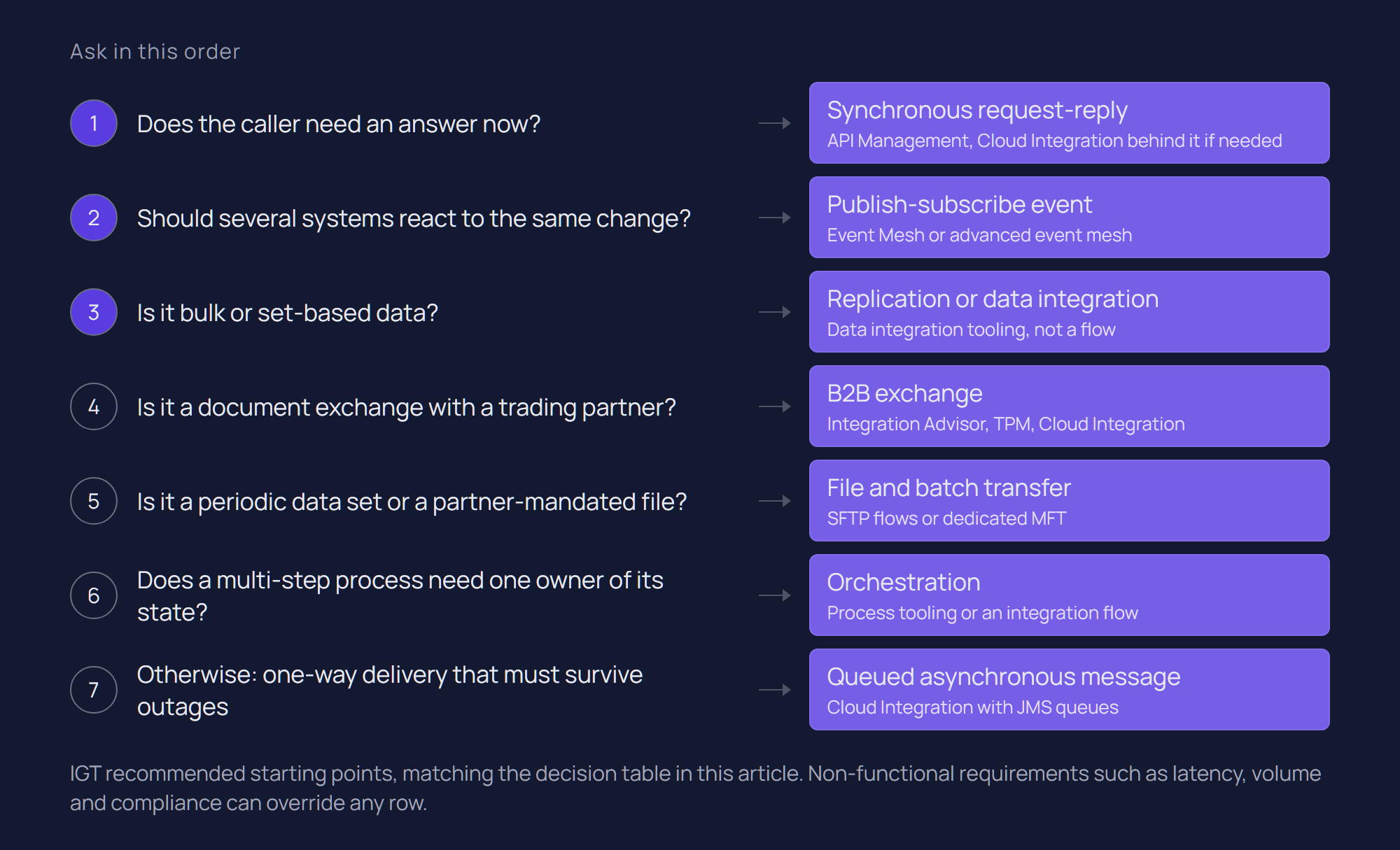
Pick the pattern from the requirement, then the capability from the pattern, and treat every row below as a starting point that non-functional requirements can override. The first six rows match the starting points in the architecture article; the table adds the SAP capability and a non-SAP equivalent, using webMethods because it is the other platform IGT delivers on. IBM now offers webMethods as part of IBM webMethods Hybrid Integration; the table uses the established component names.
Requirement | Pattern to evaluate first | SAP capability | Non-SAP equivalent (webMethods example) |
Request and response business capability | API (synchronous request-reply) | API Management for exposure and policy; Cloud Integration behind it only where mediation is needed | webMethods API Gateway, with Integration Server services behind it |
Transformation or orchestration across systems | Integration flow | Cloud Integration (cloud runtime or Edge Integration Cell) | webMethods Integration Server |
Asynchronous notification of a change | Event (publish-subscribe) | Event Mesh; SAP Cloud Application Event Hub for SAP-to-SAP cloud events | webMethods Universal Messaging or an existing Kafka platform |
Long-running partner exchange | B2B capabilities | Integration Advisor (design), Trading Partner Management (agreements), Cloud Integration (runtime) | webMethods Trading Networks with Integration Server |
Bulk data movement | Evaluate data integration technology | SAP data integration tooling, such as SAP Datasphere replication flows or SAP Landscape Transformation Replication Server | A dedicated ETL, replication or streaming platform; integration middleware is usually not the right tool |
Real-time, high-scale event distribution | Event architecture, including advanced event mesh | SAP Integration Suite, advanced event mesh | webMethods Universal Messaging, or an enterprise event streaming platform |
Guaranteed one-way delivery to a single receiver | Queued asynchronous message | Cloud Integration with JMS queues | Integration Server with guaranteed delivery over Universal Messaging or JMS |
Periodic data set or partner-mandated file | File and batch transfer | Cloud Integration SFTP-based flows; dedicated MFT for large or partner-heavy volumes | webMethods ActiveTransfer |
Multi-step process with days of waiting or human steps | Orchestration in a process layer | A process or workflow tool calling Cloud Integration, not state held in integration flows | A process engine calling Integration Server services |
Before using the table, IGT recommends answering five questions per interface. This is our working sequence rather than an SAP-defined method, and it fits inside ISA-M's mapping phase:
- Does the caller need an answer before it can continue? If yes, request-reply; if no, asynchronous.
- How many consumers are there now, and how many are likely? One points to a queued message; several point to events or a governed API.
- What are the volume and size per run? Large periodic sets point to file or replication patterns.
- What must happen when the receiver is unavailable or a message fails? This sets the reliability patterns, and sometimes reverses the answer to question one.
- Who owns the process state across steps? This decides orchestration or choreography.
Integration Assessment can record the outcome as integration policy, so the answer for a class of interface is decided once rather than per project. What is SAP Integration Suite covers each capability in the table in more detail.
What are the most common SAP integration anti-patterns?
These are IGT observations from SAP and non-SAP estates rather than SAP-defined rules, and most are pattern decisions made by default.
- Everything through Cloud Integration. Integration flows used for API exposure, bulk replication and long-running workflow because the team knows integration flows. Each works, and each is harder to run than the pattern built for it.
- Point-to-point growth inside the platform. A fully connected estate of 10 systems has 45 possible pairwise links, each potentially with its own mapping. With a canonical model, each system needs one translation to and from the canonical format, so 10 rather than up to 45. Moving to the cloud does not change that arithmetic.
- Events where an answer is needed. Publishing an event, then waiting for a correlated reply to complete a user transaction. If the user is waiting, use request-reply.
- Bulk data through message flows. Nightly table loads split into thousands of messages that a replication tool would move with restartability built in.
- Retries without idempotency. Automatic retry and replay switched on for writes to a receiver that cannot detect duplicates.
- A canonical model for everything. The opposite failure: forcing a simple one-to-one interface through an enterprise canonical model it does not need. Canonical models pay back where many systems share one business object.
Patterns in a PI/PO migration: re-pattern, don't lift and shift
A PI/PO migration is the best opportunity most SAP estates will get to correct pattern decisions, because every interface has to be touched anyway. Converting interfaces one to one preserves whatever pattern they had, including the ones that were wrong when they were built.
In many PI/PO estates the dominant pattern is asynchronous point-to-point messaging, often with IDocs. In the target, some interfaces stay as messages, some become APIs or events, partner traffic moves to the B2B capabilities, and some bulk interfaces move to data integration tooling or are retired.
The disposition step in SAP PI/PO migration to SAP Integration Suite is where re-patterning is decided: migrate, refactor, replace with API, replace with event, consolidate or retire. The five questions above make that classification concrete. The counterweight from that article applies too: redesigning everything is its own failure mode, so re-pattern where the pattern causes a real problem, such as availability coupling, duplicate interfaces or bulk loads through messaging, and migrate the rest simply.
How IGT applies pattern selection
IGT applies pattern selection as standardisation: decide the pattern for a class of interface once, express it as a shared contract, and make each new instance a configuration task rather than a development project. Our SAP ECC and MES global factory integration case study is the clearest example.
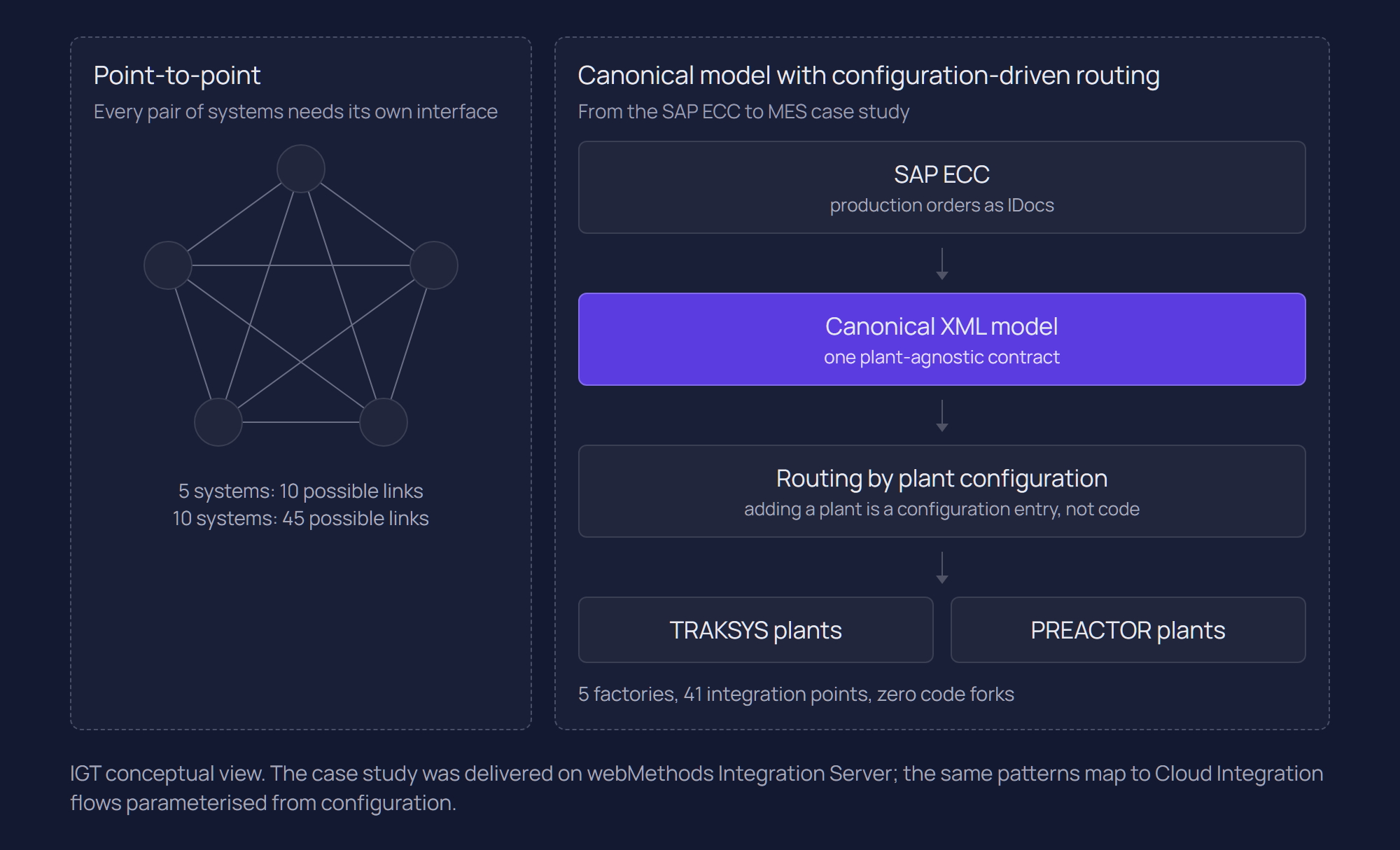
A global manufacturer ran five factories in Belgium, Switzerland, China, Turkey and the United States against one SAP ECC core, with TRAKSYS at some plants and PREACTOR at others. The risk was a separate integration project per plant, with maintenance growing with every new factory.
The patterns chosen were deliberately few:
- Asynchronous messaging from SAP. SAP IDocs are consumed by the integration layer.
- Canonical data model. IDocs are transformed into one plant-agnostic canonical XML model of production execution data.
- Configuration-driven routing. Messages are routed from the canonical layer to TRAKSYS or PREACTOR according to which MES the receiving plant runs. Routing is configuration, not code.
- One integration contract. Every plant integration honours the same shared service contract; plant-specific behaviour lives in configuration.
- Built-in reliability. Monitoring, retry and replay, so operational support does not need a developer every time a transaction needs attention.
The result was 41 integration points across five factories, two MES platforms served by the same core integration code, and zero code forks. A sixth plant is planned to join as a configuration exercise rather than a development project.
The platform was webMethods Integration Server, with webMethods ActiveTransfer for file exchange, not SAP Integration Suite. We cite it for that reason rather than despite it. Canonical model, configuration-driven routing, a single contract and designed-in retry and replay are platform-independent patterns; on Integration Suite they map to Cloud Integration flows parameterised from configuration such as the Partner Directory. Our view of how webMethods fits alongside SAP is in what integrates with webMethods.
Conclusion
SAP integration patterns are a small set of decisions with large consequences for reliability, coupling and cost. ISA-M supplies the vocabulary to classify requirements; the pattern decides how each one behaves when something goes wrong.
The estates that age well tend to decide patterns per class of interface, write them down and enforce them through review, whichever platform executes them. The estates that age badly let each project choose by familiarity and end up with one requirement implemented four ways.
If you are defining integration patterns for an S/4HANA programme, a PI/PO migration or a mixed SAP and webMethods estate, talk to our SAP integration team, or see how our SAP integration services support architecture and delivery.
Related questions
What are the main SAP integration patterns?
Synchronous request-reply (APIs), asynchronous messaging, publish-subscribe events, orchestration and choreography, file and batch transfer, B2B partner exchange and bulk data replication. In SAP Integration Suite they map mainly to API Management, Cloud Integration, Event Mesh or advanced event mesh and the B2B capabilities, with bulk replication usually handled by data integration tooling.
What is ISA-M?
The SAP Integration Solution Advisory Methodology is SAP's structured approach to defining an integration strategy. It classifies requirements by integration domain, integration style (process, data, analytics, user, thing) and use case pattern, then maps them to suitable SAP or non-SAP technologies. Integration Assessment in SAP Integration Suite implements it.
When should I use events instead of APIs in SAP?
Use events when a system needs to announce a change without knowing who reacts, especially when several consumers exist or are likely. Use APIs when the caller needs an answer before it can continue. Many processes combine both: an event announces the change and consumers call an API for details.
Is file-based integration still a valid pattern?
Yes, where the receiver works in batches, a partner or regulator mandates files, or the data is naturally periodic. It is the wrong pattern when the business needs low latency, and large or partner-heavy file traffic is often better handled by managed file transfer.
What is the difference between orchestration and choreography?
In orchestration one component directs a multi-step process and holds its state. In choreography each participant reacts to events and no single component sees the whole process. Orchestration gives visibility and control; choreography gives looser coupling at the cost of harder end-to-end tracing.
Sources
SAP Help Portal: Integration Styles and Integration Use Case Patterns
SAP Help Portal: Integration Assessment
SAP Learning: Understanding the SAP Integration Solution Advisory Methodology (ISA-M)
SAP Architecture Center: API Managed Integration with SAP Integration Suite
SAP Architecture Center: Event-Driven Architecture and SAP's EDA Strategy
SAP Help Portal: Feature Scope Description for SAP Integration Suite
SAP Help Portal: Define Idempotent Process Call
SAP Help Portal: Quality of Service Exactly Once
SAP Integration Suite, advanced event mesh documentation: Message Delivery Modes
Latest writings
The latest news, technologies, and resources from our team.
View all blogs


Let’s make it click!
Whether you're scaling a startup or streamlining a corporate ecosystem, we help teams launch faster and integrate smarter.

Eva Polcíková
Project Manager