SAP Integration Suite Error Handling: Retries, Idempotency and Replay
Every failed message should end in a limited retry or with a named owner, never in silence. Exception subprocesses, JMS retries with backoff, what the Dead-Letter Queue option really does, idempotency, synchronous calls and replay in SAP Cloud Integration.

Last technically reviewed: 18/11/2026. Reviewed by Marek Juračka, CTO.

Table of contents
A receiver goes down for maintenance on a Saturday night. By Monday, some integration flows have retried and delivered every order, some have failed and wait in the monitor, and one has lost messages because nobody decided what happens after the last retry. Same platform for all three. The difference is whether SAP Integration Suite error handling was designed per interface or left to defaults.
This article goes deeper than the reliability section of our SAP integration patterns guide and covers retries, idempotency and replay in one place: error classes, exception subprocesses, JMS retries, duplicates, synchronous calls and reprocessing. SAP facts link to SAP documentation as of November 2026; IGT recommendations are labelled as such.
In short
Every failed message should end in one of two places: an automatic retry with a limit, or a named owner's queue with enough context to fix and resend it.
The JMS sender adapter has no maximum retry count, and its Dead-Letter Queue option only covers worker node crashes, so the retry limit and the parking queue are yours to design.
Retries and replay are only safe when a duplicate can be recognised, and SAP itself describes duplicate detection in the integration flow as the second-best option behind an idempotent receiver.
What does good error handling look like in SAP Integration Suite?
Good error handling means every failure ends in a defined outcome: a limited automatic retry, or a person who is alerted and can act. Nothing fails silently, nothing retries forever, and nothing reaches a receiver twice if that receiver cannot cope with it.
SAP is explicit about who owns this. Its quality of service documentation states that the integration flow developer is responsible for the quality of service of the end-to-end message flow, and that an adapter's quality-of-service setting applies only inside that adapter. That includes sender retries, resilience during rolling platform updates and idempotency at the receiver.
SAP's migration guide adds a useful split. Technical errors (a wrong password, an unavailable web service, a mapping error) belong to the middleware. Business errors raised by the target application, such as a material that does not exist, should be propagated to the source system or handled in the business layer, for example with SAP Application Interface Framework. Retrying a business error from the middleware only repeats it.
How do you tell transient from permanent errors?
A transient error may succeed if the same message is tried again later without anyone changing anything. A permanent error fails the same way every time until data or configuration is fixed. Retry the first automatically and send the second straight to a person.
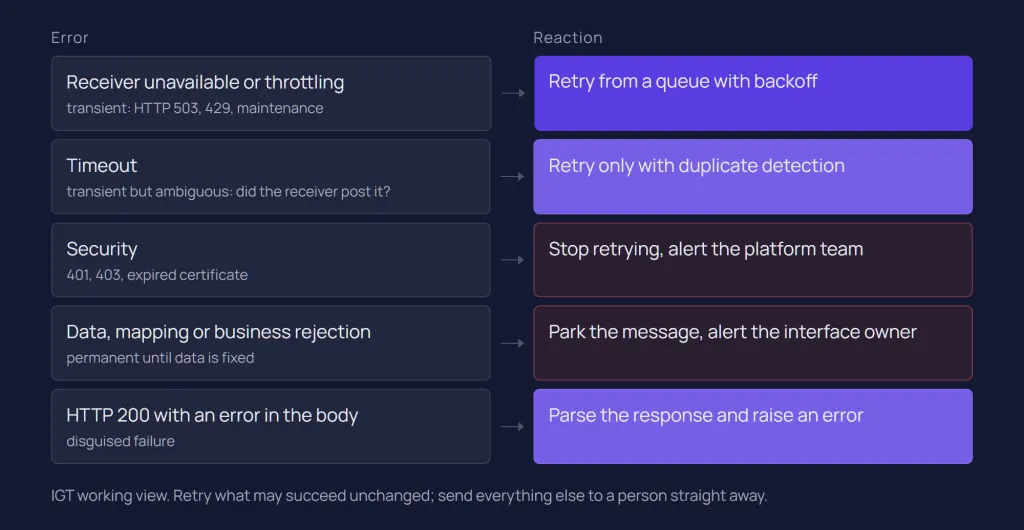
Error type | Example | Suitable reaction |
Receiver unavailable (transient) | Connection refused, HTTP 503, maintenance window | Retry from a queue with backoff |
Throttling (transient) | HTTP 429 with a Retry-After header | Retry, respecting the receiver's interval |
Timeout (transient, ambiguous) | No response within the adapter timeout | Retry only if the receiver or the flow detects duplicates |
Security (permanent until fixed) | HTTP 401 or 403, expired certificate | Stop retrying and alert the platform team |
Data or mapping (permanent) | Invalid payload, missing mandatory field, mapping exception | No automatic retry; park and alert the interface owner |
Business (permanent) | Target rejects the document, for example an unknown material | Return to the sender or handle in the business layer |
Disguised error | HTTP 200 with an error message in the body | Parse the response and raise an error explicitly |
SAP's guideline on errors in successful responses warns that a flow checking only the status code shows Completed while the receiver failed.
Cloud Integration helps with classification at runtime. The exchange property SAP_ErrorModelStepID holds the model step ID of the step that failed, so error handling can branch on it, for example in a Router condition, and treat a failed receiver call differently from a failed mapping, as described in SAP's error classification page. SAP's own pipeline templates for PI/PO migration skip retries for mapping errors by default and park them immediately.
IGT recommends this decision sequence for each error class:
Could the same message succeed later without a fix? If not, do not retry automatically.
Can the receiver recognise a duplicate? If not, add duplicate detection before enabling any retry.
Is the sender waiting for an answer? If so, retry briefly inside its timeout or fail fast; otherwise retry from a queue.
Does the order of messages matter? If so, use an exclusive queue and accept that one failure blocks the rest.
Where does the message go after the last retry, and who is alerted?
What do exception subprocesses catch, and what not?
An exception subprocess catches exceptions thrown in the integration process it sits in and decides how processing ends. Once it takes over, normal processing of that message stops.
According to Define Exception Subprocess, it always starts with an Error Start event and ends with an End Message, Error End or Escalation event. The end event decides what the monitor shows, as SAP's Handle Errors Gracefully guideline summarises:
End event | Message status | Typical use |
End Message | Completed | Reply to the sender with a custom error message |
Error End | Failed | Add context to the log and keep the message failed, for example so it is retried from a JMS queue |
Escalation End | Escalated | Add context and make handled failures searchable as their own status; in an asynchronous flow no exception is raised, so a message read from a JMS queue is not retried |
Inside the subprocess, ${exception.message} gives the error details. Several limits are documented. An exception in a local integration process cannot be caught by the main process, so each local process that needs handling gets its own exception subprocess. A Data Store Write that fails on a duplicate entry ID cannot be handled, because the database transaction is rolled back. Splitter, Aggregator and another exception subprocess are not supported inside one.
What the sender sees is a separate setting. Under Error Configuration, Return Exception to Sender is deselected by default, so the sender receives an error template with the message processing log ID instead of internal details, and SAP advises against enabling it. If a synchronous sender needs a meaningful fault, build it with an End Message event.
IGT recommends one shared error-handling pattern per tenant, for example SAP's documented variant that calls a central error-handling flow through ProcessDirect, so logging, custom status and alerts stay consistent. Our SAP Cloud Integration (CPI) guide lists it among the conventions to agree early.
How do retries with JMS queues work?
An inbound flow writes the message to a JMS queue and acknowledges the sender at once (HTTP 202 for an HTTP sender). A second flow consumes it with the JMS sender adapter, and if outbound processing fails, Cloud Integration retries from the queue as long as the error lasts. JMS queues are available in all SAP Integration Suite editions except the basic edition.
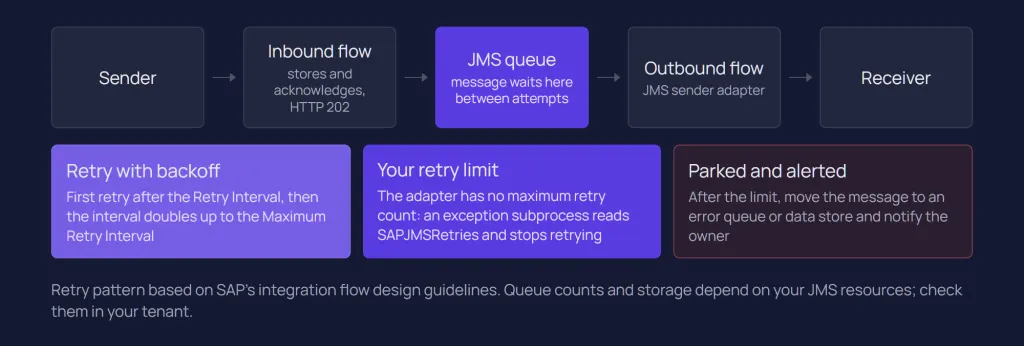
Retry behaviour is set on the JMS sender adapter, with defaults from SAP's retry pattern guideline:
Parameter | What it does | Documented values |
Retry Interval | Wait before the first retry | Default 1 minute; 1 to 60 minutes for exclusive queues, up to 10,080 for non-exclusive |
Exponential Backoff | Doubles the interval after each failed retry | Activated by default |
Maximum Retry Interval | Caps the doubled interval | Default 60 minutes, minimum 10; up to 180 for exclusive queues, 43,200 for non-exclusive |
Access Type | Exclusive (one consumer, ordered) or Non-Exclusive (parallel) | Cannot be changed after the queue is created |
Number of Concurrent Processes | Parallel consumers per worker node (non-exclusive only) | Default 1; SAP recommends keeping it small, typically 1 to 5 |
Dead-Letter Queue | Blocks a message that repeatedly crashed a worker node (non-exclusive only) | Selected by default |
There is no maximum retry count
The adapter documentation is clear: you can configure intervals, but not that processing ends after a number of retries. For non-exclusive queues, the documented approach is an exception subprocess that reads the header SAPJMSRetries, set by the JMS sender adapter, and decides what happens once a limit is reached.
SAP's own pipeline concept for PI/PO migration shows a complete design. Its retry handling reads a maximum (5 unless configured per scenario), ends with an Error End event while retries remain so the message stays in the queue, and once the limit is exceeded sets the custom status MaxRetriesExceeded, writes the message to a separate queue with a _DLQ suffix and ends with an Escalation event. IGT recommends the same structure for hand-built flows.
The Dead-Letter Queue option is narrower than its name
The Dead-Letter Queue checkbox does not park messages after failed business retries. It takes a message out of processing and marks it Blocked when it has caused worker node failures, typically out-of-memory errors with large messages. The message is not restarted automatically; a lock entry appears under Message Locks, and releasing it starts retries again. SAP suggests deselecting it only for high-load scenarios or when only small messages are processed, and notes the outage risk if memory runs out. It protects the runtime; it is not a parking queue for business failures.
Ordering and exclusive queues
For exactly-once-in-order delivery, SAP's EOIO guidance uses a JMS queue with exclusive access, or exclusive or partitioned queues in SAP Integration Suite, advanced event mesh. End-to-end order also requires the sender to send the next message only after the previous one was acknowledged. The cost is documented: one failing message blocks all later messages in an exclusive queue, so EOIO interfaces need prompt alerting.
JMS resources are finite
Per SAP's JMS resource limits, all SAP Integration Suite service plans start with 30 queues and 9.3 GB queue capacity, and can be raised by self-service to 100 queues and 30 GB; more than 100 needs SAP Note 2589823. The JMS, AS2, AS4 and XI adapters share these resources, headers and properties stored with a message must stay under 4 MB, and unused queues are not deleted automatically. In larger estates, the queue limit shapes the design.
JMS gives at least once, not exactly once
SAP's page on monitoring scenarios with message queues states that the JMS broker does not provide exactly-once processing. With non-exclusive queues, a message can occasionally be processed more than once, even in parallel, and retries can happen although the log shows Completed. Queue-based retry therefore needs idempotency.
When a data store is the better buffer
A data store can also decouple and retry: one flow writes the message, and a flow with the Data Store sender adapter consumes it with its own retry interval and optional backoff (off by default). Data store content can be read several times, which suits low-volume, high-value messages, but SAP does not recommend it for high volumes. Entries expire after 30 days by default, at most 180. Unconsumed JMS messages also expire, after the Expiration Period set in the JMS receiver adapter (30 days by default, at most 180), so IGT recommends expiration periods well beyond the time your team needs to notice and fix a failure.
How do you avoid duplicate messages?
Assume any asynchronous message can arrive twice: after a sender retry, a JMS redelivery or a replay. The robust answer is an idempotent receiver that checks a stable business key in the same transaction as its update; detection in Cloud Integration is the fallback when the receiver cannot do that.
The Idempotent Process Call runs a local integration process only if a given message ID has not yet been processed successfully. The ID comes from a header or property; Skip Process Call for Duplicates is selected by default, and if you deselect it, the property CamelDuplicateMessage tells the subprocess it is handling a duplicate. Four documented details matter in production:
Stored IDs are deleted after 90 days by default, so an older duplicate is no longer detected.
The check is bound to the step instance: delete and remodel the step, and its history starts empty.
Only a fully successful subprocess counts as done, so SAP advises a single step.
SAP calls it the second-best solution: after a timeout or a lost acknowledgement, it is unclear whether the receiver processed the message.
Duplicates can also come from inside a flow. Cloud Integration does not support distributed transactions, so SAP's transaction handling guidelines warn that a committed data store or variable write followed by a failed JMS commit leads to a retry that repeats the write. SAP's example wraps such side effects in an Idempotent Process Call keyed on the message processing log ID.
Some protocols carry their own protection. The XI sender adapter offers Best Effort, At Least Once, Exactly Once (with a data store as temporary storage) and Handled by Integration Flow; with Exactly Once, repeated XI message IDs are recognised as duplicates. IDoc receivers can discard duplicates under conditions explained in our IDoc vs API vs events article. Event consumers face the same at-least-once reality, as covered in SAP Event Mesh.
What changes in synchronous scenarios?
In a synchronous call the sender is waiting, so there is no parking a message for tomorrow. You can retry briefly within the caller's timeout or fail fast with a clear error; the durable retry belongs to the sender.
The HTTP receiver adapter has a built-in retry: Retry on Exception for listed exceptions and Retry on Error Response for listed HTTP status codes, with at most three iterations and at most 60 seconds between them. A Retry-After value from the target overrides the configured values, and an exception subprocess runs only after the last iteration fails. Its timeout defaults to 60,000 milliseconds, but the shortest idle timeout of any component on the path, such as a load balancer, wins.
SAP's guideline on retries in sender applications adds three cautions. A synchronous flow holds runtime resources while it retries, and exhaustion can trigger runtime restarts in the cloud runtime or HTTP 503 responses on Edge Integration Cell. The sender's timeout must leave room for the flow's retries. And synchronous writes need idempotency, because a sender retrying after a timeout cannot know whether the first call succeeded.
Note that an Escalation End event raises an exception in a synchronous flow but not in an asynchronous one. And if the caller does not need an answer to continue, IGT recommends questioning the synchronous design itself.
Who reprocesses failed messages, and how are they notified?
Reprocessing is an operating process, not a feature: each interface needs a named owner, an alert that reaches that owner, and a documented action for each place a message can be parked. Cloud Integration has no built-in alerting, so the alert path is designed too.
The tools are in the Monitor. In the message queue monitor, SAP's queue management documentation lists the statuses Waiting, Overdue (past the Retention Threshold for Alerting, 2 days by default on the JMS receiver adapter), Failed and Blocked, and the actions Retry (non-exclusive queues), Move (up to 100 messages to another queue), Download and Delete (PI_Administrator role). Moving messages from a parking queue back to the processing queue is a practical replay, safe only for idempotent interfaces. SAP warns that releasing a message lock without analysis can cause inconsistencies.
Findability decides how fast someone can act, so set a custom status and the application message ID in the flow. For tenants on the Premium or Enhanced Edition, AI-assisted error resolution proposes a root cause and fix for Failed messages; SAP offers it as a free promotion until the January 2027 release, within a monthly fair-usage quota.
Alert routing through SAP Alert Notification service or SAP Cloud ALM, retention and runbooks are covered in our SAP Integration Suite monitoring guide. Who decides the error-handling standard across teams is a question for SAP integration governance.
What changes when you come from PI/PO?
In PI/PO, many reliability behaviours came with the platform: configurable retries for asynchronous messages, fault messages, EOIO as a quality of service, and alert rules. In Cloud Integration you design each of them.
Fault messages become exception subprocesses, EOIO becomes a JMS queue with exclusive access, alert rules move to SAP Alert Notification service or SAP Cloud ALM, and retries come from JMS queues or data stores. Our PI/PO vs Integration Suite comparison covers the full list. The migration tooling helps unevenly: in the standard approach it creates an exception subprocess stub you complete by hand, while the pipeline approach brings retry handling and a dead-letter queue built in, as our PI/PO to Cloud Integration migration guide explains.
IGT recommends this checklist for every migrated or new asynchronous interface:
Error classes listed as transient, permanent or business, with the reaction for each.
Retry location chosen (sender, JMS queue, data store or none), with interval, backoff and a maximum count implemented through SAPJMSRetries or an equivalent.
A parking queue or data store for exhausted retries, with a custom status and the original error attached.
Duplicate detection at the receiver by business key, or an Idempotent Process Call with its 90-day window understood.
Expiration periods longer than the realistic time to detect and fix a failure.
An alert route and a named owner, with error behaviour tested before go-live: unreachable receiver, invalid payload, expired certificate.
Conclusion
SAP Integration Suite provides the building blocks for reliable integration. It does not decide for you which errors to retry, how many times, where exhausted messages go or how duplicates are recognised.
Those decisions belong in the design of each interface, not in its first production incident. Treat retries, idempotency and replay as one design, and test the failure paths as carefully as the happy path.
If you are designing error handling for new flows, reviewing a tenant that grew without a standard, or rebuilding PI/PO reliability during migration, our SAP integration services cover design and review. Talk to our SAP integration team.
Related questions
How do you handle errors in SAP CPI?
Add an exception subprocess to each integration process that can fail, ending with an End Message, Error End or Escalation event depending on the status the message should get. Combine it with queue-based retry for transient errors, a parking place for exhausted retries and an alert to a named owner.
How do retries work in SAP Cloud Integration?
For asynchronous flows, a JMS queue stores the message and the JMS sender adapter retries it with a configurable interval and optional exponential backoff. The adapter has no retry limit, so the maximum count is implemented in an exception subprocess using the SAPJMSRetries header. Synchronous HTTP calls can use the HTTP receiver's built-in retry.
What is a dead-letter queue in SAP Integration Suite?
The Dead-Letter Queue option of the JMS sender adapter blocks a message that has repeatedly crashed a worker node, typically through out-of-memory errors. A parking queue for messages that exceeded their retries is something you build, as SAP's pipeline templates do with a separate queue.
How do you avoid duplicate messages in SAP Integration Suite?
The approach SAP ranks first is an idempotent receiver, ideally one that checks a stable business key in the same transaction as its update. Where the receiver cannot do that, wrap the call in an Idempotent Process Call keyed on a stable message ID, keeping in mind that stored IDs are deleted after 90 days by default.
Sources
SAP Help (SAP-docs GitHub mirror): Configure the JMS Receiver Adapter
SAP Help (SAP-docs GitHub mirror): Quality of Service
SAP Help (SAP-docs GitHub mirror): Handle Errors Gracefully, Integration Flow Design Guidelines
SAP Help (SAP-docs GitHub mirror): Define Exception Subprocess
SAP Help (SAP-docs GitHub mirror): Escalation End Event Behavior
SAP Help (SAP-docs GitHub mirror): Error Classification
SAP Help (SAP-docs GitHub mirror): Handle Errors in Successful Responses
SAP Help (SAP-docs GitHub mirror): Outsource Exception Handling into a Separate Integration Flow
SAP Help (SAP-docs GitHub mirror): Define Error Configuration
SAP Help (SAP-docs GitHub mirror): Configure the JMS Sender Adapter
SAP Help (SAP-docs GitHub mirror): Apply the Retry Pattern with JMS Queue
SAP Help (SAP-docs GitHub mirror): JMS Resource Limits and Optimizing their Usage
SAP Help (SAP-docs GitHub mirror): Monitoring Scenarios that Include Message Queues
SAP Help (SAP-docs GitHub mirror): Quality of Service Exactly Once In Order
SAP Help (SAP-docs GitHub mirror): Data Store Sender Adapter
SAP Help (SAP-docs GitHub mirror): Define Data Store Write Operations
SAP Help (SAP-docs GitHub mirror): Define Idempotent Process Call
SAP Help (SAP-docs GitHub mirror): Transaction Handling Guidelines
SAP Help (SAP-docs GitHub mirror): Configure the XI Sender Adapter
SAP Help (SAP-docs GitHub mirror): HTTP Receiver Adapter
SAP Help (SAP-docs GitHub mirror): Apply the Retry Pattern in the Sender Applications
SAP Help (SAP-docs GitHub mirror): Managing Messages Stored in Queues
SAP Help (SAP-docs GitHub mirror): Message Locks
SAP Help (SAP-docs GitHub mirror): AI-assisted Error Resolution
SAP Help (SAP-docs GitHub mirror): Error Handling, Migration Guide for SAP Process Orchestration
Latest writings
The latest news, technologies, and resources from our team.
View all blogs


Let’s make it click!
Whether you're scaling a startup or streamlining a corporate ecosystem, we help teams launch faster and integrate smarter.

Eva Polcíková
Project Manager