SAP Cloud Integration (CPI): How Integration Flows Work, Where They Run, and When to Use Something Else
CPI is not the whole of Integration Suite, nor the right tool for every interface. How integration flows, adapters, mappings and scripts work, what monitoring and security need, where Edge Integration Cell fits, and when an API, an event or another platform is the better answer.

Last technically reviewed: 03/11/2026. Reviewed by Marek Juračka, CTO.

Table of contents
Ask an SAP integration team what their interfaces run on and many will say "CPI" before anyone mentions SAP Integration Suite. SAP Cloud Integration, still widely called CPI, is the part of the suite where integration flows are designed, deployed and run. It is the runtime that moves a sales order from SAP S/4HANA to a logistics provider, a production confirmation from an MES back to the ERP, or an employee record from SAP SuccessFactors into a payroll system.
It is also the capability most often stretched beyond what it does well. Because integration flows are familiar, they end up exposing APIs that should be governed, polling for changes that should arrive as events, and moving bulk data that belongs in a data integration tool. That works until volumes, consumers or audit requirements grow.
This guide explains how Cloud Integration works, from integration flows, adapters, mappings and scripts to security, monitoring and runtime placement, which conventions to set early, and where it is the wrong tool.
In short
SAP Cloud Integration (formerly SAP Cloud Platform Integration, hence "CPI") is the integration flow capability of SAP Integration Suite, not the whole suite.
An integration flow receives a message through a sender adapter, processes it through steps such as content modifiers, routers, mappings and scripts, and delivers it through receiver adapters, with a processing log for every message.
It is strong for application, process and B2B integration, while API exposure, event distribution and bulk data movement are usually better served by other capabilities or tools.
What is SAP Cloud Integration (CPI)?
SAP Cloud Integration is the capability of SAP Integration Suite for building and running integration flows across cloud, on-premise and hybrid landscapes. SAP's Cloud Integration documentation describes it as supporting application-to-application (A2A), business-to-business (B2B) and business-to-government (B2G) scenarios through the exchange of messages.
In practice, Cloud Integration is where a developer models how a message travels from a sender to one or more receivers: which adapter receives it, how it is validated, transformed, enriched and routed, and what happens when something fails. It combines a design environment, a runtime and monitoring in one service.
Why is it still called CPI?
The product has carried several names. It started as SAP HANA Cloud Integration (HCI), became SAP Cloud Platform Integration, and is now Cloud Integration, following SAP's move from the SAP Cloud Platform brand to SAP BTP and the grouping of its integration services into SAP Integration Suite. "CPI" outlived each rename because job titles, SAP Notes, community posts and project documentation kept using it.
For practical purposes HCI, CPI and Cloud Integration are the same capability. Older material may describe the Neo environment or screens that have since changed; current Integration Suite tenants run on SAP BTP in the Cloud Foundry environment.
Where does Cloud Integration sit in SAP Integration Suite and SAP BTP?
Cloud Integration is one capability within SAP Integration Suite, which is itself an offering on SAP BTP: platform, then suite, then capability.
SAP BTP provides the account model, identity, connectivity services and commercial framework, covered in what is SAP BTP. SAP Integration Suite bundles the integration capabilities on top of it: Cloud Integration, API Management, Event Mesh, Integration Advisor, Trading Partner Management, Integration Assessment, Migration Assessment and several more, as listed in SAP's Integration Suite overview. Cloud Integration is the capability that executes message-based integration flows.
The difference is one of scope. Integration Suite is the platform and Cloud Integration is the part that runs integration flows, so scoping a programme as "a CPI project" tends to understate both what the suite offers and what it needs to govern. The full comparison, with a side-by-side table, is in what is SAP Integration Suite.
What does Cloud Integration do?
Cloud Integration connects systems by processing messages: it receives data, transforms and routes it, orchestrates calls across systems and delivers the result. It covers cloud-to-cloud, cloud-to-on-premise and hybrid scenarios.
The three scenario types SAP names map to recognisable work:
A2A and process integration. SAP S/4HANA to SAP SuccessFactors, Salesforce, a warehouse system or an MES, in real time or on a schedule.
B2B. Orders, despatch advices and invoices exchanged with partners in formats such as EDIFACT or ASC X12, over protocols such as AS2, AS4 or SFTP.
B2G. Submissions to authorities, such as tax and e-invoicing reporting, where application-specific adapters exist for some government endpoints.
Across those scenarios, an integration flow does four kinds of work:
Transformation. Mapping one structure to another and converting between XML, JSON, CSV and EDI formats.
Routing. Sending a message to one or several receivers based on its content or headers.
Orchestration. Calling several systems in sequence, enriching a message with data from another system, and splitting or aggregating messages.
Reliability. Decoupling inbound and outbound processing through queues, retrying failed deliveries and detecting duplicates.
The integration capabilities reference lists the individual step types behind each of these.
How does an integration flow work?
An integration flow receives a message from a sender through a sender adapter, passes it through a sequence of processing steps in an integration process, and delivers it to one or more receivers through receiver adapters. Every run produces a message processing log that operations can inspect.
The anatomy of an integration flow
Take a production order travelling from SAP S/4HANA to an MES in one plant. A typical flow looks like this:
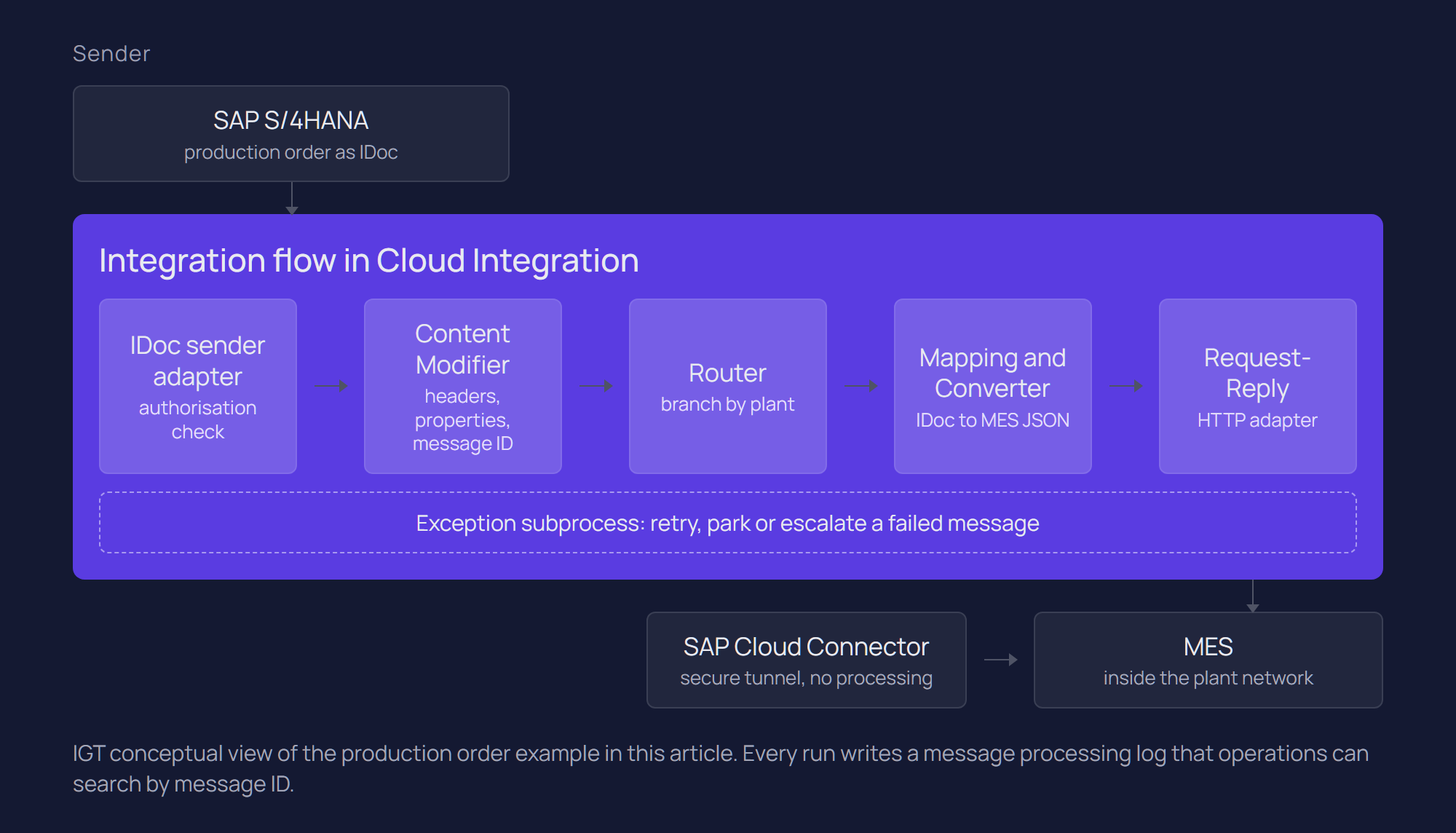
Sender channel. An IDoc sender adapter receives the order from S/4HANA and checks that the caller is authorised.
Content Modifier. Sets headers and exchange properties, such as the plant, the order number and an application message ID that makes the message searchable in monitoring.
Router. Evaluates the plant and chooses a branch, for example because two plants run different MES versions.
Message Mapping and Converter. Transform the IDoc structure into the MES format and convert XML to JSON.
Request-Reply or receiver channel. Calls the MES API through an HTTP adapter, reaching it through SAP Cloud Connector if the MES sits inside the plant network.
Exception subprocess. Catches failures, records what went wrong and decides whether the message is retried, parked or escalated.
Body, headers and exchange properties
A message in Cloud Integration has a body, headers and, while it is being processed, exchange properties. The distinction matters more than it first appears. Headers and the body can travel to other integration flows and receivers, while exchange properties exist only for the duration of a single flow run, as SAP's data storage documentation explains.
Values used only for internal decisions belong in properties and anything a downstream flow needs belongs in headers. Because adapters can forward headers to receivers, sensitive values are safer in properties.
Synchronous, asynchronous and decoupled processing
A synchronous flow keeps the sender waiting until the receiver answers, so failures surface to the sender. An asynchronous flow acknowledges receipt and takes responsibility for delivery, so the flow must deal with an unavailable receiver.
For that responsibility Cloud Integration offers several storage mechanisms. JMS queues decouple inbound from outbound processing and allow retries; messages not consumed are kept for 90 days by default. Data stores hold content between steps or flows, with a default retention of 30 days that can be extended to 180. The Idempotent Process Call step detects messages that have already been processed, which matters when a sender resends after a timeout.
Error handling
Each integration process can have an exception subprocess that runs when a step fails. What it should do is a business decision made per interface: a stock movement might be retried automatically, while a payment instruction might be parked for a person to review.
Which adapters and connectivity options does Cloud Integration offer?
Cloud Integration ships with more than 80 standard adapters, split into technical adapters for protocols and application-specific adapters for named systems. It also offers a large catalogue of non-SAP connectors through Open Connectors, and an Adapter Development Kit for building custom adapters, according to SAP's connectivity options documentation.
Category | Example adapters | Typical use |
SAP-specific | IDoc, RFC (receiver), XI, SOAP (SAP RM), OData, SuccessFactors, Ariba | SAP S/4HANA, SAP ECC, SAP cloud applications |
Web and API protocols | HTTPS sender, HTTP receiver, SOAP 1.x, OData | REST and SOAP services, SaaS APIs |
File transfer and mail | SFTP, FTP, SMB, NFS, Mail | File-based legacy systems and partners |
Messaging and events | JMS, AMQP, Kafka, IBM MQ, RabbitMQ, Advanced Event Mesh | Queues, brokers and event platforms |
B2B and B2G | AS2, AS4, RNIF, ELSTER | Trading partners and government endpoints |
Data and cloud storage | JDBC, LDAP, AzureStorage, Google Cloud Storage, AmazonWebServices | Databases, directories and object storage |
Non-SAP applications | Salesforce, ServiceNow, Workday, Microsoft Dynamics CRM, Snowflake | SaaS business applications |
Internal | ProcessDirect, Data Store sender | Flow-to-flow calls and polling stored data |
Two caveats apply. Availability of some adapters depends on the Integration Suite service plan, and several non-SAP application adapters are licensed separately, so check entitlements before designing around one. And an adapter handles protocol and authentication, not meaning: it does not decide how a Salesforce account maps to a customer in your ERP.
Reaching on-premise systems
When an integration flow on the cloud runtime calls a system inside a private network, the call typically goes through SAP Cloud Connector. The receiver adapter is configured for on-premise connectivity, and Cloud Connector, installed inside the network, opens the connection outward to SAP BTP, so no inbound firewall port is needed. Only resources explicitly exposed in Cloud Connector are reachable. The details are in our guide to SAP Cloud Connector.
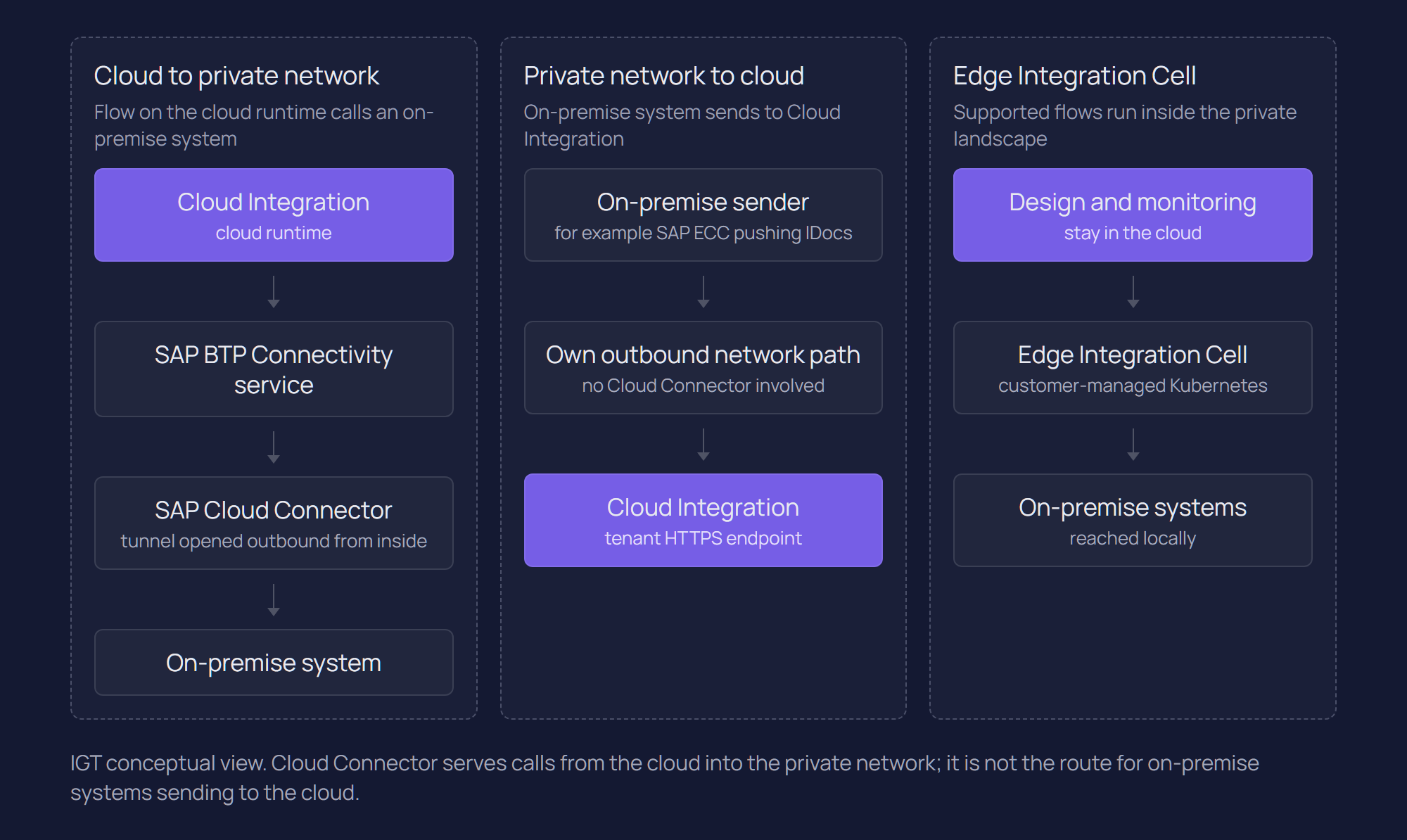
Direction matters here. Cloud Connector serves calls from the cloud into the private network. An on-premise system sending to Cloud Integration, such as an ECC system pushing IDocs, calls the tenant's HTTPS endpoint through its own outbound network path.
How do mapping and transformation work?
Cloud Integration offers three main ways to transform a message: graphical message mappings, XSLT mappings, and scripts written in Groovy or JavaScript. Converter steps handle format changes such as XML to JSON, CSV to XML or EDI to XML.
Message mapping. A graphical editor that maps source to target structures defined in XSD or EDMX. Mappings can be built as reusable artefacts, extended with custom Groovy functions, simulated before deployment, and imported from the Enterprise Services Repository of SAP PI/PO, with documented limitations.
XSLT mapping. Suited to teams with XSLT skills and to complex restructuring of XML. XSLT mappings can also be read dynamically from the Partner Directory, which is useful in partner-specific scenarios.
Scripts. Groovy and JavaScript, run through a Java API that gives access to the message, headers and properties. SAP's script step documentation lists the runtime versions: Groovy 2.4 for script step version 1.1, Groovy 4.0 for script step version 2.0, and the Rhino engine for JavaScript. Script Collections let several flows share one script.
When do scripts become technical debt?
Scripts are the most flexible transformation tool and the hardest to govern. A graphical mapping can be read by anyone who knows the two structures. A script can be read only by someone who knows Groovy, and the logic it contains is invisible from the flow diagram.
In many mature tenants the same pattern appears: scripts copied between flows with small variations, business rules hard-coded out of sight, and debug payload logging left in place long after the incident. SAP's script guidance adds that XML parsing in scripts must be protected against external entity attacks.
IGT recommends a short script policy agreed before development scales:
Use a script only where standard steps cannot do the job, and say why in the flow description.
Keep shared logic in Script Collections rather than in copies.
Hold business rules such as plant codes or partner mappings in value mappings, externalised parameters or the Partner Directory, not in code.
Review scripts like any other code, and plan for runtime upgrades such as the move from Groovy 2.4 to 4.0.
Do not attach payloads to the processing log in production unless the log level calls for it.
Should you use prepackaged integration content?
Often yes, for SAP-to-SAP and common SAP-to-SaaS scenarios where SAP or a partner has already built the flow. Prepackaged content is available in the Discover section of Integration Suite and on SAP Business Accelerator Hub, and it is most valuable when you can configure it rather than modify it.
A package typically contains integration flows, message and value mappings, and documentation. You copy it to your design workspace, set its configurable parameters and deploy it, as described in SAP's guide to working with prepackaged integration content.
The decision that matters is what happens to updates. SAP's publishers release fixes and enhancements either manually, where you choose to apply them, or automatically, either immediately or on a scheduled date. Once you modify an artefact, it no longer receives updates, according to the package update documentation. SAP's recommendation is to only configure standard content.
That gives three realistic options. Configure the package and leave it untouched, which keeps the update path. Keep the package standard and place your additions in separate flows around it, which preserves updates at the cost of an extra hop. Or build your own flow when the package does not fit your process, and accept that you now own its maintenance.
Where do integration flows run: cloud runtime or Edge Integration Cell?
By default, integration flows run on the SAP-managed cloud runtime. Edge Integration Cell is an optional hybrid runtime that lets supported integration flows and APIs run inside your private landscape, while design and monitoring remain in the cloud.
SAP's Edge Integration Cell documentation names two main use cases: security and compliance requirements that keep data inside the enterprise network, and a migration path for SAP Process Integration customers running ground-to-ground scenarios. It runs on a Kubernetes cluster you provide and operate.
The runtime scope is not identical to the cloud runtime. SAP publishes an Edge Integration Cell runtime scope with resource limits and a reference to SAP Note 3391207 for out-of-scope items. One example: the OAuth2 Authorization Code credential type is not supported on the edge runtime. Conversely, some adapters, such as an RFC sender and an OFTP adapter, are documented specifically for Edge Integration Cell. Check scenarios against the current scope before committing.
Runtime placement is a per-interface architecture decision driven by data residency, latency and connectivity, covered in SAP Integration Suite architecture.
What are the security essentials?
Cloud Integration security has two sides: authenticating systems that call into an integration flow, and storing the credentials and keys a flow uses to call receivers. Both are managed on the tenant rather than inside flow logic.
Inbound: who may call a flow
In the Cloud Foundry environment, sender systems authenticate with credentials from a service instance and service key created in SAP BTP, using OAuth client credentials or a client certificate. Each sender adapter then applies an authorisation check, either by user role or by client certificate.
A common shortcut is to grant every sender the default sending role, which means any valid credential can call any flow on the tenant. Defining roles per integration domain and assigning them deliberately limits what a leaked credential can reach.
Outbound: how a flow authenticates to receivers
Credentials for receivers are stored as security material on the tenant: user credentials, secure parameters and several OAuth2 credential types. Keys and certificates live in the tenant keystore, and PGP keys are managed separately for payload encryption. Flows reference these artefacts by name, so a password or certificate can be rotated without changing flow logic.
The Monitor section of Integration Suite exposes these artefacts alongside access policies, JDBC data sources and user roles, as described in SAP's monitoring overview. Certificate expiry deserves a named owner and a calendar entry, because an expired certificate stops an interface as effectively as a broken mapping.
Data in logs
The Trace log level records message content, and scripts can attach payloads to the processing log, so who may enable trace and read its output is a data protection question. SAP's design guidelines recommend removing sensitive content before logging or forwarding it.
How do you monitor and operate Cloud Integration?
Operations work from the Monitor section of Integration Suite: message processing logs for each message, the status of deployed artefacts, security material, data stores, variables and message queues. How much detail each message records depends on the log level set per integration flow.
SAP's log level documentation defines five levels:
Log level | What it records | Points to note |
None | Nothing | No monitoring data and no archiving for that flow |
Error | Basic information for failed messages only, with detail for the last 50 steps | A final successful retry is not recorded, so the status can stay at Retry or Failed |
Info | Basic information for all messages, with step detail for failures | Default for newly deployed flows |
Debug | Detailed information for every step | Resource-intensive; expires after a fixed 24 hours; SAP recommends it for development and test |
Trace | Every step plus message content | Expires after 10 minutes by default; captured content is kept for 1 hour by default |
The Error caveat matters: a team that sets Error to reduce log volume may see messages reported as failed that were delivered on retry.
Retention and long-term logging
Monitoring data on the tenant is kept for limited periods, which differ by data type: message processing logs for 30 days in the standard setup, data store entries for 30 days by default (up to 180), unconsumed JMS messages for 90 days by default, and trace content for an hour. For longer retention, correlation across tenants or integration into an existing monitoring stack, SAP offers external logging to Splunk, to any HTTP endpoint as JSON, or as OpenTelemetry log records, alongside archiving options.
Making messages findable
The message monitor lets operations filter by IDs such as the application message ID and correlation ID, and shows optional fields such as sender, receiver, application message type and custom status, according to SAP's message monitoring documentation. These are set in the flow, usually with a Content Modifier. A flow that sets the order number as the application message ID lets a support analyst answer "what happened to order 4711?" in one search.
Alerting and ownership
SAP documents options for central monitoring and alerting, including SAP Cloud ALM, and the processing logs are available through an OData API for custom tooling. The technical setup is the easier half. The harder half is deciding, per interface, who receives an alert and what they are expected to do with it.
What are the common enterprise use cases?
Cloud Integration earns its place in four recurring scenarios: connecting SAP S/4HANA to SaaS applications, connecting SAP to shop-floor and logistics systems, exchanging documents with business partners, and hosting interfaces migrated from SAP PI/PO, which has its own section below.
SAP S/4HANA and SaaS applications
This is where prepackaged content helps most. Integrations between S/4HANA and SAP SuccessFactors, SAP Ariba or other SAP cloud applications often start from an SAP package, and connections to Salesforce, ServiceNow or Workday can use dedicated adapters. The work that remains is usually master data alignment and error handling rather than connectivity.
SAP and MES or shop-floor systems
Production orders flow down to the plant and confirmations, consumption and quality results flow back. These interfaces need routing by plant, tolerance of plant network interruptions, and traceability. Plant systems are usually inside private networks, which brings in Cloud Connector, or Edge Integration Cell where processing should stay on site.
Our published SAP ECC and MES case study is a useful reference for the pattern, though not for the platform. It was delivered on webMethods Integration Server, not on Cloud Integration. It uses a canonical XML model and configuration-driven routing to two MES platforms across five factories and 41 integration points, with no per-plant code forks. The same pattern can be expressed in Cloud Integration, with a mapping to a canonical format and routing rules held in externalised parameters, value mappings or the Partner Directory rather than in branches of flow logic.
Business partners and B2B
Partner traffic over AS2, AS4 or SFTP, with EDI converted to and from XML, runs in Cloud Integration. For more than a handful of partners, Integration Advisor (design-time mapping guidelines) and Trading Partner Management (partner profiles and agreements) keep partner-specific configuration out of individual flows.
When is Cloud Integration the wrong tool?
When the requirement is not message-based integration. Exposing APIs to many consumers, distributing events, moving bulk data and running large-scale file transfer often fit other capabilities or platforms better, even though an integration flow could technically do each of them.
Requirement | Evaluate first | Why |
A reusable API consumed by many systems or external developers | API Management, with Cloud Integration behind it only if transformation is needed | Policies, rate limits, versioning and developer access belong in an API layer |
Notifying several systems that something changed | Event Mesh or SAP Integration Suite, advanced event mesh | One event, many subscribers, no per-consumer flow and no polling |
Bulk or analytical data movement | Data integration or replication tooling | Set-based processing at volume; integration flows are message-oriented |
High-volume managed file transfer with partner onboarding | A dedicated managed file transfer platform | Scheduling, partner self-service and file-level audit are its core function |
Long-running processes with human approval steps | Process automation tooling | Human tasks and process state are not what integration flows are built for |
The more frequent failure is not any single row in that table. It is the "everything through CPI" estate, where every requirement became an integration flow because integration flows were what the team knew. It shows up later as point-to-point sprawl inside one tenant, synchronous chains that fail together, and APIs nobody governs. Our guide to SAP integration patterns covers how to choose between an API, a flow and an event, and SAP API Management covers the API layer in detail.
The honest answer sometimes points outside SAP altogether. Where an estate already runs a mature webMethods, MuleSoft or Boomi platform for non-SAP workloads, or where B2B and managed file transfer already run well elsewhere, coexistence with a clearly stated boundary can be the better architecture than consolidation.
How does Cloud Integration fit into a PI/PO migration?
Cloud Integration is the main target for message-based interfaces leaving SAP PI/PO, and it includes Migration Tooling that converts supported PI/PO objects into integration flows. What converts cleanly depends on the pattern; what needs rework is usually the custom part.
According to SAP's Migration Tooling documentation, the tooling is pattern-based. It currently migrates Integrated Configuration Objects and Receiver Determination objects from PI/PO 7.31 SP28, 7.40 SP23 and 7.50 SP06 or higher, mapping each to a supported pattern such as point-to-point, recipient list or content-based routing. SAP recommends evaluating scenarios with Migration Assessment first, which estimates technical migration effort.
What tends to carry over with modest effort: standard routing patterns, graphical mappings imported from the Enterprise Services Repository, and standard adapters with Cloud Integration equivalents. What tends to need redesign: Java mappings and custom adapter modules, BPM and ccBPM orchestration, custom adapters, and the operational practices built around PI/PO monitoring. The migration method, including which interfaces should not move one-to-one, is covered in SAP PI/PO migration to SAP Integration Suite.
How to start: conventions that pay off later
Agree packaging, naming, configuration, versioning and transport conventions before the first dozen flows exist. Retrofitting them across hundreds of flows costs far more than setting them early.
IGT recommends settling the following before development scales:
Packages. Group flows by business domain or end-to-end scenario, not by project or developer, and give each package a named owner.
Naming. A pattern that encodes source, target, business object and direction, such as S4_MES_ProductionOrder_Out, makes the monitor readable without opening each flow.
Externalised parameters. Every environment-specific value, such as hosts, paths and credential names, is externalised, so the same flow moves unchanged from development to test to production.
Versioning. Save versions with meaningful comments at each deployable state. Recent releases also add Git integration for integration flows, worth evaluating for teams with established code review practices.
Transport. Choose one route, whether SAP Cloud Transport Management, CTS+, MTAR download or manual export and import, and use it consistently. Mixed transport routes can be a source of "it works in test" incidents.
Error handling template. One agreed exception subprocess pattern, with alerting and the fields operations need, reused across flows.
Log level policy. Info in production, Trace only time-boxed and approved, no payload attachments by default.
Technology decision per interface. A short record of why this requirement is an integration flow rather than an API or an event. Integration Assessment provides a structured way to do this.
Conclusion
SAP Cloud Integration is the integration flow capability of SAP Integration Suite: adapters on the edges, processing steps in the middle, and a processing log for every message. It is well suited to application, process and B2B integration across SAP and non-SAP systems, in the cloud or, through Edge Integration Cell, inside a private landscape.
Its value depends on how it is used. Selecting it for the right requirements, controlling scripts and modified standard content, and setting conventions early decide whether a tenant stays maintainable as it grows.
If you are planning a Cloud Integration landscape, migrating from PI/PO, or reviewing a tenant that has grown faster than its conventions, our SAP integration services cover design, delivery and review. Talk to our SAP integration team.
Related questions
Is SAP CPI the same as SAP Integration Suite?
No. CPI, now called Cloud Integration, is one capability within SAP Integration Suite, which also includes API Management, Event Mesh, B2B capabilities, assessment tools and Edge Integration Cell. Treating the two as identical understates a programme's scope.
Is SAP CPI being discontinued?
No. The product was renamed, not retired: Cloud Integration is a core capability of SAP Integration Suite. What is ending elsewhere is SAP PI/PO mainstream maintenance (end of 2027, with optional extended maintenance to 2030) and the older Neo environment of SAP BTP, from which remaining tenants need to move to Cloud Foundry.
Does SAP Cloud Integration need Cloud Connector?
Only when an integration flow on the cloud runtime needs to call a system inside a private network. Cloud and SaaS endpoints are reached directly, and on-premise systems sending to Cloud Integration call its HTTPS endpoint outbound. Flows running on Edge Integration Cell already sit inside the private landscape.
Can SAP Cloud Integration connect non-SAP systems?
Yes. Technical adapters such as HTTP, SOAP, SFTP, JDBC, JMS and Kafka reach systems that speak standard protocols, and application adapters cover SaaS products such as Salesforce, ServiceNow and Workday. Some non-SAP adapters are licensed separately.
What scripting languages does SAP Cloud Integration support?
Groovy and JavaScript. Current documentation lists Groovy 2.4 for script step version 1.1, Groovy 4.0 for script step version 2.0, and the Rhino engine for JavaScript. Custom Groovy functions can also be used inside graphical message mappings.
Sources
SAP Help Portal: What is SAP Integration Suite?
SAP Help Portal: Cloud Integration
SAP Help Portal: Connectivity Options
SAP Help Portal: Integration Capabilities
SAP Help Portal: Define a Local Script Step
SAP Help Portal: Data Storages
SAP Help Portal: Setting Log Levels
SAP Help Portal: Monitor Message Processing
SAP Help Portal: Monitor Integrations
SAP Help Portal: External Logging
SAP Help Portal: Working with Prepackaged Integration Content
SAP Help Portal: Updates for SAP's Integration Packages
SAP Help Portal: What Is Edge Integration Cell
Latest writings
The latest news, technologies, and resources from our team.
View all blogs


Let’s make it click!
Whether you're scaling a startup or streamlining a corporate ecosystem, we help teams launch faster and integrate smarter.

Eva Polcíková
Project Manager