SAP PI/PO to Cloud Integration Migration: Step by Step, from Assessment to Cutover
The assessment is done; now the interfaces have to move. How to prepare the tenant, what SAP's migration tooling converts in 2026, the manual work it leaves, how to test without duplicate postings, and how to switch traffic and finally switch PO off.

Last technically reviewed: 17/11/2026. Reviewed by Marek Juračka, CTO.

Table of contents
The decision is made, Migration Assessment has run, and the wave plan is approved. Now an integration team has to move real interfaces off SAP Process Orchestration without breaking the order-to-cash flow that runs through them. This is the point where an SAP PO to Cloud Integration migration stops being a strategy topic and becomes a sequence of practical tasks: connect the tenant to PO, run the migration tooling, finish what it leaves undone, prove the result, and switch traffic.
This is the hands-on part of our PI/PO series. Strategy and wave planning are covered in our PI/PO migration pillar; here we go step by step through tenant preparation, SAP's migration tooling as documented in November 2026, the manual work it leaves, testing, parallel running and cutover. SAP facts link to SAP documentation; IGT's own practices are labelled as such.
In short
SAP's migration tooling in Cloud Integration converts ICOs and receiver determinations into integration flows using four pattern families, and since 2026 it can migrate several scenarios at once and convert supported Java mappings to Groovy, but every generated flow still needs review and testing.
Adapter modules, value mappings, BPM processes, bridges, fault messages, lookups and several mapping features remain manual work, so plan them as design tasks, not as tooling exceptions.
Run PI/PO and Integration Suite side by side per interface, test with shadow or replay traffic rather than dual processing of live transactions, and keep a documented rollback until PO is switched off.
From assessment to the first migrated flow
The first migrated flow should be a representative, low-risk interface that tests your tenant setup, conventions and test approach end to end. Its purpose is to prove the process, not to move volume.
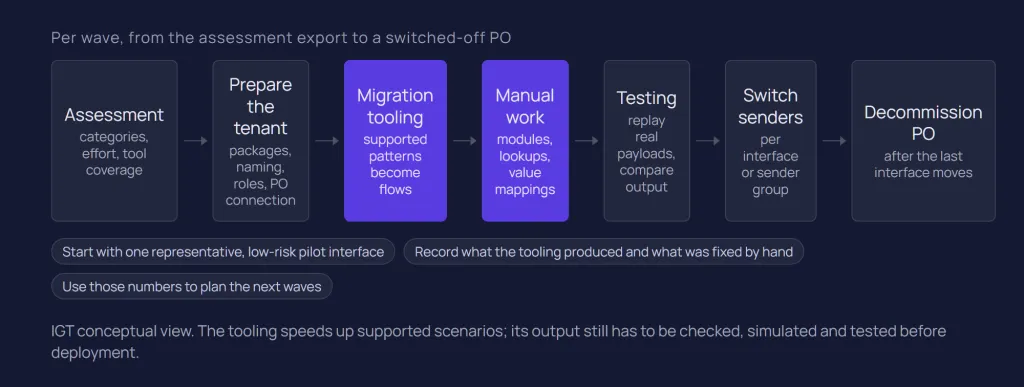
By this stage, Migration Assessment has given you an assessment category, an effort estimate and, since 2026, a migration tool coverage indicator per scenario. Our Migration Assessment article explains how to read those results and turn them into waves.
IGT recommends a pilot that uses a pattern the tooling supports, has a cooperative business owner and test data, reaches at least one on-premise system through Cloud Connector, and carries one mapping. That exercises connectivity, the wizard, mapping import, transport and monitoring at once, while mistakes are still cheap.
Keep the assessment export as the master list. For each migrated scenario, record what the tooling produced, what was fixed by hand and how long testing took. Those numbers from your own estate are a better basis for later waves than any estimate made before the first flow ran.
Preparing the target tenant
Before migrating anything, the Integration Suite tenant needs a package structure, naming rules, roles, a working connection to the PO system and a transport path. Fixing these after a hundred flows exist costs far more than agreeing them first.
Packages and naming
The migration wizard is started from inside an integration package (Edit, then Migrate), and packages take over the grouping role of software component versions, as our PI/PO vs Integration Suite comparison explains. IGT recommends deciding up front whether packages follow business domain, sending system or wave, and fixing naming patterns for flows, scripts, value mappings and JMS queues.
Two wizard behaviours make this concrete. Message mappings are imported as reusable global artifacts by default, with reuse proposed by name, namespace and software component version. In the pipeline approach, the scenario name creates a partner in the Partner Directory, so a naming clash forces a rename.
Roles and access
Configuring the PO connection needs the tenant administrator role. For the pipeline approach, SAP's pipeline approach procedure also requires the AuthGroup_IntegrationDeveloper and AuthGroup_TenantPartnerDirectoryConfigurator role collections, activated message queues and the generic pipeline flows copied and deployed. Credentials, key aliases and certificates used by source scenarios must exist in the tenant before migrated flows run; see our Integration Suite security article.
Connecting the PO system through Cloud Connector
The migration tooling reads PO content over standard APIs, so the tenant must reach your Integration Directory and ES Repository. SAP documents this in configuring connectivity to an SAP Process Orchestration system:
In Cloud Connector, expose the PO host as an HTTP system with back-end type SAP Process Integration, and limit access to the documented Directory and ESR paths with the access policy Path And All Sub-Paths.
In the tenant, add the system under Settings, Integrations, System, with the Cloud Connector address, location ID and a technical user holding SAP_XI_API_DISPLAY_J2EE, SAP_XI_API_DEVELOP_J2EE and SAP_XI_MONITOR_J2EE.
If you use a central ES Repository, configure it separately from the Integration Directory, then use Test Connection.
SAP lists the exact endpoints on its importing content from PO page, and notes that one tenant can connect to several PO systems. This tooling connection is separate from runtime connectivity: every on-premise receiver of a migrated flow needs its own Cloud Connector mapping, RFC destination or JDBC data source (see our SAP Cloud Connector guide).
Transport and landscape
SAP's migration guide recommends automated transport through SAP Cloud Transport Management or CTS+, keeping manual export and import for exceptions. IGT recommends running the tooling only in the development tenant and transporting from there. In the pipeline approach, SAP's landscape stages feature lets one Partner Directory configuration work across development, test and production tenants. Runtime placement, including Edge Integration Cell for ground-to-ground traffic, is covered in Integration Suite architecture.
Using the migration tooling
SAP's migration tooling is a pattern-based feature of Cloud Integration that turns PI/PO integrated configurations and receiver determinations into integration flows. It speeds up supported scenarios, but SAP tells you to check, simulate and fix the generated content before deployment.
According to What Is Migration Tooling, it supports PI/PO 7.31 SP28, 7.40 SP23 and 7.50 SP06 or higher, and availability depends on your service plan (SAP Note 2903776).
The four pattern families
The tooling analyses each object and maps it to a pattern, adding flow steps dynamically for mappings, conversions and options you select. SAP's supported patterns page lists:
Point-to-point asynchronous: decoupled by a JMS queue by default, optionally with an idempotent receiver-side process that ignores duplicates.
Point-to-point synchronous: with request and response mappings where the source has them.
Recipient list asynchronous: several receivers, where more than one condition can be true.
Content-based routing: exactly one receiver; synchronous or asynchronous in the standard approach, asynchronous only when the tooling generates a pipeline flow (synchronous cases can be modelled manually with SAP's pipeline template).
An object that matches no pattern gets a default point-to-point flow with empty channels but migrated mappings and scripts. SAP's supported components list adds the boundary: specific adapters (including HTTP, REST, SOAP, IDoc, XI, RFC, JDBC, SFTP, FTP, Mail, OData and AS2), timer events, message, Java and XSLT mappings, function libraries, imported archives and some conversions. Anything outside that list needs additional effort.
Standard or pipeline approach
For each object the wizard asks for an approach. SAP's migration approaches page positions the standard approach for migrating a few scenarios and the pipeline approach for many, and compares them as follows.
Criterion | Standard approach | Pipeline approach |
Patterns | Point-to-point sync and async, recipient list, content-based routing | Point-to-point async, recipient list, content-based routing |
Result per scenario | One integration flow | Several integration flows plus Partner Directory entries |
Error handling | Exception subprocess stub, modelled manually | Built in, with automatic and manual restart and custom exits |
JMS queues | One per asynchronous scenario | Fewer queues, shared across scenarios |
Single XI and IDoc endpoint | Modelled manually | Out of the box |
Changing routing conditions | Directly in the integration flow | Download, edit and re-upload an XSLT in the Partner Directory |
The pipeline concept mimics PO pipeline processing with generic flows, which suits large asynchronous estates, but routing logic then lives in Partner Directory XSLT rather than in visible flow steps. IGT recommends one default approach per estate, with documented exceptions.
Running the wizard
The wizard walks through the same steps in both approaches, as SAP's standard approach procedure describes:
Select the PO system, object type and object.
Confirm the preselected pattern and approach, and options such as JMS decoupling.
Choose create or reuse for each message mapping and its dependent resources.
Handle Java mappings in their own step (see below).
Name the scenario, review and migrate, then download the PDF migration report, whose Next Steps section lists the manual tasks before deployment.
Since release 2607 (23 August 2026), SAP's What's New for Integration Suite lists mass migration of integrated configuration objects, so several scenarios can be migrated to the tenant in one go. That reduces clicking, not checking: each generated flow still goes through the review and testing below.
Java mappings and the migration agent
The Integration Content Migration Agent, also generally available since August 2026, converts Java mappings into Groovy scripts during migration; release 2609 added .class files to .java sources. SAP's agent documentation sets clear limits:
Supported: a single Java class entry point that extends AbstractTransformation, including lookup service calls, for which it generates a lookup integration flow called through ProcessDirect.
Not supported: several entry classes, external library dependencies and custom adapter modules.
A tenant administrator must enable it in the AI settings. SAP states that AI features require the Premium or Enhanced Edition and are a free promotion until the January 2027 software release.
Other Java mappings that use only functions available in Cloud Integration are migrated through a Groovy script wrapper. SAP's Java mapping guide lists cases the wrapper may not handle, such as binary attachments, encryption, lookups, file system access and dynamic headers, and asks you to retest every imported mapping. SAP also says to verify AI-generated scripts before use, so treat them as a draft for code review.
What to do straight after each migration
Turn SAP's post-migration steps into a checklist per flow: check every component, set externalised adapter parameters, create RFC destinations and JDBC data sources, deploy security material, simulate, then deploy. One step is easy to miss: a source scenario's scheduler is reset to run every 60 seconds. A polling flow deployed with that default can start reading a folder or table PO still reads, so fix schedules first.
Value mappings are not migrated by the wizard. SAP's value mapping guide offers an import from the Integration Directory (up to 10 value mappings at once since release 2608, from SAP Process Orchestration 7.5 SP22 or higher) or a CSV upload. The result is a set of bidirectional mappings that looks different from the PO value mapping group.
What still needs manual work
Anything outside the supported patterns and components, and everything on SAP's known limitations list, needs a developer. In many estates this is where most of the migration effort sits.
SAP's known limitations of migration tooling page is the reference. The items that most often reach a project plan are:
PI/PO feature | What the tooling does | Manual work |
Standard and custom adapter modules | Not imported | Re-implement with flow steps, XSLT or Groovy (SAP's Message Transformation Utilities package covers some) |
Value mappings | Not migrated | Separate import, then assign in the message mapping |
RFC and JDBC lookups in mappings | Not supported | Rebuild with Groovy, XSLT or ProcessDirect |
ASMA used in mappings, sender and receiver node functions | Not carried over | Headers or properties in a Content Modifier or script; review mapping logic |
N:1 and M:N multi-mappings, 1:N message splitting | Not supported | Additional flow design (SAP provides pipeline templates for 1:N) |
Sync/async bridges | Not supported | Redesign with message correlation |
Fault messages | Not available | Exception subprocesses |
EOIO quality of service | Adapter migrated, ordering not preserved | JMS queue with exclusive access |
Schema validation, CSV and fixed-length conversion | Partial; XSDs and fixed-length not migrated | Upload schemas, configure validator and converter steps |
Extended receiver determination, receiver wildcards | Partial or not supported | Complete or redesign routing |
JDBC sender with select and update in one transaction | Not supported | Redesign at database level, for example status flags and stored procedures |
Beyond this table sit the items that were never in the tooling's scope. ccBPM and NetWeaver BPM processes need a redesign as integration flows or, for human steps, SAP Build Process Automation. Custom adapters need a partner adapter or a rebuild with the Adapter Development Kit, and B2B add-on content follows its own approach. Our PI/PO vs Integration Suite article maps each of these in detail, and the SAP integration patterns guide covers the target designs.
IGT recommends treating each redesign item as a small design task with an owner and a review. It is also the moment to ask whether the interface should stay message-based at all; see IDoc vs API vs events.
Testing migrated interfaces
A migrated interface is done when it produces the same business result as the PO original for representative messages, including errors, and when the support team can operate it. SAP recommends testing all migrated content, and the generated flow is only the starting point.
Regression and output comparison
The core test is comparison: send the same input through PO and through the migrated flow and compare outputs field by field. Namespaces, empty elements, number and date formats, encoding and header values are common sources of mismatch. Collect test messages from PO monitoring early, including large payloads, special characters and messages PO rejects today.
SAP's migration tooling page notes that partner regression test tools are available free of charge for 12 months, and the migration guide's test automation section names Int4 and Figaf. Automated test sets keep paying off, because they are reused for regression after later changes.
Testing transactional flows safely
The risk in testing a migrated flow is that it succeeds against a real receiver: a test order posted twice is an incident. Be precise about which kind of parallel test you plan:
Approach | How it works | Risk |
Shadow or replay testing | Copies of production messages are replayed through the new flow, which sends to a mocked or test receiver and commits nothing | Low, if receivers are reliably isolated |
Differential testing | Outputs of PO and Integration Suite for the same input are compared offline | Low; covers mapping, not end-to-end behaviour |
Dual processing of live transactions | Both platforms process real production messages to real receivers | High: duplicate postings and side effects; avoid for transactional flows |
For pipeline-based flows, SAP's testing the pipeline page describes a testMode header passed through the flow sequence, which can route test messages to a mocked receiver or stop retries for failed test messages. In the standard approach you build that isolation yourself, typically through externalised receiver addresses that point to test systems.
Beyond functional correctness
Test error behaviour deliberately: an unreachable receiver, an invalid payload, an expired certificate. SAP's guide on message reprocessing describes Cloud Integration using JMS queues or data stores for retries, so check that failed messages end where your runbook expects. Add volume tests for high-throughput interfaces, alert routing and a support handover before go-live; day-to-day operation is covered in SAP Cloud Integration (CPI).
Running PI/PO and Integration Suite in parallel
Yes, both platforms can and usually do run at the same time, but each interface should be live on exactly one of them at any moment. Parallel running means coexistence of platforms, not two platforms processing the same production traffic.
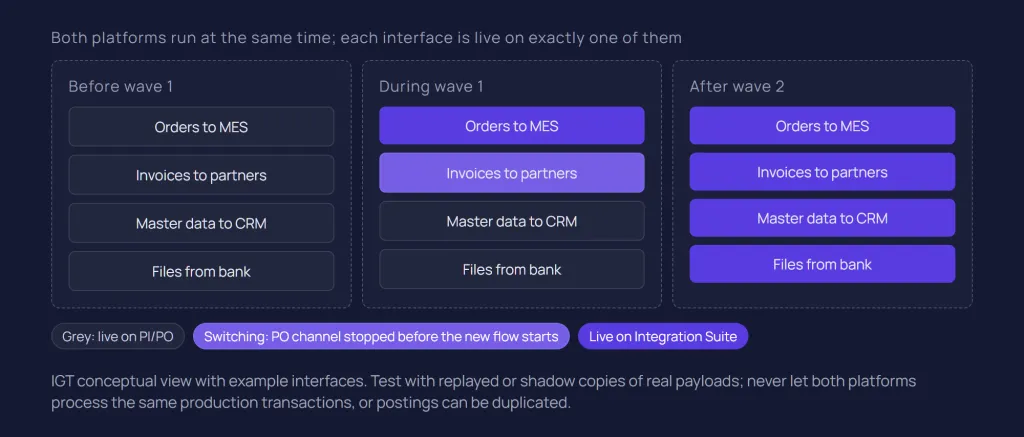
PO keeps running the interfaces not yet moved while Integration Suite takes over wave by wave, and traffic moves by changing where senders deliver and which platform polls a source. IGT recommends three rules per interface:
One active owner. At any time, a single platform is responsible for each interface, recorded in the master list. This avoids the duplicate-posting risk described above.
Pollers never overlap. For file, SFTP, JDBC and mail senders, stop the PO channel before the migrated flow starts polling, and remember the 60-second default schedule after migration.
Idempotent receivers where possible. The tooling's idempotent process option and stable business keys at the receiver limit the damage if a message is delivered twice during a switch.
Routing and switching order
How finely you can switch depends on the sender. HTTP, SOAP and REST senders can usually be repointed per interface. Where an SAP system reaches PO through shared configuration, such as ABAP proxies over XI or IDoc ports and RFC destinations, check how granularly it can be changed before fixing wave boundaries; sometimes a whole sender system moves in one step. The pipeline approach's single XI and IDoc entry points help here.
Within a wave, IGT recommends this order: receiver connectivity first (Cloud Connector, destinations, certificates), then migrated flows deployed without active triggers, then senders switched one interface or sender group at a time. Dependent interfaces, such as master data and the transactional flow that needs it, switch together or in data order.
Coexistence means two platforms to operate and license, so keep the plan dated. In estates with a large non-SAP share, part of it may deliberately stay on another platform, as our Integration Suite vs webMethods comparison discusses.
Cutover and decommissioning PO
Cutover is a series of small, reversible switches per wave, each with a runbook and a rollback, followed by a deliberate decommissioning of PO once nothing depends on it. Big-bang cutover is rarely appropriate for a large estate.
The cutover runbook per wave
IGT recommends a written runbook for every wave that covers:
Business sign-off on tests and a cutover window outside quarter end and other blackout periods.
Draining PO: stop senders, let queued messages finish, and resolve every message in error so nothing is lost or processed twice.
Switching: deactivate PO sender channels, repoint senders, start migrated flows.
Verification: first production messages checked end to end with the business owner, alerts confirmed.
Handover to the support team, with runbooks for the new flows.
Rollback
Rollback needs the PO configuration to still exist, so deactivate migrated PO scenarios rather than deleting them until the wave has run stably for an agreed period. Rolling back is the reverse switch: stop the migrated flow, resolve its queued messages, repoint senders and reactivate PO channels. Agree in advance who may trigger it and on what criteria, and rehearse it for critical interfaces.
Decommissioning PO
PO can be switched off when no traffic, scheduled job, monitoring or audit dependency remains. IGT recommends checking logs for traffic still arriving, archiving PO message data per your retention obligations and exporting ESR and Directory content as a reference. Then remove the Cloud Connector entries and technical users created for the tooling.
Timing matters commercially. The maintenance dates and the cost of extended maintenance, covered in SAP PI/PO end of maintenance, apply to the whole PO installation, however few interfaces remain on it. An estate that leaves a handful of interfaces behind keeps paying for a whole platform, so the last wave deserves the same attention as the first.
Conclusion
A PI/PO to Cloud Integration migration becomes manageable when it is run as a repeatable process: a prepared tenant, the migration tooling for what it supports, planned manual work for what it does not, testing that cannot touch real receivers by accident, and per-interface switches that can be reversed.
SAP's 2026 additions, mass migration and the Java mapping agent, shorten conversion. They do not change what decides the schedule: adapter modules, BPM logic, lookups, test data and the business calendar. Measure your pilot honestly and feed the numbers into the next wave.
If you are moving interfaces from PI/PO and want a team that has worked with both SAP and non-SAP integration platforms, talk to our SAP integration team or read more about our SAP integration services.
Related questions
Can SAP PI/PO interfaces be migrated automatically?
Partly. SAP's migration tooling converts integrated configurations and receiver determinations that match its supported patterns and components into integration flows, and can migrate several scenarios at once. Adapter modules, value mappings, lookups, BPM processes, bridges and other documented limitations need manual work, and every generated flow must be reviewed and tested.
How long does a PI/PO to Cloud Integration migration take?
There is no honest universal figure. Duration depends on the number of interfaces and how their complexity is distributed, the share of custom code, adapter modules and BPM, documentation quality, test data and testing capacity, how many interfaces are redesigned rather than migrated, team skills, and the cutover windows the business allows. A measured pilot on your own estate is the best basis for a plan.
Can PI/PO and Integration Suite run in parallel?
Yes. During a phased migration both platforms run side by side, with each interface active on only one of them at a time. Use shadow or replay testing rather than dual processing of live transactions, which can cause duplicate postings.
What happens to Java mappings during migration?
Since August 2026 the Integration Content Migration Agent can convert Java mappings with a single entry class extending AbstractTransformation into Groovy scripts, subject to the Integration Suite edition. Other mappings may run through a Groovy script wrapper or need a manual rewrite. SAP asks you to verify generated scripts and retest every mapping.
Sources
SAP Help (SAP-docs GitHub mirror): What Is Migration Tooling?, SAP Integration Suite
SAP Help (SAP-docs GitHub mirror): Migration Tooling, SAP Integration Suite
SAP Help (SAP-docs GitHub mirror): Supported Patterns, SAP Integration Suite
SAP Help (SAP-docs GitHub mirror): Supported Components, SAP Integration Suite
SAP Help (SAP-docs GitHub mirror): Migration Approaches, SAP Integration Suite
SAP Help (SAP-docs GitHub mirror): Standard Approach, SAP Integration Suite
SAP Help (SAP-docs GitHub mirror): Pipeline Approach, SAP Integration Suite
SAP Help (SAP-docs GitHub mirror): Known Limitations of Migration Tooling, SAP Integration Suite
SAP Help (SAP-docs GitHub mirror): Integration Content Migration Agent, SAP Integration Suite
SAP Help Portal: What's New in SAP Integration Suite
SAP Help (SAP-docs GitHub mirror): Adapter Modules, Migration Guide for SAP Process Orchestration
SAP Help (SAP-docs GitHub mirror): Test Automation, Migration Guide for SAP Process Orchestration
SAP Help (SAP-docs GitHub mirror): Landscape Stages, Migration Guide for SAP Process Orchestration
Latest writings
The latest news, technologies, and resources from our team.
View all blogs


Let’s make it click!
Whether you're scaling a startup or streamlining a corporate ecosystem, we help teams launch faster and integrate smarter.

Eva Polcíková
Project Manager