webMethods to SAP Integration Suite: Migrate, Coexist or Stay?
We deliver both platforms, so here is the honest version: move what centres on SAP, keep B2B, managed file transfer and on-premise traffic on webMethods where it works, and plan any move as a redesign. Traffic table, concept map, wave plan and coexistence rules.

Last technically reviewed: 18/11/2026. Reviewed by Marek Juračka, CTO.

Table of contents
Many organisations that run IBM webMethods are now moving their ERP core to SAP S/4HANA and adopting SAP BTP. Sooner or later someone asks whether the integrations should follow, and whether a move from webMethods to SAP Integration Suite would simplify the landscape. It rarely has a yes or no answer.
A disclosure first: IGT Systems is an official IBM partner and also delivers SAP Integration Suite projects. This article therefore recommends keeping webMethods where it does the job well and moving where SAP has become the centre of gravity. Our comparison of SAP Integration Suite and webMethods covers the platforms feature by feature. This article is the next step: how to decide per interface, how webMethods concepts map to Integration Suite, and how to plan a migration in waves if you go ahead.
In short
- Move interfaces whose traffic starts and ends in SAP; keep B2B and EDI on Trading Networks, managed file transfer on ActiveTransfer and mostly non-SAP or on-premise traffic on webMethods, unless a specific reason says otherwise.
- SAP's migration tooling covers SAP PI/PO only, so moving from webMethods is a redesign: logic, schemas and test data carry over, flows are rebuilt.
- Run both platforms with a one-sentence boundary, one owner per interface and shared monitoring, and move interfaces in waves rather than in one cutover.
Should you migrate from webMethods to SAP Integration Suite?
It depends on how much of your traffic runs through SAP and how much runs through B2B, managed file transfer and non-SAP systems. The more of it starts and ends in SAP, the stronger the case for moving; the more of it is partner, file or plant traffic, the stronger the case for keeping webMethods.
In practice there are three outcomes, and many estates end up with a mix:
- Migrate. SAP is the centre of the landscape, most interfaces connect SAP applications to each other or to SaaS, and the webMethods estate is small or due for a major upgrade anyway.
- Coexist. SAP-centric flows move to Integration Suite, while partner, file and plant traffic stays on webMethods. The boundary between the two is stated in one sentence and enforced.
- Stay. SAP is one important system among many, a large share of traffic is B2B, files or ground to ground, and the webMethods platform and team are healthy. webMethods then connects to S/4HANA through released APIs or the SAP adapter.
The expensive outcome is a half-finished migration with no boundary, where both platforms grow and nobody knows which one owns an interface.
Why the question comes up now
The question usually arrives with an S/4HANA programme, a decision to standardise on SAP BTP, or a push to consolidate platforms and licences. It does not arrive because webMethods is ending: IBM has published no end date for the webMethods product line comparable to the one SAP set for PI/PO.
S/4HANA, clean core and BTP
An S/4HANA move changes the integration surface. SAP's clean core approach favours released APIs and business events over custom code in the ERP, and SAP's integration guidance around S/4HANA centres on SAP Integration Suite on BTP (see our articles on S/4HANA integration architecture and clean core integration). Clean core is a discipline any integration platform can follow; webMethods can call released OData and SOAP APIs like any other HTTP endpoint.
Consolidation and licences
Group IT often wants one integration standard. Consolidation only saves money if the retired platform is actually switched off. Keeping webMethods for a small set of B2B flows still means keeping its licences, infrastructure and skills. Get quotes for your own volumes before assuming a saving. If you are moving from a non-SAP platform, ask your SAP account team which current programmes, if any, apply to your case.
What about support deadlines?
There is no platform-wide deadline on the webMethods side. What IBM does publish is a lifecycle per release. In its webMethods 10.x product support lifecycle, IBM lists end of support for release 10.15 on 31 October 2027, followed by initial extended support to 31 October 2028 and ongoing extended support, limited to usage questions and known defects, to 31 October 2030. IBM webMethods Integration 12.1 became generally available on 4 May 2026 under IBM's Support Cycle-5 policy (five years of support, plus extensions).
So a 10.x estate faces an upgrade decision, not an end of platform. That upgrade is a natural moment to ask the migrate, coexist or stay question, but it is a different kind of pressure from SAP PI/PO, where SAP has said that SAP NetWeaver AS Java 7.5 moves into customer-specific maintenance from 2031 without a follow-on release.
When migration makes sense, and when it does not
Migration makes sense for traffic where SAP is both the reason for the interface and one or both of its ends. It makes less sense for traffic that webMethods handles with components Integration Suite has no direct equivalent for, or that never leaves your own network.
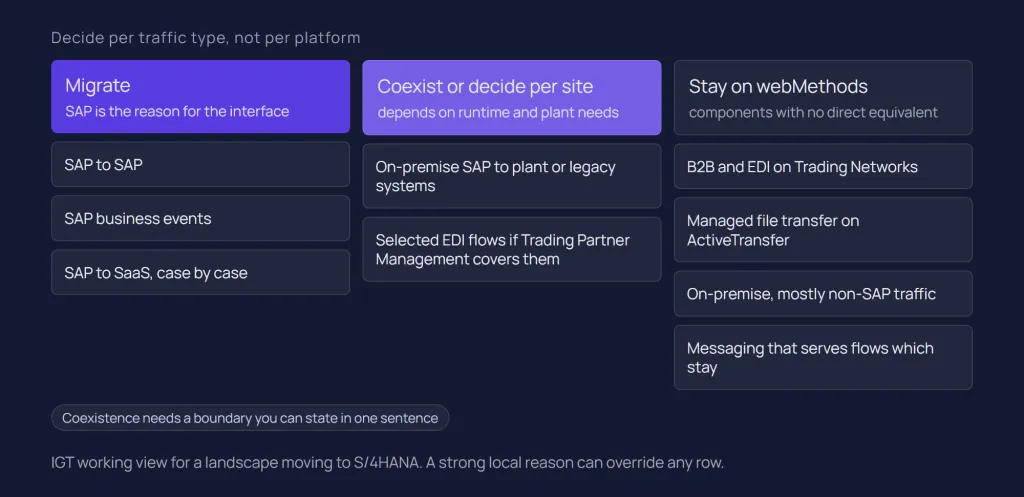
The table below is IGT's working view per traffic type, not a vendor standard. It assumes a landscape moving to S/4HANA; a strong local reason can override any row.
Traffic type | Usual recommendation | Why |
SAP to SAP (S/4HANA and SAP cloud applications) | Migrate to Integration Suite | SAP-aware content, released APIs and events, and the platform SAP aligns its own guidance with |
SAP to SaaS (CRM, HR, procurement) | Usually migrate, case by case | Check whether SAP ships standard content for the scenario; custom flows are rebuilt either way |
B2B and EDI on Trading Networks | Usually stay; consider moving X12 or EDIFACT partners that feed S/4HANA to Trading Partner Management where it covers their standards and protocols | Partner profiles, document types and processing rules are rebuilt, and every partner has to be retested |
Managed file transfer on ActiveTransfer | Stay | Integration Suite has no dedicated managed file transfer capability; its SFTP and FTP adapters are not a like-for-like replacement |
On-premise, ground to ground, mostly non-SAP | Stay | Moving it means either a cloud hop or running Edge Integration Cell on Kubernetes, for little SAP-specific benefit |
On-premise SAP to plant or legacy systems | Coexist or stay; decide per site | Depends on whether you will run Edge Integration Cell and how close the logic must sit to the plant |
SAP business events | Migrate to SAP eventing | Events that originate in SAP fit SAP's own eventing options |
Integration-internal messaging on Universal Messaging | Stay with the flows that use it | It moves only if the publishing and subscribing flows move |
B2B and MFT are often the main reasons to keep webMethods, because Trading Networks and ActiveTransfer carry partner relationships and operational routines that are costly to rebuild. The on-premise question is about infrastructure as much as features: Edge Integration Cell needs a supported Kubernetes cluster, and for production also an external database and data store, according to SAP's setup planning guide. For the broader picture of where each platform fits, see our guide to SAP and non-SAP integration.
How webMethods concepts map to Integration Suite
Most webMethods components have a functional counterpart in Integration Suite, but almost none map one to one, and two have no direct equivalent. Treat the table as a translation aid for planning, not as a conversion guide.
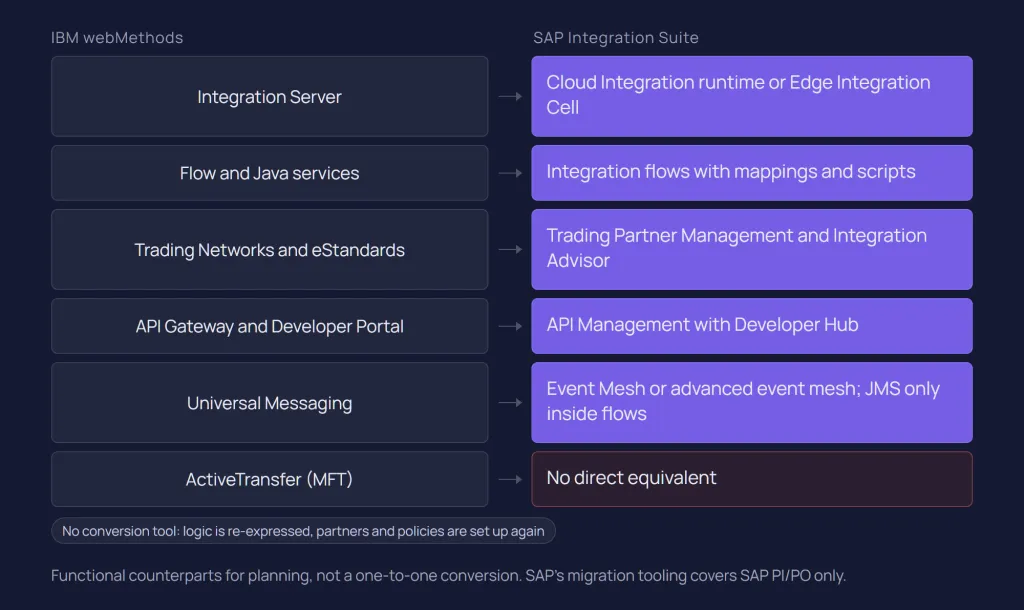
The names below follow IBM's 2026 portfolio. IBM now sells its integration products as IBM Integration, "formerly IBM webMethods Hybrid Integration and IBM Cloud Pak for Integration" in IBM's words, with IBM webMethods Integration, IBM webMethods B2B and IBM webMethods MFT as the webMethods-branded products. The familiar component names (Integration Server, Trading Networks, ActiveTransfer, Universal Messaging, API Gateway) remain in IBM's documentation. Our primer What is webMethods? explains each one, and our guide to SAP Integration Suite does the same for the SAP side.
webMethods | SAP Integration Suite | What to know |
Integration Server, self-managed | Cloud Integration runtime on SAP BTP; Edge Integration Cell for a private landscape | Design and monitoring stay in SAP's cloud in both cases; Edge Integration Cell runs on Kubernetes |
Integration Server packages | Integration packages | Similar grouping role; package structure is designed anew, not converted |
Flow services and Java services | Integration flows with message mapping, XSLT and Groovy or JavaScript script steps | Logic is re-expressed in the new model; no conversion tool exists |
IS document types | Message structures in mappings (XSD, WSDL, OData metadata, OpenAPI JSON) | Reusable where the model already exists as a schema file; otherwise re-expressed as XSD |
Adapters, including the Adapter for SAP | Cloud Integration adapters (for example IDoc, RFC, OData, SOAP, JDBC, SFTP, AMQP, Kafka) | IDoc runs over HTTP only; the RFC sender is available only on Edge Integration Cell; check every adapter you use |
Trading Networks (partner profiles, document types, processing rules) | Trading Partner Management, with Integration Advisor at design time and Cloud Integration at runtime | Comparable concepts, different model; partners and agreements are set up again |
eStandards modules | Integration Advisor type systems and mapping guidelines | Check each standard and transport protocol you use against SAP's current lists |
ActiveTransfer (MFT) | No direct equivalent | SFTP and FTP adapters move files inside flows but are not a managed file transfer product |
Universal Messaging | Event Mesh capability or advanced event mesh; JMS queues inside Cloud Integration | No direct equivalent as a general JMS provider: the Cloud Integration JMS adapter is internal only |
webMethods API Gateway and Developer Portal | API Management with Developer Hub | Proxies and policies are rebuilt; SAP's API Management migration covers SAP environments only |
Built-in monitoring, retry and resubmit | Cloud Integration message monitoring; alerting through SAP Alert Notification service | No pre-built alerting out of the box; design retry and alerting explicitly |
Where the differences matter
SAP connectivity. The webMethods Adapter for SAP talks RFC, tRFC, qRFC, bgRFC, IDoc and BAPI directly, according to IBM's documentation of the SAP ERP connector that is based on it. In Cloud Integration, SAP's adapter guidance states that IDoc runs over HTTP, that traditional RFC-based IDoc packing cannot be used, and that the RFC sender is available for Edge Integration Cell. An ECC or S/4HANA sender that pushes IDocs over RFC to webMethods today needs its ports and partner profiles reviewed before it can deliver to Integration Suite.
B2B. Trading Partner Management holds partner profiles, agreement templates and agreements, supports protocols such as AS2, SFTP and FTP, and pushes runtime configuration into the Partner Directory of Cloud Integration. Trading Networks works with partner profiles, document types and processing rules. The ideas overlap, but there is no import path between them.
Messaging. Universal Messaging is a general messaging layer with publish and subscribe, queues and a JMS provider. The Event Mesh capability of Integration Suite is a single broker for low and moderate event volumes, supporting AMQP, MQTT and HTTP. Neither is a drop-in replacement for the other; see our article on SAP Event Mesh.
APIs. IBM documents webMethods API Gateway within its IBM API Connect documentation. Our article on SAP API Management covers the SAP side. An API usually moves when the services behind it move.
There is no SAP migration tool: plan for redesign
SAP's migration tooling supports SAP PI/PO only, so moving integrations from webMethods to Integration Suite is a redesign project. Plan and estimate it as one.
Migration Tooling migrates integrated configuration objects and receiver determination objects from on-premise SAP Process Orchestration and SAP Process Integration releases 7.31, 7.40 and 7.50 at specified support package levels. Migration Assessment extracts and evaluates data from SAP Process Orchestration systems only. In the Integration Suite documentation snapshot of 22 October 2026, we found no tooling or procedure for webMethods or any other non-SAP source.
Some SAP partners market their own accelerators for migrating from non-SAP platforms. If you consider one, treat it as a partner product: test it on a sample of your own flows and check what it actually converts, what it leaves as stubs and who maintains the output.
What carries over
- Mapping logic and business rules. The rules are reusable even when the code is not. Document them from the flow services before rebuilding.
- Canonical models. Where your canonical model exists as XSD, WSDL or OpenAPI, Cloud Integration message mappings can use those formats as message structures. A model that exists only as IS document types has to be expressed as a schema first.
- Test data and expected results. Real messages from webMethods monitoring, including errors, are a valuable asset to collect early.
- Interface catalogue, partner and endpoint data. Endpoints, credentials (re-issued, not copied), schedules and partner identifiers.
- Operational knowledge. Which interfaces fail and why, and what support resubmits.
What is rebuilt
- Integration flows, scripts and mappings, in Cloud Integration's model.
- Connectivity: Cloud Connector or Edge Integration Cell for on-premise systems; see our SAP Cloud Connector guide.
- Error handling, retries and alerting, which webMethods estates often have built into shared services. Our article on Integration Suite error handling covers the target design.
- B2B partner setup and API proxies, if those move at all.
A redesign is also a chance to re-pattern. An interface built as a file drop many years ago may be better as an API call or an event today; our guide to SAP integration patterns helps with that decision.
A step-by-step migration plan
Plan the move as a sequence of small, reversible steps, ending with switching off what is no longer used. The steps below are IGT's recommended approach, not a vendor method.
1. Inventory with operational data
List every interface with its sender, receiver, pattern, protocol, schedule, volume, error rate, business owner and the webMethods components it touches (Integration Server packages, adapters, Trading Networks partners, ActiveTransfer events, Universal Messaging channels, API Gateway APIs). Take volumes and error history from monitoring, not from documentation, and retire unused interfaces now.
2. Classify and decide per interface
Assign each interface to migrate, keep, retire or redesign, using the traffic table above as a starting point. Integration Suite's Integration Assessment capability, based on SAP's Integration Solution Advisory Methodology (ISA-M), can record your technology policies and guide interface requests. Our article on SAP integration governance covers the surrounding rules.
3. Prepare the target
Agree package structure, naming, roles, transport, connectivity and alerting before the first flow is built. If ground-to-ground traffic will move, decide now whether you will run Edge Integration Cell, because it is infrastructure your team will operate. Our article on SAP Integration Suite architecture covers the runtime options.
4. Pilot
Pick a representative interface that is SAP-centric, has a cooperative owner and test data, and reaches at least one on-premise system. Rebuild it, test it against webMethods output, run it in production and measure the effort. Those measurements are a better planning basis than any upfront estimate.
5. Waves with parallel platforms
Group interfaces into waves by sender system and dependency, so that master data and the transactions that need it move together. During each wave, both platforms run, but each interface is live on exactly one of them. Test with replayed copies of production messages against test receivers rather than letting both platforms process real transactions.
6. Switch and decommission
Switch one interface or sender group at a time, with a runbook and a rollback that keeps the webMethods configuration deactivated rather than deleted until the wave is stable. Switch off webMethods components that no longer carry traffic and review your IBM entitlements. If webMethods stays for B2B or MFT, this step becomes a scope reduction.
The same principles apply to PI/PO migrations; our PI/PO to Cloud Integration migration guide describes testing, parallel running and cutover in more detail.
Running both platforms during the transition
Running webMethods and Integration Suite together works when the boundary fits in one sentence, monitoring covers both, and every failure has an owner. Without those three, coexistence turns into two platforms growing side by side.
A boundary in one sentence
For example: "SAP-to-SAP and SAP-to-SaaS integration runs on Integration Suite; partner, file and plant traffic runs on webMethods, which reaches S/4HANA through released APIs." Publish it and use it to decide every new interface request.
Connecting the two platforms
A straightforward link is synchronous or asynchronous HTTP: Integration Server services exposed as REST or SOAP, called from Cloud Integration, and the reverse. For queued handover, SAP lists the message brokers it supports with the Cloud Integration AMQP adapter in its supported broker settings; IBM MQ is on that list, Universal Messaging is not. Test any broker link that is not on SAP's list before you rely on it.
Monitoring across both
Each platform monitors its own messages; nobody monitors the handover unless you design it. IGT recommends passing a business correlation ID, such as an order or delivery number, through both platforms in a message header and logging it on each side, so support can trace a transaction end to end. Alerting needs particular attention on the SAP side, because SAP's monitoring guidance states that Cloud Integration is not delivered with pre-built alerting and points to SAP Alert Notification service. See our article on Integration Suite monitoring.
Who owns an error between platforms?
Agree a rule before the first incident. A workable one: the platform that has accepted a message owns it until the next platform confirms receipt. Retries, replay and resubmission then sit with one team, and the interface catalogue records the active owner of each interface.
How IGT approaches it
IGT delivers integration projects on both IBM webMethods and SAP Integration Suite, so we start from your landscape rather than from a platform preference. Often the right outcome is a deliberate split rather than a full move in either direction.
Our One SAP, Five Factories case study shows the kind of architecture we build. A single SAP ECC core serves five factories in Belgium, Switzerland, China, Turkey and the United States. webMethods Integration Server consumes SAP IDocs, transforms them into a canonical XML model and routes them by configuration to TRAKSYS or PREACTOR, depending on the plant. ActiveTransfer handles file-based document exchange, and monitoring, retry and replay are built in. The result is 41 integration points and zero per-plant code forks.
That project ran on webMethods, not on Integration Suite, and it illustrates why we do not recommend migration by default. A canonical model, configuration-driven routing and operational tooling are architecture decisions; they would carry over to either platform, and an estate built that way is already in good shape whatever the ERP becomes. Our overview of what integrates with webMethods shows the range of systems involved.
Conclusion
Moving from webMethods to SAP Integration Suite is a sound decision for interfaces where SAP is the centre: SAP-to-SAP and SAP-to-SaaS traffic, SAP business events and clean core integration around S/4HANA. Keeping webMethods is equally sound for B2B and EDI on Trading Networks, managed file transfer on ActiveTransfer and on-premise traffic where SAP is one system among many. Many estates will run both, with a clear boundary.
Whichever way you go, plan for a redesign rather than a conversion: the value of your current estate lies in its mapping logic, canonical models, test data and operational knowledge. Inventory first, decide per interface, pilot, move in waves, and keep one owner per interface throughout.
If you are weighing whether to migrate, coexist or stay, talk to our SAP integration and webMethods integration teams, or get in touch to plan an assessment of your landscape.
Related questions
Can SAP Integration Suite replace webMethods?
For SAP-centric application integration, APIs and SAP events, yes, with a redesign of each interface. For managed file transfer there is no direct equivalent in Integration Suite, and for complex B2B or mostly on-premise non-SAP traffic, keeping webMethods is often the better fit. Many estates replace part of webMethods and keep the rest.
Is there a tool to migrate webMethods integrations to SAP Integration Suite?
Not from SAP. SAP's Migration Tooling and Migration Assessment support SAP Process Orchestration and SAP Process Integration only. Some SAP partners offer their own accelerators for non-SAP sources; test any of them on your own flows before planning around it.
Can webMethods and SAP Integration Suite run together?
Yes. Coexistence works when the boundary between the platforms can be stated in one sentence, each interface has one active owner, and a shared correlation ID lets support trace transactions across both. The platforms usually connect through REST or SOAP services, or through a message broker SAP supports.
How long does a webMethods to Integration Suite migration take?
There is no universal duration. It depends on the number of interfaces worth moving, how much custom Java and B2B logic they contain, whether canonical schemas and test data exist, whether Edge Integration Cell is needed, and how often the business can accept a cutover. A pilot measured on your own estate gives the first reliable estimate.
Sources
IBM: IBM Integration (formerly IBM webMethods Hybrid Integration and IBM Cloud Pak for Integration)
IBM: IBM webMethods Hybrid Integration, integration for the agentic AI era (Think 2025)
IBM Support: IBM webMethods 10.x software Product Support Lifecycle
IBM Support: IBM webMethods Integration 12.1
IBM Support: IBM webMethods Managed File Transfer 11.1.X
IBM Documentation: Overview of webMethods ActiveTransfer
IBM Documentation: Understanding IBM webMethods B2B Trading Networks
IBM Documentation: IBM webMethods Universal Messaging 12.1
IBM Documentation: Using webMethods API Gateway, IBM API Connect
IBM Documentation: SAP ERP connector, IBM webMethods Integration
SAP Help Portal (SAP-docs mirror): What Is Migration Tooling
SAP Help Portal (SAP-docs mirror): What Is Migration Assessment?
SAP Help Portal (SAP-docs mirror): What is SAP Integration Suite?
SAP Help Portal (SAP-docs mirror): Plan Your Setup of Edge Integration Cell
SAP Help Portal (SAP-docs mirror): Trading Partner Management
SAP Help Portal (SAP-docs mirror): What Is Integration Assessment
SAP Help Portal (SAP-docs mirror): Event Mesh Scope
SAP Help Portal (SAP-docs mirror): Connectivity (Adapters), Cloud Integration
SAP Help Portal (SAP-docs mirror): Supported Settings for Specific Message Brokers
SAP Help Portal (SAP-docs mirror): Creating Message Mapping as a Flow Step
SAP Migration Guide for SAP Process Orchestration (SAP-docs mirror): Standard Adapter Migration
SAP Migration Guide for SAP Process Orchestration (SAP-docs mirror): Monitoring
Latest writings
The latest news, technologies, and resources from our team.
View all blogs


Let’s make it click!
Whether you're scaling a startup or streamlining a corporate ecosystem, we help teams launch faster and integrate smarter.

Eva Polcíková
Project Manager